
Building an NVIDIA GPU Controller (2) — GPU Info Query and Display Enumeration

·2727 words·13 mins· loading · loading ·
Author
Plus
NVIDIA GPU Controller Dev Log 2026 - This article is part of a series.
Part 2: This Article

Part 1 covered how to build the NVAPI wrapper layer and pull native functions into C# through NvApiWrapper. This installment focuses on two core modules that actually put that wrapper to use: NvGpuInfo, which collects GPU hardware data, and NvDisplay, which enumerates every connected display and resolves monitor names.

The data structures these two classes produce — GpuInfoData, DisplayInfo, and DriverInfo — are the shared models used throughout the entire controller.

GPU Enumeration: Starting with the Physical GPU Handle Array
#
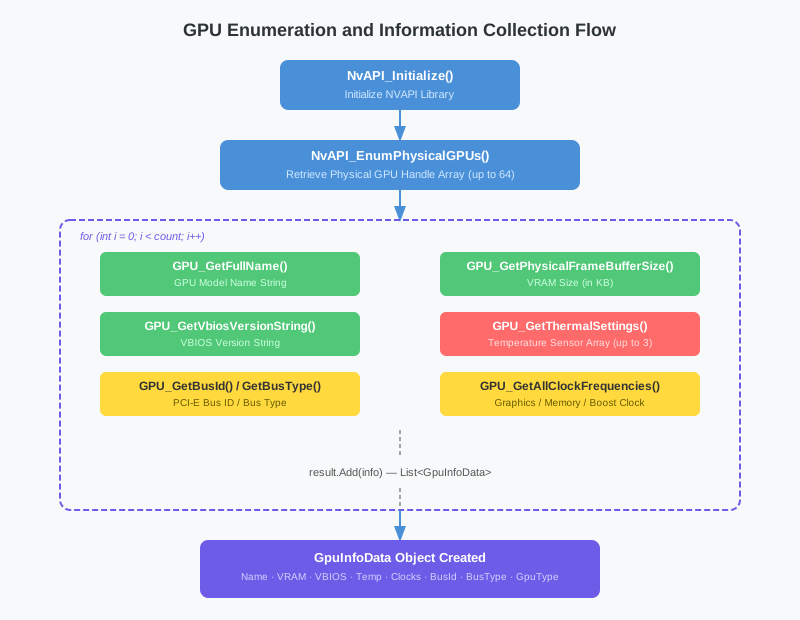
GPU enumeration and data collection flow

Every NVAPI GPU workflow starts by obtaining an array of physical GPU handles (NvPhysicalGpuHandle). NvGpuInfo.EnumerateGPUs() begins at this step and fills in all the required properties sequentially.

 1
 2
 3
 4
 5
 6
 7
 8
 9
10
11
12
13
14
15
16
17
18
19
20
21
public static List<GpuInfoData> EnumerateGPUs()
{
    var result = new List<GpuInfoData>();

    NvPhysicalGpuHandle[] handles;
    uint count;
    if (NvApiWrapper.EnumPhysicalGPUs(out handles, out count) != NvStatus.OK)
        return result;

    for (int i = 0; i < count; i++)
    {
        var info = new GpuInfoData
        {
            Index = i,
            Handle = handles[i]
        };
        // ... populate properties
        result.Add(info);
    }
    return result;
}

EnumPhysicalGPUs internally calls NvAPI_EnumPhysicalGPUs and returns up to 64 handles for all NVIDIA GPUs installed in the system. SLI configurations and multi-GPU workstations will yield multiple handles, but a standard desktop will almost always return just one.

Worth noting: when the result is not NvStatus.OK, the method immediately returns an empty list. If NVAPI was not initialized or no driver is present, this is where it fails.

Collecting GPU Properties: Eight API Calls
#

Once you have the handles, eight properties are queried in sequence for each GPU. Each call handles failure independently, so if some properties are unsupported, the rest still populate correctly.

Name and VRAM
#

1
2
3
4
5
6
7
string name;
if (NvApiWrapper.GPU_GetFullName(handles[i], out name) == NvStatus.OK)
    info.Name = name;

uint vram;
if (NvApiWrapper.GPU_GetPhysicalFrameBufferSize(handles[i], out vram) == NvStatus.OK)
    info.VramSizeKB = vram;

GPU_GetFullName returns the marketing name — something like “NVIDIA GeForce RTX 4090”. GPU_GetPhysicalFrameBufferSize returns the actual physical VRAM size in kilobytes, which is why GpuInfoData exposes two convenience computed properties.

1
2
public string VramSizeMB => $"{VramSizeKB / 1024} MB";
public string VramSizeGB => $"{VramSizeKB / 1024 / 1024.0:F1} GB";

For a 24 GB card, the raw value stored internally is 25165824 (KB), and VramSizeGB returns "24.0 GB".

VBIOS Version
#

1
2
3
string vbios;
if (NvApiWrapper.GPU_GetVbiosVersionString(handles[i], out vbios) == NvStatus.OK)
    info.VbiosVersion = vbios;

The VBIOS version comes back as a dot-separated string like “96.00.89.00.67”. Overclocked cards and custom AIB BIOSes will show a different version from the reference design. This matches what tools like GPU-Z display.

Thermal Sensor
#

1
2
3
4
NvGpuThermalSettings thermal;
if (NvApiWrapper.GPU_GetThermalSettings(handles[i], out thermal) == NvStatus.OK
    && thermal.Count > 0)
    info.Temperature = thermal.Sensors[0].CurrentTemp;

NvGpuThermalSettings can hold up to three NvThermalSensor entries. Each sensor carries a Target (GPU, Memory, PowerSupply, Board), CurrentTemp, DefaultMinTemp, and DefaultMaxTemp.

1
2
3
4
5
6
7
public struct NvGpuThermalSettings
{
    public uint Version;
    public uint Count;
    [MarshalAs(UnmanagedType.ByValArray, SizeConst = 3)]
    public NvThermalSensor[] Sensors;
}

The Version field packing is a convention used throughout NVAPI structs — the struct size and version number are packed into a single uint via bitwise operations.

1
s.Version = (uint)(Marshal.SizeOf(typeof(NvGpuThermalSettings)) | (2 << 16));

The upper 16 bits hold the version (2 in this case) and the lower 16 bits hold the struct size. NVAPI validates this field and returns NvStatus.IncompatibleStructVersion on a mismatch.

Bus Information
#

1
2
3
4
5
6
7
uint busId;
if (NvApiWrapper.GPU_GetBusId(handles[i], out busId) == NvStatus.OK)
    info.BusId = busId;

NvGpuBusType busType;
if (NvApiWrapper.GPU_GetBusType(handles[i], out busType) == NvStatus.OK)
    info.BusType = busType;

In the NvGpuBusType enum, PCIExpress = 3 is the standard for modern GPUs. BusId corresponds to the PCI slot number visible in Windows Device Manager.

Clock Frequencies
#

The clock query runs twice — once for the current operating frequency and once for the boost clock.

 1
 2
 3
 4
 5
 6
 7
 8
 9
10
11
12
13
14
15
16
17
18
NvGpuClockFrequencies clocks;
if (NvApiWrapper.GPU_GetAllClockFrequencies(handles[i],
        NvClockType.CurrentFreq, out clocks) == NvStatus.OK)
{
    if (clocks.Domain[(int)NvClockDomain.Graphics].bIsPresent != 0)
        info.GraphicsClockMHz =
            clocks.Domain[(int)NvClockDomain.Graphics].freq_kHz / 1000;
    if (clocks.Domain[(int)NvClockDomain.Memory].bIsPresent != 0)
        info.MemoryClockMHz =
            clocks.Domain[(int)NvClockDomain.Memory].freq_kHz / 1000;
}
if (NvApiWrapper.GPU_GetAllClockFrequencies(handles[i],
        NvClockType.BoostClock, out clocks) == NvStatus.OK)
{
    if (clocks.Domain[(int)NvClockDomain.Graphics].bIsPresent != 0)
        info.BoostClockMHz =
            clocks.Domain[(int)NvClockDomain.Graphics].freq_kHz / 1000;
}

NvGpuClockFrequencies holds an array of 32 NvClockEntry items. After confirming a domain entry exists via bIsPresent (Graphics=0, Memory=4, Video=8), freq_kHz is divided by 1000 to get MHz. Depending on GPU state, the current clock will be near the boost clock during gaming and below the base clock at idle.

GpuInfoData: The Result Data Class
#
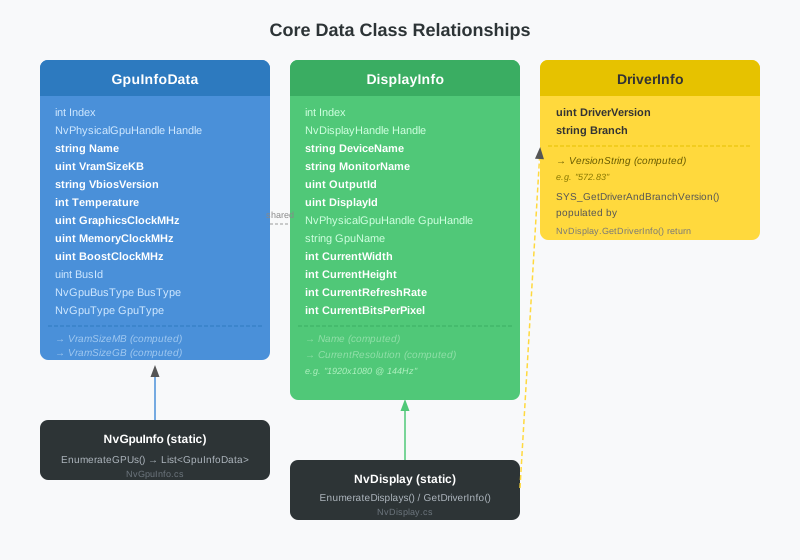
Data class relationships

Here is the full structure of GpuInfoData, which holds all collected properties.

 1
 2
 3
 4
 5
 6
 7
 8
 9
10
11
12
13
14
15
16
17
18
public class GpuInfoData
{
    public int Index { get; set; }
    public NvPhysicalGpuHandle Handle { get; set; }
    public string Name { get; set; } = "";
    public uint VramSizeKB { get; set; }
    public string VbiosVersion { get; set; } = "";
    public int Temperature { get; set; }
    public uint BusId { get; set; }
    public NvGpuBusType BusType { get; set; }
    public NvGpuType GpuType { get; set; }
    public uint GraphicsClockMHz { get; set; }
    public uint MemoryClockMHz { get; set; }
    public uint BoostClockMHz { get; set; }

    public string VramSizeMB => $"{VramSizeKB / 1024} MB";
    public string VramSizeGB => $"{VramSizeKB / 1024 / 1024.0:F1} GB";
}

There is a deliberate reason for storing Handle in the data class. Subsequent features — EDID reads, custom resolution APIs, color control APIs — all require an NvPhysicalGpuHandle. Keeping it here means DisplayPanel can immediately reach for the associated GPU handle when a display is selected.

Display Enumeration: Two Separate ID Schemes
#
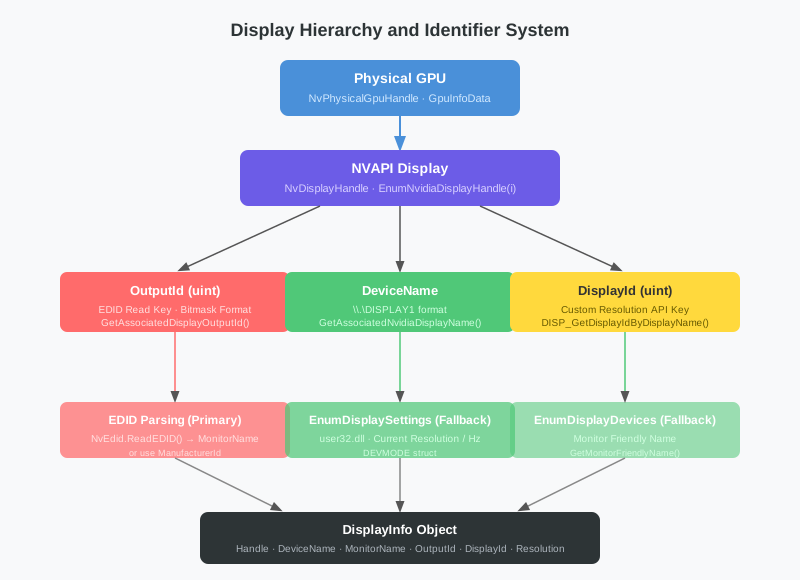
Display hierarchy

Display enumeration is more involved than GPU enumeration. NVAPI has two ways to identify a display, and they serve different purposes.

  • OutputId: A bitmask-style identifier used for EDID reads and writes
  • DisplayId: An integer identifier used by the custom resolution APIs (NvAPI_DISP_TryCustomDisplay, etc.)

NvDisplay.EnumerateDisplays() collects both.

 1
 2
 3
 4
 5
 6
 7
 8
 9
10
11
12
13
14
15
16
17
18
19
20
public static List<DisplayInfo> EnumerateDisplays()
{
    var result = new List<DisplayInfo>();

    NvPhysicalGpuHandle[] gpuHandles;
    uint gpuCount;
    NvApiWrapper.EnumPhysicalGPUs(out gpuHandles, out gpuCount);

    for (uint i = 0; i < 32; i++)
    {
        NvDisplayHandle handle;
        var status = NvApiWrapper.EnumNvidiaDisplayHandle(i, out handle);
        if (status != NvStatus.OK)
            break;

        var info = new DisplayInfo { Index = (int)i, Handle = handle };
        // ...
    }
    return result;
}

Displays are iterated starting from index 0 until a non-OK result is received. A ceiling of 32 prevents an infinite loop. The loop exits on NvStatus.EndEnumeration or any other error code.

Obtaining OutputId and DeviceName
#

1
2
3
4
5
6
7
string devName;
if (NvApiWrapper.GetAssociatedNvidiaDisplayName(handle, out devName) == NvStatus.OK)
    info.DeviceName = devName;

uint outputId;
if (NvApiWrapper.GetAssociatedDisplayOutputId(handle, out outputId) == NvStatus.OK)
    info.OutputId = outputId;

DeviceName is the logical display name assigned by Windows — strings like \\.\DISPLAY1 or \\.\DISPLAY2. This string is passed directly to EnumDisplaySettings later.

OutputId maps one-to-one with the GPU’s physical output port. It is bit-encoded, which allows individual ports to be distinguished in multi-display setups.

Obtaining DisplayId
#

1
2
3
uint displayId;
if (NvApiWrapper.DISP_GetDisplayIdByDisplayName(info.DeviceName, out displayId) == NvStatus.OK)
    info.DisplayId = displayId;

Passing the DeviceName string lets NVAPI return the corresponding DisplayId for that display. This value will be a key argument for the custom resolution feature (NvAPI_DISP_TryCustomDisplay, NvAPI_DISP_SaveCustomDisplay) covered in Part 3.

Finding Monitor Names: A Three-Stage Strategy
#

Showing users a raw \\.\DISPLAY1 is not very helpful. What they want is a real monitor name like “SAMSUNG” or “LG ULTRAGEAR”. Three methods are attempted in order to get there.

Stage 1: Read Directly from EDID
#

 1
 2
 3
 4
 5
 6
 7
 8
 9
10
11
12
13
14
15
16
17
if (info.GpuHandle.IsValid && info.OutputId != 0)
{
    try
    {
        byte[] edidData;
        if (NvEdid.ReadEDID(info.GpuHandle, info.OutputId, out edidData) == NvStatus.OK
            && edidData != null)
        {
            var parsed = EDID.EdidParser.Parse(edidData);
            if (!string.IsNullOrEmpty(parsed.MonitorName))
                info.MonitorName = parsed.MonitorName;
            else
                info.MonitorName = parsed.ManufacturerId;
        }
    }
    catch { }
}

The EDID block stores the monitor name set by the manufacturer in a Monitor Name Descriptor (tag 0xFC). EdidParser.Parse() extracts this field. If no name is present, the 3-character manufacturer code (ManufacturerId, e.g. “SAM”, “LGD”) is used as a fallback.

The dual check on GpuHandle.IsValid and OutputId != 0 is defensive. An invalid handle or a zero OutputId can cause the NVAPI call to fail or return garbage data.

Stage 2: Windows EnumDisplayDevices Fallback
#

1
2
3
4
5
6
7
8
if (string.IsNullOrEmpty(info.MonitorName))
{
    try
    {
        info.MonitorName = GetMonitorFriendlyName(info.DeviceName);
    }
    catch { }
}

If the EDID read fails — virtual displays with no monitor connected, certain docking stations, etc. — the code falls back to a Windows API call.

 1
 2
 3
 4
 5
 6
 7
 8
 9
10
11
12
13
14
[DllImport("user32.dll", CharSet = CharSet.Ansi)]
private static extern bool EnumDisplayDevicesA(
    string lpDevice, uint iDevNum,
    ref DISPLAY_DEVICE lpDisplayDevice, uint dwFlags);

private static string GetMonitorFriendlyName(string deviceName)
{
    if (string.IsNullOrEmpty(deviceName)) return "";
    var dd = new DISPLAY_DEVICE();
    dd.cb = Marshal.SizeOf(typeof(DISPLAY_DEVICE));
    if (EnumDisplayDevicesA(deviceName, 0, ref dd, 1))
        return dd.DeviceString;
    return "";
}

Passing the display adapter name to EnumDisplayDevicesA returns the DeviceString of the connected monitor — the same name shown in Windows Display Settings.

Stage 3: The DisplayInfo.Name Computed Property
#

1
2
3
4
public string Name =>
    !string.IsNullOrEmpty(MonitorName)
        ? $"{MonitorName} ({DeviceName})"
        : DeviceName;

The Name property used by the UI combines everything: if a monitor name was found it returns something like "SAMSUNG (\\.\DISPLAY1)", otherwise it falls back to just "\\.\DISPLAY1". This is what appears in the DisplayPanel tree view.

Current Resolution: Windows EnumDisplaySettings
#

NVAPI does have functions for querying display resolution, but when the goal is simply reading the current active settings, EnumDisplaySettingsA from the Windows API is more direct.

 1
 2
 3
 4
 5
 6
 7
 8
 9
10
11
12
13
14
15
16
17
18
19
[DllImport("user32.dll", CharSet = CharSet.Ansi)]
private static extern bool EnumDisplaySettingsA(
    string lpszDeviceName, int iModeNum, ref DEVMODE lpDevMode);

// iModeNum = -1 means ENUM_CURRENT_SETTINGS

try
{
    var devMode = new DEVMODE();
    devMode.dmSize = (short)Marshal.SizeOf(typeof(DEVMODE));
    if (EnumDisplaySettingsA(info.DeviceName, -1, ref devMode))
    {
        info.CurrentWidth = devMode.dmPelsWidth;
        info.CurrentHeight = devMode.dmPelsHeight;
        info.CurrentRefreshRate = devMode.dmDisplayFrequency;
        info.CurrentBitsPerPixel = devMode.dmBitsPerPel;
    }
}
catch { }

Passing -1 (ENUM_CURRENT_SETTINGS) for iModeNum returns the currently active mode. The dmSize field on the DEVMODE struct must be initialized before the call; omitting this will cause the API to fail.

The CurrentResolution computed property formats these values into a human-readable string.

1
2
3
4
public string CurrentResolution =>
    CurrentWidth > 0
        ? $"{CurrentWidth}x{CurrentHeight} @ {CurrentRefreshRate}Hz"
        : "Unknown";

DriverInfo: Querying the Driver Version
#

Driver information is system-wide and independent of any particular GPU handle.

 1
 2
 3
 4
 5
 6
 7
 8
 9
10
11
12
public static DriverInfo GetDriverInfo()
{
    var info = new DriverInfo();
    uint version;
    string branch;
    if (NvApiWrapper.SYS_GetDriverAndBranchVersion(out version, out branch) == NvStatus.OK)
    {
        info.DriverVersion = version;
        info.Branch = branch;
    }
    return info;
}

DriverVersion is an integer-encoded version number. The VersionString computed property converts it to the familiar format.

1
public string VersionString => $"{DriverVersion / 100}.{DriverVersion % 100:D2}";

A driver version of 57283 becomes 572.83. Branch is the NVIDIA internal branch name, like “r572_10”. The :D2 format specifier ensures the second component is always two digits.

DisplayInfo: The Full Display Data Class
#

 1
 2
 3
 4
 5
 6
 7
 8
 9
10
11
12
13
14
15
16
17
18
19
20
21
22
23
24
25
public class DisplayInfo
{
    public int Index { get; set; }
    public NvDisplayHandle Handle { get; set; }
    public string DeviceName { get; set; } = "";   // \\.\DISPLAY1
    public string MonitorName { get; set; } = "";  // e.g. "SAMSUNG"
    public uint OutputId { get; set; }             // Key for EDID APIs
    public NvPhysicalGpuHandle GpuHandle { get; set; }
    public string GpuName { get; set; } = "";
    public uint DisplayId { get; set; }            // Key for custom resolution APIs
    public int CurrentWidth { get; set; }
    public int CurrentHeight { get; set; }
    public int CurrentRefreshRate { get; set; }
    public int CurrentBitsPerPixel { get; set; }

    public string Name =>
        !string.IsNullOrEmpty(MonitorName)
            ? $"{MonitorName} ({DeviceName})"
            : DeviceName;

    public string CurrentResolution =>
        CurrentWidth > 0
            ? $"{CurrentWidth}x{CurrentHeight} @ {CurrentRefreshRate}Hz"
            : "Unknown";
}

GpuHandle and GpuName are stored in DisplayInfo because EDID reads from DisplayPanel require knowing which GPU drives that particular display. The signature NvEdid.ReadEDID(gpuHandle, outputId, out data) demands a GPU handle.

The current implementation uses a simplification where gpuHandles[0] is always used. A multi-GPU environment would require accurately mapping each display to the GPU that drives it, but for the single-GPU setups that represent the vast majority of real-world use, this is sufficient.

UI Binding: GpuInfoPanel
#

GpuInfoPanel is a UserControl that displays the output of NvGpuInfo.EnumerateGPUs() in a ListView.

 1
 2
 3
 4
 5
 6
 7
 8
 9
10
11
12
13
14
15
16
17
18
19
20
21
public void LoadData(List<GpuInfoData> gpus)
{
    listView.Items.Clear();

    for (int i = 0; i < gpus.Count; i++)
    {
        var gpu = gpus[i];
        if (i > 0) AddItem("", "");
        AddItem($"=== GPU #{i} ===", "");
        AddItem("Name", gpu.Name);
        AddItem("Type", gpu.GpuType.ToString());
        AddItem("VRAM", gpu.VramSizeGB);
        AddItem("VBIOS Version", gpu.VbiosVersion);
        AddItem("Temperature", $"{gpu.Temperature} C");
        AddItem("Graphics Clock", $"{gpu.GraphicsClockMHz} MHz");
        AddItem("Memory Clock", $"{gpu.MemoryClockMHz} MHz");
        AddItem("Boost Clock", $"{gpu.BoostClockMHz} MHz");
        AddItem("Bus ID", $"{gpu.BusId}");
        AddItem("Bus Type", gpu.BusType.ToString());
    }
}

Rows starting with === are rendered with a dark background to serve as visual separators.

 1
 2
 3
 4
 5
 6
 7
 8
 9
10
11
private void AddItem(string prop, string value)
{
    var item = new ListViewItem(prop);
    item.SubItems.Add(value);
    if (prop.StartsWith("==="))
    {
        item.BackColor = Color.FromArgb(60, 60, 65);
        item.ForeColor = Color.White;
    }
    listView.Items.Add(item);
}

The Refresh button handler simply calls EnumerateGPUs() again and passes the result to LoadData(). Since temperature and clock readings are live values, each refresh reflects the current state.

UI Binding: DisplayPanel
#

DisplayPanel has a three-pane layout: a tree view on the left, a detail list in the upper right, and an EDID hex dump in the lower right.

 1
 2
 3
 4
 5
 6
 7
 8
 9
10
11
12
13
14
15
16
17
18
19
20
21
public void LoadData(List<DisplayInfo> displays, List<GpuInfoData> gpus)
{
    _displays = displays;
    _gpus = gpus;
    treeView.Nodes.Clear();

    foreach (var display in displays)
    {
        var node = treeView.Nodes.Add($"Display {display.Index}: {display.Name}");
        node.Tag = display;
        node.Nodes.Add($"Resolution: {display.CurrentResolution}");
        node.Nodes.Add($"Output ID: 0x{display.OutputId:X}");
        node.Nodes.Add($"GPU: {display.GpuName}");
    }

    if (displays.Count > 0)
    {
        treeView.ExpandAll();
        treeView.SelectedNode = treeView.Nodes[0];
    }
}

The key detail is storing the DisplayInfo object in each node’s Tag. When a node is selected, that tag is retrieved to populate the detail view.

1
2
3
4
5
6
7
8
9
private void TreeView_AfterSelect(object sender, TreeViewEventArgs e)
{
    var node = e.Node;
    while (node.Parent != null) node = node.Parent;
    var display = node.Tag as DisplayInfo;
    if (display == null) return;

    ShowDisplayDetail(display);
}

Clicking a child node (Resolution, Output ID, etc.) walks up via the while (node.Parent != null) loop to reach the root node and extract the DisplayInfo. This ensures that clicking anywhere in the tree shows the detail view for the corresponding display.

ShowDisplayDetail also performs an EDID read, appends the parsed results to the detail list, and shows the raw bytes as a hex dump. EDID parsing is covered separately in the next part.

OutputId: What the Bitmask Means
#

The fact that OutputId is a bitmask rather than a simple index can be puzzling at first. On a 4-port GPU, the first port might be encoded as 0x00000001, the second as 0x00000002, the third as 0x00000004, and so on. This design lets NVAPI internally combine multiple outputs using bitwise OR — useful for multi-stream or SLI scenarios.

In practice, when calling NvAPI_GPU_GetEDID, you pass OutputId as-is and NVAPI resolves which physical port it corresponds to internally. Mixing up DisplayId and OutputId causes NVAPI to return NvStatus.InvalidArgument, so keeping track of which identifier each API expects is essential.

Up Next
#

The data collection pipeline is now complete. With List<GpuInfoData> and List<DisplayInfo> in hand, the logical next step is to look at the actual parsing logic inside the EDID block.

Part 3 will cover how EdidParser decodes the 128-byte EDID base block, the structure of Detailed Timing Descriptors (DTDs) and Monitor Descriptors, and parsing the HDR metadata and VIC codes stored in CTA-861 extension blocks.

NVIDIA GPU Controller Dev Log 2026 - This article is part of a series.
Part 2: This Article