Building an NVIDIA GPU Controller (3) — Deep Dive into EDID Binary Structure and Parsing

·3816 words·18 mins· loading · loading ·
Author
Plus
Table of Contents
NVIDIA GPU Controller Dev Log 2026 - This article is part of a series.
Part 3: This Article

In the previous installment we covered initializing NVAPI and obtaining GPU handles along with display Output IDs. This entry is the most technically dense in the series. We’ll dissect the EDID byte array retrieved from an NVIDIA GPU — byte by byte — examining exactly what structure it encodes and how our C# parser interprets it.


What Is EDID?
#

EDID (Extended Display Identification Data) is binary data that a monitor sends to the GPU to identify itself and declare what it supports. First standardized by VESA in 1994, the spec has evolved through EDID 1.4 and consists of a 128-byte base block plus optional 128-byte extension blocks.

When you plug a monitor into a computer, the GPU reads the EDID over the I2C bus (the DDC channel). The OS and driver use this data to determine supported resolutions, refresh rates, color spaces, HDR capabilities, and more. NVAPI exposes this at the C# level through the NvAPI_GPU_GetEDID function.

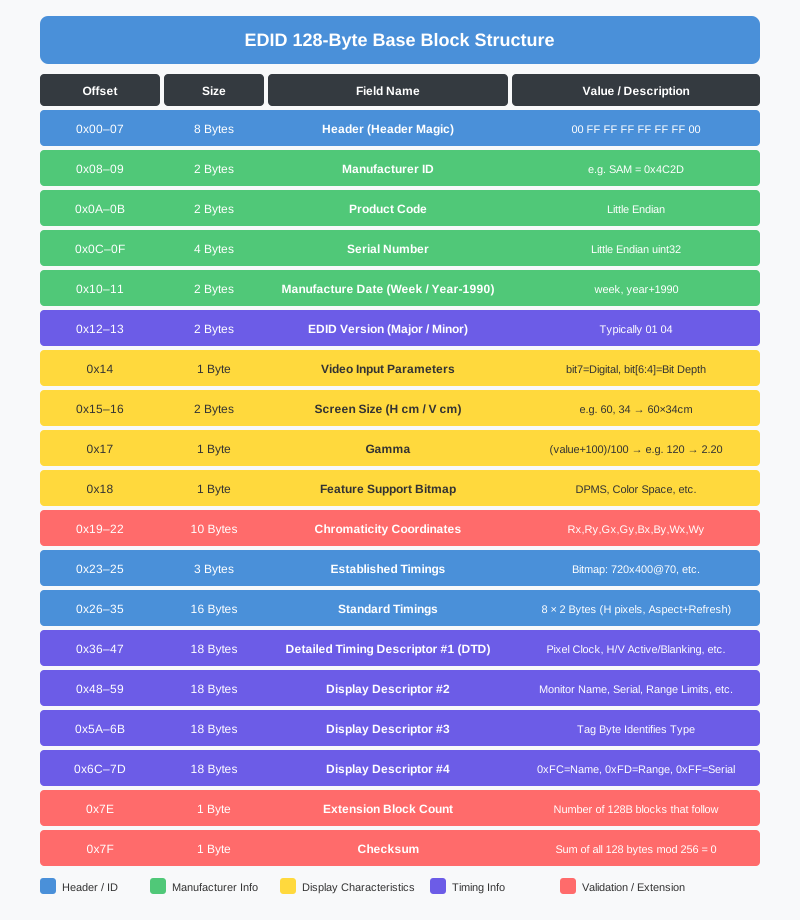
EDID 128-byte base block structure


Reading EDID via NVAPI
#

Before diving into parsing, let’s look at how we fetch the raw data. The ReadEDID method in NvEdid.cs handles this.

 1
 2
 3
 4
 5
 6
 7
 8
 9
10
11
12
13
14
15
16
17
18
19
20
21
22
23
24
25
26
27
28
29
30
31
32
33
public static NvStatus ReadEDID(NvPhysicalGpuHandle gpuHandle,
                                 uint outputId, out byte[] edidData)
{
    edidData = null;

    // 첫 번째 호출: 총 크기와 첫 256바이트 수신
    var edid = NvEdidV3.Create();
    edid.Offset = 0;
    var status = NvApiWrapper.GPU_GetEDID(gpuHandle, outputId, ref edid);
    if (status != NvStatus.OK || edid.EdidSize == 0)
        return status;

    uint totalSize = edid.EdidSize;
    edidData = new byte[totalSize];
    uint firstChunk = System.Math.Min(totalSize, 256);
    System.Array.Copy(edid.EdidData, edidData, firstChunk);

    // 나머지 블록을 256바이트씩 읽기
    uint offset = 256;
    while (offset < totalSize)
    {
        var nextEdid = NvEdidV3.Create();
        nextEdid.Offset = offset;
        status = NvApiWrapper.GPU_GetEDID(gpuHandle, outputId, ref nextEdid);
        if (status != NvStatus.OK) break;
        uint chunk = System.Math.Min(totalSize - offset, 256);
        System.Array.Copy(nextEdid.EdidData, 0, edidData, offset, chunk);
        offset += 256;
    }

    Logger.Info($"EDID read complete: {totalSize} bytes ({totalSize / 128} blocks)");
    return NvStatus.OK;
}

NvEdidV3 maps directly to NVAPI’s NV_EDID_V3 struct. The key constraint is that at most 256 bytes can be retrieved per call. Monitors with multiple CTA-861 extension blocks — 4K monitors being the typical case — can have an EDID exceeding 256 bytes (128×2), so we increment the Offset field and call in a loop.

NvEdidV3’s version field is initialized in a peculiar way:

1
e.Version = (uint)(Marshal.SizeOf(typeof(NvEdidV3)) | (3 << 16));

The version number (3) goes in the upper 16 bits, and the struct size goes in the lower 16 bits via OR. This is a common NVAPI pattern that allows the driver to perform compatibility checks.


The 128-Byte Base Block in Detail
#

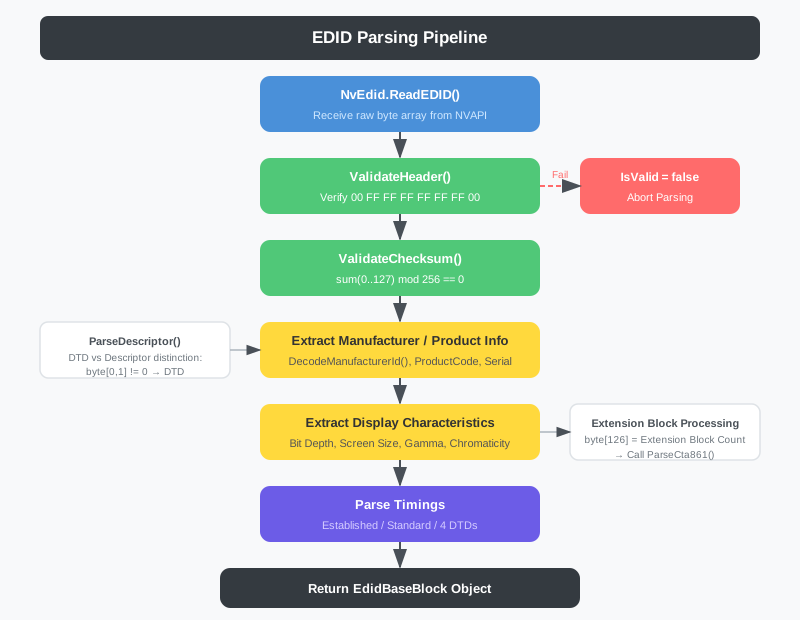
EDID parsing pipeline

Header Magic (0x00–0x07)
#

The first 8 bytes of any EDID are always a fixed magic value:

1
00 FF FF FF FF FF FF 00

EdidParser.ValidateHeader() verifies these 8 bytes:

1
2
3
4
5
6
7
8
9
private static readonly byte[] EDID_HEADER = { 0x00, 0xFF, 0xFF, 0xFF, 0xFF, 0xFF, 0xFF, 0x00 };

public static bool ValidateHeader(byte[] data)
{
    if (data == null || data.Length < 128) return false;
    for (int i = 0; i < 8; i++)
        if (data[i] != EDID_HEADER[i]) return false;
    return true;
}

If the header doesn’t match, the data is not a valid EDID — this is the first gate for catching corrupted data or failed NVAPI calls.

Checksum Algorithm (0x7F)
#

The last byte of the 128-byte block is a checksum. The EDID spec requires that the sum of all 128 bytes in the base block be divisible by 256.

1
2
3
4
5
6
7
public static bool ValidateChecksum(byte[] data, int offset = 0, int length = 128)
{
    byte sum = 0;
    for (int i = offset; i < offset + length; i++)
        sum += data[i];
    return sum == 0;  // byte overflow 덕분에 자동으로 mod 256
}

Since byte wraps at 256, the overflow acts as mod 256 automatically. When computing a new checksum byte, take the two’s complement of the sum of the other 127 bytes:

1
2
3
4
5
6
7
public static byte CalculateChecksum(byte[] data, int offset = 0, int length = 128)
{
    byte sum = 0;
    for (int i = offset; i < offset + length - 1; i++)  // 마지막 바이트 제외
        sum += data[i];
    return (byte)(256 - sum);  // 2의 보수
}

Manufacturer ID Encoding (0x08–0x09)
#

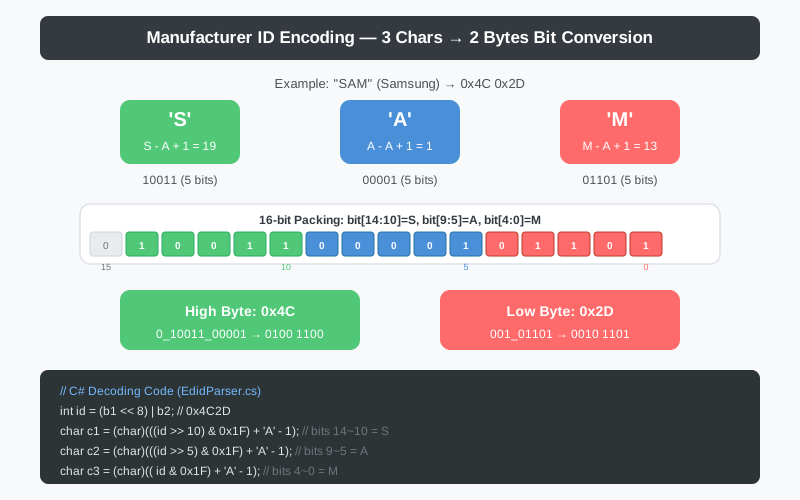
This is the most interesting bit manipulation in EDID. It compresses a 3-character ASCII alphabetic string into a 2-byte (16-bit) integer.

Manufacturer ID encoding bit diagram

Subtracting 'A' (65) from each character and adding 1 maps A=1, B=2, …, Z=26, fitting each into 5 bits. The three characters are packed into 15 bits with the most-significant bit always zero.

1
2
3
4
5
6
7
8
public static string DecodeManufacturerId(byte b1, byte b2)
{
    int id = (b1 << 8) | b2;
    char c1 = (char)(((id >> 10) & 0x1F) + 'A' - 1);  // 비트 14:10
    char c2 = (char)(((id >> 5)  & 0x1F) + 'A' - 1);  // 비트  9:5
    char c3 = (char)((id         & 0x1F) + 'A' - 1);  // 비트  4:0
    return $"{c1}{c2}{c3}";
}

Let’s encode Samsung (SAM) as a concrete example:

  • S = 19 = 10011
  • A = 1 = 00001
  • M = 13 = 01101

Packed into 16 bits: 0_10011_00001_01101 = 0100 1100 0010 1101 = 0x4C 0x2D

The inverse EncodeManufacturerId() applies the same logic in reverse:

1
2
3
4
5
6
7
8
9
public static byte[] EncodeManufacturerId(string id)
{
    id = id.ToUpper();
    int c1 = id[0] - 'A' + 1;
    int c2 = id[1] - 'A' + 1;
    int c3 = id[2] - 'A' + 1;
    int val = (c1 << 10) | (c2 << 5) | c3;
    return new byte[] { (byte)(val >> 8), (byte)(val & 0xFF) };
}

Product Code and Serial Number (0x0A–0x0F)
#

1
2
3
4
5
6
// Product code (bytes 10-11, little-endian)
block.ProductCode = (ushort)(data[10] | (data[11] << 8));

// Serial number (bytes 12-15, little-endian)
block.SerialNumber = (uint)(data[12] | (data[13] << 8)
                           | (data[14] << 16) | (data[15] << 24));

Following x86 convention, these are stored little-endian with the LSB at the lower address. A serial number of 0x00000000 or 0x01010101 signals that no serial is encoded here — the monitor serial string lives in the descriptor area (0xFC–0x7D) instead.

Manufacture Date (0x10–0x11)
#

1
2
block.ManufactureWeek = data[16];         // 1~53주
block.ManufactureYear = data[17] + 1990;  // 오프셋 1990년

The year uses an offset encoding where 0 represents 1990. So data[17] = 34 means 2024. Some monitors set the week byte to 0xFF to indicate that only the year is specified.

Video Input Parameters (0x14)
#

1
2
3
4
5
6
7
block.IsDigital = (data[20] & 0x80) != 0;
if (block.IsDigital)
{
    int depth = (data[20] >> 4) & 0x07;
    byte[] depths = { 0, 6, 8, 10, 12, 14, 16, 0 };
    block.BitDepth = depths[depth];
}

Bit 7 set means a digital interface (HDMI, DisplayPort); clear means analog (VGA). For digital interfaces, bits 6:4 encode the color bit depth:

Value Bit Depth
000 Undefined
001 6-bit
010 8-bit
011 10-bit
100 12-bit
101 14-bit
110 16-bit

Screen Size and Gamma (0x15–0x17)
#

1
2
3
block.HScreenSizeCm = data[21];  // 가로 cm
block.VScreenSizeCm = data[22];  // 세로 cm
block.Gamma = (data[23] + 100) / 100.0;

Screen size is stored as integer centimeters. 0x3C 0x22 gives 60×34 cm — computing the diagonal yields roughly 69 cm, or about 27 inches.

Gamma uses an offset encoding where 0 represents 1.00 and 120 represents 2.20. The value data[23] = 120 (gamma 2.20) is standard for sRGB monitors.


Chromaticity Coordinates (0x19–0x22)
#

Ten bytes pack the CIE 1931 chromaticity coordinates (Rx, Ry, Gx, Gy, Bx, By, Wx, Wy). Each coordinate has 10-bit precision. The layout is non-trivial: the two LSBs of each coordinate are packed together in the first two bytes, while the upper 8 bits of each follow in subsequent bytes.

For reference, the standard sRGB primaries are:

Color Point x y
Red (R) 0.640 0.330
Green (G) 0.300 0.600
Blue (B) 0.150 0.060
White (W, D65) 0.3127 0.3290

Established Timings (0x23–0x25)
#

Three bytes encode legacy resolution support as a bitmap:

 1
 2
 3
 4
 5
 6
 7
 8
 9
10
11
12
13
14
15
16
17
public List<string> GetTimingList()
{
    var list = new List<string>();
    string[] timings1 = { "720x400@70Hz", "720x400@88Hz", "640x480@60Hz", "640x480@67Hz",
                          "640x480@72Hz", "640x480@75Hz", "800x600@56Hz", "800x600@60Hz" };
    string[] timings2 = { "800x600@72Hz", "800x600@75Hz", "832x624@75Hz", "1024x768@87Hz(I)",
                          "1024x768@60Hz", "1024x768@70Hz", "1024x768@75Hz", "1280x1024@75Hz" };
    string[] timings3 = { "1152x870@75Hz", ... };

    for (int i = 0; i < 8; i++)
    {
        if ((Byte1 & (1 << (7 - i))) != 0) list.Add(timings1[i]);
        if ((Byte2 & (1 << (7 - i))) != 0) list.Add(timings2[i]);
        ...
    }
    return list;
}

Bit 7 carries the highest priority. For example, Byte1 = 0x21 (0010 0001) indicates support for 640×480@60Hz and 800×600@60Hz.


Standard Timings (0x26–0x35)
#

Sixteen bytes hold up to 8 standard timings as 2-byte pairs:

 1
 2
 3
 4
 5
 6
 7
 8
 9
10
11
12
13
14
15
16
17
public int HActive => (HPixelDiv8Minus31 + 31) * 8;
public int VActive
{
    get
    {
        int aspect = (AspectAndRefresh >> 6) & 0x03;
        switch (aspect)
        {
            case 0: return HActive * 10 / 16;  // 16:10
            case 1: return HActive * 3 / 4;    // 4:3
            case 2: return HActive * 4 / 5;    // 5:4
            case 3: return HActive * 9 / 16;   // 16:9
            default: return 0;
        }
    }
}
public int RefreshRate => (AspectAndRefresh & 0x3F) + 60;

Take 0xD1 0xC0 as an example:

  • Horizontal: (0xD1 + 31) × 8 = (209 + 31) × 8 = 1920
  • Aspect ratio: (0xC0 >> 6) & 0x03 = 3 → 16:9 → Vertical = 1920 × 9 / 16 = 1080
  • Refresh rate: (0xC0 & 0x3F) + 60 = 0 + 60 = 60Hz

Result: 1920×1080@60Hz


Detailed Timing Descriptors (DTD, 0x36–0x7D)
#

Among the four 18-byte slots, the first typically holds a Detailed Timing Descriptor (DTD) representing the monitor’s native resolution. The remaining slots may be additional DTDs or special display descriptors.

 1
 2
 3
 4
 5
 6
 7
 8
 9
10
11
12
13
14
15
16
17
18
19
20
21
22
23
24
25
26
27
private static void ParseDescriptor(byte[] data, int offset, EdidBaseBlock block)
{
    // pixel clock != 0 → 상세 타이밍 디스크립터
    if (data[offset] != 0 || data[offset + 1] != 0)
    {
        var dtd = new DetailedTimingDescriptor();
        // 픽셀 클럭: 10kHz 단위
        dtd.PixelClockKHz10 = (ushort)(data[offset] | (data[offset + 1] << 8));
        // 가로 해상도: 8비트 + 상위 4비트 (byte[4]의 상위 니블)
        dtd.HActive   = data[offset + 2] | ((data[offset + 4] & 0xF0) << 4);
        dtd.HBlanking = data[offset + 3] | ((data[offset + 4] & 0x0F) << 8);
        dtd.VActive   = data[offset + 5] | ((data[offset + 7] & 0xF0) << 4);
        dtd.VBlanking = data[offset + 6] | ((data[offset + 7] & 0x0F) << 8);
        ...
    }
    else
    {
        // pixel clock == 0 → 디스플레이 디스크립터
        byte tag = data[offset + 3];
        switch (tag)
        {
            case 0xFC: // 모니터 이름
            case 0xFF: // 모니터 시리얼 문자열
            case 0xFD: // 주사율 범위 제한
        }
    }
}

DTD Pixel Clock Calculation
#

The pixel clock is stored as a 16-bit little-endian value in units of 10 kHz:

1
public double PixelClockMHz => PixelClockKHz10 * 0.01;

A 4K@60Hz monitor has a pixel clock of roughly 594 MHz, so the stored value is 59400. 0x08 0xE8(0x08 | (0xE8 << 8)) = 0xE808 = 59400 → 594.00 MHz.

DTD Actual Refresh Rate Calculation
#

1
2
3
4
5
6
7
8
public double RefreshRate
{
    get
    {
        if (HTotal == 0 || VTotal == 0) return 0;
        return (PixelClockKHz10 * 10000.0) / (HTotal * VTotal);
    }
}

Total horizontal pixels (HActive + HBlanking) multiplied by total vertical lines (VActive + VBlanking) gives the total pixels per frame. Dividing the pixel clock by this product yields frames per second — the refresh rate.

Descriptor Tag Types
#

Slots with a pixel clock of zero are identified by the tag byte at data[offset + 3]:

 1
 2
 3
 4
 5
 6
 7
 8
 9
10
11
12
public enum DescriptorTag : byte
{
    MonitorSerialNumber = 0xFF,   // 모니터 시리얼 문자열 (최대 13자)
    DataString          = 0xFE,   // 임의 ASCII 문자열
    MonitorRangeLimits  = 0xFD,   // GTF/CVT 주사율 범위 제한
    MonitorName         = 0xFC,   // 모니터 모델명 (최대 13자)
    ColorPoint          = 0xFB,   // 추가 색도 좌표
    StandardTimingId    = 0xFA,   // 추가 표준 타이밍 8개
    CVTTimingCodes      = 0xF8,   // CVT 3바이트 타이밍 코드
    EstablishedTimingsIII = 0xF7, // 확립된 타이밍 3 (추가)
    Dummy               = 0x10,   // 패딩
}

The MonitorRangeLimits (0xFD) descriptor records the monitor’s supported vertical scan rate range (MinVRate–MaxVRate Hz), horizontal scan rate range (MinHRate–MaxHRate kHz), and maximum pixel clock. For variable refresh rate (VRR) monitors this range is especially significant.


CTA-861 Extension Block Parsing
#

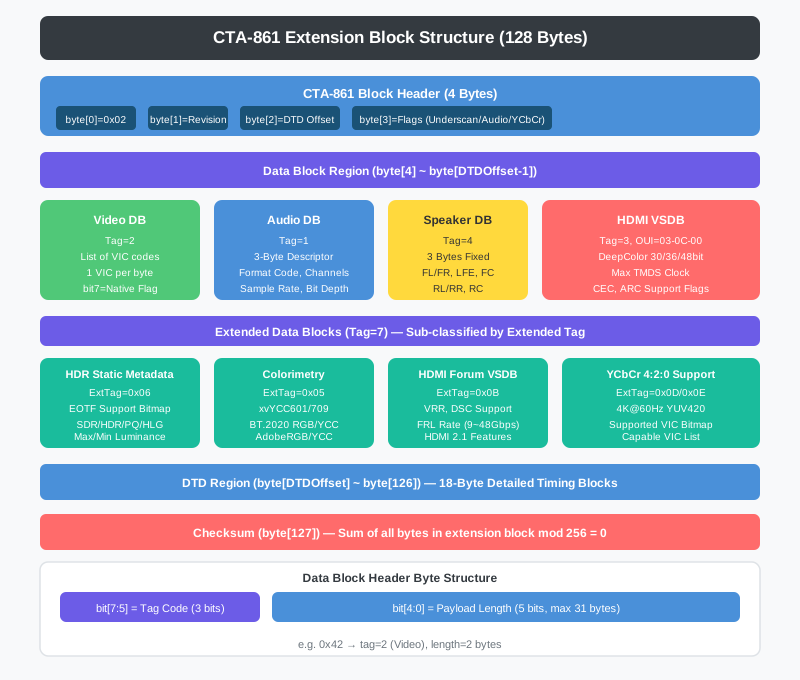
CTA-861 extension block structure

HDMI and DisplayPort monitors almost universally have byte 0x7E (the extension count) set to 1 or more, signaling that a CTA-861 extension block follows. This second 128-byte block begins at byte[128].

CTA-861 Block Header
#

1
2
3
4
5
6
7
var block = new CtaExtensionBlock
{
    Tag      = data[blockOffset],     // 0x02 = CTA-861
    Revision = data[blockOffset + 1], // 보통 0x03
    DTDOffset = data[blockOffset + 2], // 데이터 블록 끝 오프셋
    Flags    = data[blockOffset + 3]  // 기능 플래그
};

Each bit of the Flags byte has a defined meaning:

Bit Meaning
7 Underscan supported
6 Basic audio supported
5 YCbCr 4:4:4 supported
4 YCbCr 4:2:2 supported
3:0 Number of native DTDs

Data Block Parsing Loop
#

Each data block opens with a 1-byte header: the upper 3 bits are the tag code, and the lower 5 bits are the payload length.

 1
 2
 3
 4
 5
 6
 7
 8
 9
10
11
12
13
14
15
16
17
18
19
20
int pos = blockOffset + 4;
int dataEnd = blockOffset + block.DTDOffset;

while (pos < dataEnd && pos < blockOffset + 127)
{
    byte header = data[pos];
    int tag    = (header >> 5) & 0x07;  // 상위 3비트
    int length = header & 0x1F;          // 하위 5비트

    switch ((CtaDataBlockTag)tag)
    {
        case CtaDataBlockTag.Video:           // 태그 2
        case CtaDataBlockTag.Audio:           // 태그 1
        case CtaDataBlockTag.SpeakerAllocation: // 태그 4
        case CtaDataBlockTag.VendorSpecific:  // 태그 3
        case CtaDataBlockTag.Extended:        // 태그 7
    }

    pos += 1 + length;  // 헤더 1바이트 + 페이로드
}

Video Data Block — VIC Codes
#

1
2
3
4
5
6
7
private static CtaVideoDataBlock ParseVideoDataBlock(byte[] data, int offset, int length)
{
    var vdb = new CtaVideoDataBlock();
    for (int i = 0; i < length; i++)
        vdb.VicCodes.Add((byte)(data[offset + i] & 0x7F));  // bit7=네이티브 플래그 제거
    return vdb;
}

A VIC (Video Identification Code) identifies a resolution and refresh rate as a single number. Some common VIC codes:

VIC Resolution/Refresh
1 640×480p@59.94/60Hz
16 1920×1080p@59.94/60Hz
97 3840×2160p@59.94/60Hz
104 3840×2160p@119.88/120Hz
214 7680×4320p@59.94/60Hz (8K)

Codes fit in a single byte (max 255), and HDMI 2.1 accommodates extended VICs in a separate block.

Audio Data Block — Audio Formats
#

Each audio descriptor is 3 bytes:

1
2
3
4
5
6
7
adb.Descriptors.Add(new CtaAudioDescriptor
{
    FormatCode  = (byte)((data[offset + i] >> 3) & 0x0F),    // 상위 4비트
    MaxChannels = (byte)((data[offset + i] & 0x07) + 1),     // 하위 3비트 + 1
    SampleRates = data[offset + i + 1],  // 비트맵: 32/44.1/48/88.2/96/176.4/192kHz
    BitDepths   = data[offset + i + 2],  // 비트맵: 16/20/24비트
});

Format code 1 is LPCM (uncompressed PCM), 2 is AC-3, 7 is DTS, 11 is DTS-HD, and 12 is Dolby TrueHD (MAT/MLP).

Speaker Allocation Data Block
#

1
2
3
4
5
6
7
8
9
public class CtaSpeakerAllocation
{
    public byte Data { get; set; }
    public bool FrontLeftRight => (Data & 0x01) != 0;  // FL/FR
    public bool LFE            => (Data & 0x02) != 0;  // 서브우퍼
    public bool FrontCenter    => (Data & 0x04) != 0;  // FC
    public bool RearLeftRight  => (Data & 0x08) != 0;  // RL/RR
    public bool RearCenter     => (Data & 0x10) != 0;  // RC
}

A 5.1-channel speaker configuration gives Data = 0x07 (FL/FR + LFE + FC).

HDMI Vendor Specific Data Block
#

The IEEE OUI 03-0C-00 identifies this as an HDMI vendor block:

 1
 2
 3
 4
 5
 6
 7
 8
 9
10
11
12
13
14
15
16
17
18
19
private static HdmiVendorBlock ParseHdmiVendorBlock(byte[] data, int offset, int length)
{
    // OUI 검증
    if (data[offset] != 0x03 || data[offset + 1] != 0x0C || data[offset + 2] != 0x00)
        return null;

    var hvb = new HdmiVendorBlock();
    if (length >= 6)
    {
        byte dcFlags = data[offset + 5];
        hvb.SupportsAI     = (dcFlags & 0x80) != 0;   // Audio Infoframe
        hvb.DeepColor48bit = (dcFlags & 0x40) != 0;   // 16비트/채널
        hvb.DeepColor36bit = (dcFlags & 0x20) != 0;   // 12비트/채널
        hvb.DeepColor30bit = (dcFlags & 0x10) != 0;   // 10비트/채널
    }
    if (length >= 7)
        hvb.MaxTmdsClock5MHz = data[offset + 6];  // 5MHz 단위
    return hvb;
}

For example, MaxTmdsClock5MHz = 60 means a maximum TMDS clock of 300 MHz. HDMI 1.4 tops out at 340 MHz; HDMI 2.0 at 600 MHz.


Extended Data Blocks — HDR and Color Gamut
#

Tag 7 (Extended) blocks carry a secondary extended tag byte to distinguish subtypes.

HDR Static Metadata (ExtTag=0x06)
#

1
2
3
4
5
6
7
8
block.HdrMetadata = new HdrStaticMetadata
{
    SupportedEotf        = data[offset + 1],
    SupportedSmType      = data[offset + 2],
    MaxLuminance         = length >= 4 ? data[offset + 3] : (byte)0,
    MaxFrameAvgLuminance = length >= 5 ? data[offset + 4] : (byte)0,
    MinLuminance         = length >= 6 ? data[offset + 5] : (byte)0,
};

The EOTF (Electro-Optical Transfer Function) support bitmap:

1
2
3
4
public bool SupportsSDR => (SupportedEotf & 0x01) != 0;  // 전통 SDR
public bool SupportsHDR => (SupportedEotf & 0x02) != 0;  // HDR (BT.1886)
public bool SupportsPQ  => (SupportedEotf & 0x04) != 0;  // Perceptual Quantizer (HDR10)
public bool SupportsHLG => (SupportedEotf & 0x08) != 0;  // Hybrid Log-Gamma

Luminance values are decoded with the formula 100 × 2^(MaxLuminance / 32) cd/m². Typical HDR monitors land at 600–1000 nits peak and 0.01–0.05 nits minimum.

Colorimetry (ExtTag=0x05)
#

1
2
3
4
5
6
7
8
9
public class ColorimetryData
{
    public byte Data { get; set; }
    public bool xvYCC601  => (Data & 0x01) != 0;
    public bool xvYCC709  => (Data & 0x02) != 0;
    public bool BT2020cYCC => (Data & 0x20) != 0;
    public bool BT2020YCC  => (Data & 0x40) != 0;
    public bool BT2020RGB  => (Data & 0x80) != 0;
}

Monitors that support HDR10 generally also support the BT.2020 color gamut, so Data & 0xE0 will be non-zero.

HDMI Forum VSDB (ExtTag=0x0B) — HDMI 2.1 Capabilities
#

1
2
3
4
5
6
7
block.HdmiForumData = new HdmiForumVSDB
{
    MaxTmdsClock = data[offset + 1],
    Flags1       = data[offset + 4],
    Flags2       = data[offset + 5],
    MaxFrlRate   = data[offset + 6],
};

MaxFrlRate encodes the maximum FRL (Fixed Rate Link) speed. FRL is the new physical layer introduced in HDMI 2.1, replacing TMDS.

 1
 2
 3
 4
 5
 6
 7
 8
 9
10
11
12
13
14
15
public int MaxFrlRateGbps
{
    get {
        switch (MaxFrlRate & 0x0F)
        {
            case 1: return 9;   // 3레인 × 3Gbps
            case 2: return 18;  // 3레인 × 6Gbps
            case 3: return 24;  // 4레인 × 6Gbps
            case 4: return 32;  // 4레인 × 8Gbps
            case 5: return 40;  // 4레인 × 10Gbps
            case 6: return 48;  // 4레인 × 12Gbps (최대)
            default: return 0;  // TMDS 전용
        }
    }
}

4K@120Hz or 8K@60Hz requires at least FRL 5 (40 Gbps).


File I/O — Saving and Loading EDID
#

EdidFileIO.cs handles reading and writing EDID data in multiple formats.

Automatic Format Detection
#

 1
 2
 3
 4
 5
 6
 7
 8
 9
10
11
12
13
14
15
16
17
18
19
20
21
22
23
24
25
26
27
28
29
30
public static byte[] LoadFromFile(string path)
{
    string ext = Path.GetExtension(path).ToLower();

    // 바이너리 파일: 원시 바이트
    if (ext == ".bin")
        return File.ReadAllBytes(path);

    string text = File.ReadAllText(path, Encoding.ASCII);

    // 형식 1: <D00FFFFFF...> — 꺾쇠 괄호 HEX
    if (text.Contains("<D"))
        return ParseAngleBracketFormat(text);

    // 형식 2: EDID BYTES: 테이블
    if (text.Contains("EDID BYTES:"))
        return ParseTableFormat(text);

    // 형식 3: 순수 HEX 문자열
    string cleaned = Regex.Replace(text, @"[^0-9A-Fa-f]", "");
    if (cleaned.Length >= 256)
        return HexStringToBytes(cleaned);

    // 폴백: 바이너리 헤더 확인
    var raw = File.ReadAllBytes(path);
    if (raw.Length >= 128 && raw[0] == 0x00 && raw[1] == 0xFF)
        return raw;

    return null;
}

Three text formats are supported because different EDID tools in the wild each use their own convention. The <D...> format comes from certain monitor configuration utilities; the table format is a human-readable hex dump.

Choosing a Save Format
#

 1
 2
 3
 4
 5
 6
 7
 8
 9
10
11
12
13
// 바이너리 저장 (가장 작고 범용적)
EdidFileIO.SaveAsBinary("monitor.bin", edidData);

// 꺾쇠 형식 TXT
EdidFileIO.SaveAsAngleBracketTxt("monitor.txt", edidData);
// 결과: <D00FFFFFF FFFFFF0043...>

// 테이블 형식 DAT
EdidFileIO.SaveAsTableDat("monitor.dat", edidData);
// 결과: EDID BYTES:
//       0x    00 01 02 ...
//       00 | 00 FF FF FF ...
//       10 | 4C 2D ...

Reading a Real EDID Hex Dump
#

Understanding the hex dump output is important for debugging. EdidParser.ToHexDump() produces output in this format:

1
2
3
4
5
6
7
     00 01 02 03 04 05 06 07 08 09 0A 0B 0C 0D 0E 0F   ASCII
     -----------------------------------------------   ----------------
0000 00 FF FF FF FF FF FF 00 4C 2D E8 08 01 01 01 01   ........L-......
0010 21 1A 01 03 80 3C 22 78 0A CF 74 A3 57 4C 9D 24   !.....<"x..t.WL.$
0020 11 50 54 BF EF 80 D1 C0 81 C0 81 80 A9 C0 B3 00   .PT.............
0030 95 00 81 40 02 3A 80 18 71 38 2D 40 58 2C 45 00   ...@.:..q8-@X,E.
0040 ...

Reading the first row: 4C 2D is manufacturer ID SAM (Samsung); E8 08 in little-endian is product code 0x08E8 = 2280; 0x3C 0x22 (60, 34) is the 60×34 cm screen size; and 0x78 (120) is gamma 2.20.


Wrapping Up
#

This installment went byte by byte through the EDID 128-byte base block and the CTA-861 extension block. The key takeaways:

  • Header magic: 00 FF FF FF FF FF FF 00 identifies a valid EDID
  • Checksum: sum of all 128 bytes mod 256 must equal zero
  • Manufacturer ID: three ASCII letters packed as 5 bits each into 2 bytes
  • DTD vs. descriptor: bytes[0,1] non-zero means timing data; zero means tag-based display descriptor
  • CTA-861: each data block opens with a 3-bit tag + 5-bit length header
  • Extended tags: HDR, colorimetry, and HDMI Forum VSDB are subtypes within Extended (tag 7) blocks
  • NVAPI reading: iterate in 256-byte chunks by incrementing the Offset field to collect the full EDID

In the next installment we’ll look at displaying and editing the parsed EDID data in a WinForms UI, and then injecting the modified EDID back into the GPU.

NVIDIA GPU Controller Dev Log 2026 - This article is part of a series.
Part 3: This Article