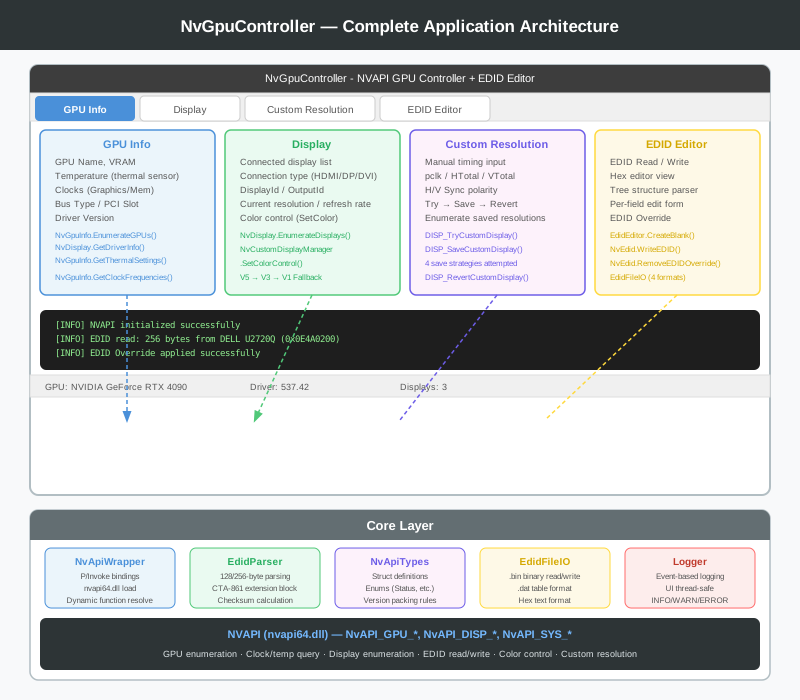
This is the final installment of the series. We’ve covered NVAPI initialization, GPU and display information queries, and custom resolutions up to this point. Now we implement the project’s highlights — the EDID editor and color control — and bring the entire application to completion.
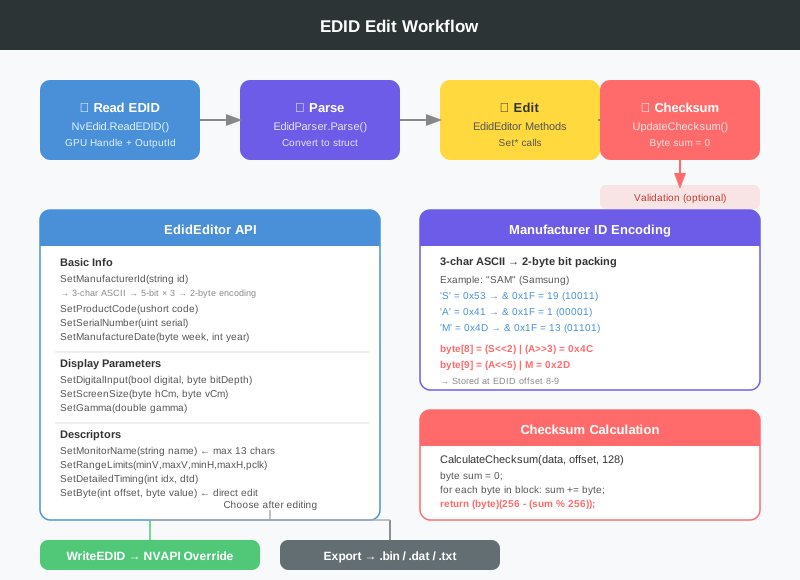
EDID (Extended Display Identification Data) is a 128-byte (or 256-byte+ for extensions) structure that a monitor uses to advertise its capabilities to the graphics card. It is exchanged automatically over the DDC/CI channel upon connection, and the GPU driver uses this data to determine supported resolutions, color depth, HDR support, and more.
There are many reasons you might need to edit EDID:
The monitor lies — some budget monitors declare features in EDID that they don’t actually support
KVM switches or HDMI splitters corrupt or strip the EDID
You need to force-register a specific resolution/refresh rate combination
You want to manually adjust HDR-related flags
NVAPI provides NvAPI_GPU_GetEDID / NvAPI_GPU_SetEDID functions that let you read and override EDID at the GPU driver level.
Making a copy to protect the original is the first design decision. If you accidentally corrupt the original while editing, there’s no way to recover it.
publicstatic EdidEditor CreateBlank(){var data =newbyte[128];// Header: 0x00 0xFF 0xFF 0xFF 0xFF 0xFF 0xFF 0x00 data[0]=0x00; data[1]=0xFF; data[2]=0xFF; data[3]=0xFF; data[4]=0xFF; data[5]=0xFF; data[6]=0xFF; data[7]=0x00;// EDID version 1.4 data[18]=0x01; data[19]=0x04;// Digital input data[20]=0x80;// Unused standard timings placeholderfor(int i =38; i <54; i +=2){ data[i]=0x01; data[i +1]=0x01;}var editor =new EdidEditor(data); editor.UpdateChecksum();return editor;}
The EDID header always starts with fixed magic bytes (00 FF FF FF FF FF FF 00). Verifying these bytes is the first step of any validation.
Manufacturer ID Encoding — Into the World of Bit Packing
#
One of the most interesting aspects of EDID is manufacturer ID encoding. A 3-character ASCII string (e.g., “SAM”, “DEL”, “LEN”) is packed into 16 bits across 2 bytes.
The rules are:
Only the lower 5 bits of each alphabetic character are used (A=1, B=2, …, Z=26)
publicvoid SetDetailedTiming(int descriptorIndex, DetailedTimingDescriptor dtd){if(descriptorIndex <0|| descriptorIndex >=4)return;int offset =54+ descriptorIndex *18;// Pixel clock (in units of 10kHz, little-endian) _data[offset]=(byte)(dtd.PixelClockKHz10 &0xFF); _data[offset +1]=(byte)(dtd.PixelClockKHz10 >>8);// H Active + H Blanking (each 12-bit, upper 4 bits combined into byte 4) _data[offset +2]=(byte)(dtd.HActive &0xFF); _data[offset +3]=(byte)(dtd.HBlanking &0xFF); _data[offset +4]=(byte)(((dtd.HActive >>4)&0xF0)|((dtd.HBlanking >>8)&0x0F));// V Active + V Blanking _data[offset +5]=(byte)(dtd.VActive &0xFF); _data[offset +6]=(byte)(dtd.VBlanking &0xFF); _data[offset +7]=(byte)(((dtd.VActive >>4)&0xF0)|((dtd.VBlanking >>8)&0x0F));// Porch/Sync widths (H is 10-bit, V is 6-bit) _data[offset +8]=(byte)(dtd.HFrontPorch &0xFF); _data[offset +9]=(byte)(dtd.HSyncWidth &0xFF); _data[offset +10]=(byte)(((dtd.VFrontPorch &0x0F)<<4)|(dtd.VSyncWidth &0x0F)); _data[offset +11]=(byte)(((dtd.HFrontPorch >>2)&0xC0)|((dtd.HSyncWidth >>4)&0x30)|((dtd.VFrontPorch >>2)&0x0C)|((dtd.VSyncWidth >>4)&0x03));// Image size (mm, each 12-bit) _data[offset +12]=(byte)(dtd.HImageSizeMm &0xFF); _data[offset +13]=(byte)(dtd.VImageSizeMm &0xFF); _data[offset +14]=(byte)(((dtd.HImageSizeMm >>4)&0xF0)|((dtd.VImageSizeMm >>8)&0x0F)); _data[offset +15]= dtd.HBorderPixels; _data[offset +16]= dtd.VBorderPixels; _data[offset +17]= dtd.Features;// 0x18 = digital separate sync UpdateChecksum();}
Horizontal/vertical resolution, blanking, front porch, sync width, and physical dimensions are all crammed into 18 bytes. Each parameter is distributed across multiple bytes at the bit level — misunderstand the order and you’ll get completely wrong timings.
privatevoid SetDescriptorString(DescriptorTag tag,string text){// Find existing slot → allocate an empty slot if none foundint targetOffset =-1;for(int i =0; i <4; i++){int offset =54+ i *18;if(_data[offset]==0&& _data[offset +1]==0&& _data[offset +3]==(byte)tag){ targetOffset = offset;break;}}// ...after securing a slot:// Max 13 chars, terminated with 0x0A (LF), rest padded with 0x20 (space)byte[] strBytes = Encoding.ASCII.GetBytes(text);int j =0;for(; j < strBytes.Length && j <13; j++) _data[targetOffset +5+ j]= strBytes[j];if(j <13){ _data[targetOffset +5+ j]=0x0A;// line feed as terminator j++;}for(; j <13; j++) _data[targetOffset +5+ j]=0x20;// space padding UpdateChecksum();}
Monitor names are limited to 13 characters. 0x0A (LF) is the string terminator, and the remainder is padded with spaces. Skipping this padding rule causes some drivers or operating systems to misread the name.
Range limits declare the monitor’s vertical and horizontal refresh rate ranges and maximum pixel clock:
 1
 2
 3
 4
 5
 6
 7
 8
 9
10
11
12
13
14
15
16
17
18
publicvoid SetRangeLimits(byte minV,byte maxV,byte minH,byte maxH,byte maxPixelClockMHz10){// offset 5: minimum vertical refresh rate (Hz)// offset 6: maximum vertical refresh rate (Hz)// offset 7: minimum horizontal refresh rate (kHz)// offset 8: maximum horizontal refresh rate (kHz)// offset 9: maximum pixel clock (in units of 10MHz) _data[targetOffset +5]= minV; _data[targetOffset +6]= maxV; _data[targetOffset +7]= minH; _data[targetOffset +8]= maxH; _data[targetOffset +9]= maxPixelClockMHz10; _data[targetOffset +10]=0x00;// default GTFfor(int i =11; i <18; i++) _data[targetOffset + i]=0x0A; UpdateChecksum();}
The last byte of EDID (offset 127) is the checksum. The sum of bytes 0–126 plus byte 127 must be a multiple of 256.
 1
 2
 3
 4
 5
 6
 7
 8
 9
10
11
12
13
14
15
publicvoid UpdateChecksum(){if(_data.Length >=128) _data[127]= EdidParser.CalculateChecksum(_data,0,128);// Update checksum for each extension block as wellfor(int ext =1; ext <= _data[126]&&(ext +1)*128<= _data.Length; ext++){int blockStart = ext *128; _data[blockStart +127]= EdidParser.CalculateChecksum(_data, blockStart,128);}}
The checksum calculation logic:
1
2
3
4
5
6
7
publicstaticbyte CalculateChecksum(byte[] data,int offset,int length){byte sum =0;for(int i = offset; i < offset + length -1; i++) sum += data[i];return(byte)(256-(sum %256));}
Since every Set* method calls UpdateChecksum() automatically at the end, the caller never needs to think about it. The only exception is raw editing via SetByte() — in that case, you need to call it manually at the end.
Color Control — NvColorControl Multi-Version Fallback
#
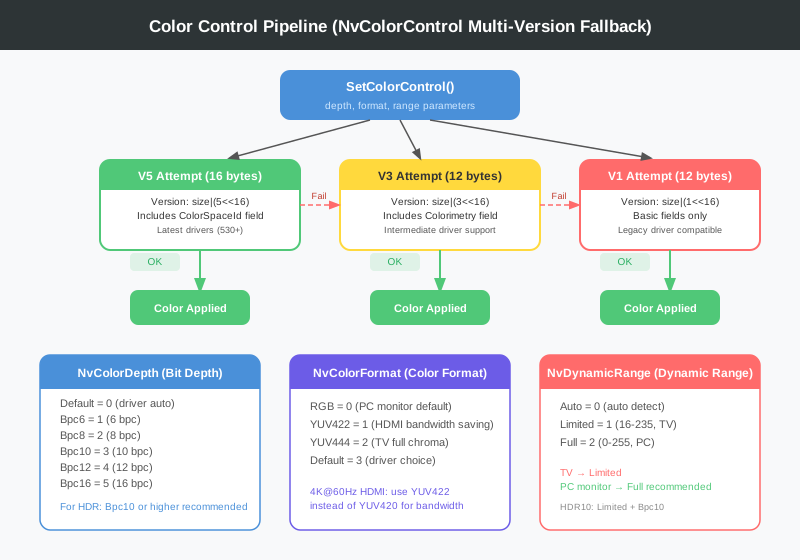
NVAPI’s color control structs vary by driver version. Three versions exist — V1, V3, and V5 — and the code tries them in order from newest to oldest, falling back to the previous version on an IncompatibleStructVersion error.
V3 and V1 share the same memory layout. The only practical difference is the version number in the Version field. Even with an identical struct, the driver handles it differently based on that version code.
publicstatic NvStatus SetColorControl(uint displayId, NvColorDepth depth, NvColorFormat format, NvDynamicRange range){ NvStatus status;// Try V5 (latest drivers)var v5 = NvColorControlV5.CreateSet(depth, format, range); status = NvApiWrapper.DISP_ColorControlV5(displayId,ref v5);if(status == NvStatus.OK)return status;if(status != NvStatus.IncompatibleStructVersion){ Logger.Error($"ColorControl v5 error: {NvApiWrapper.GetErrorMessage(status)}");return status;}// Try V3var v3 = NvColorControlV3.CreateSet(depth, format, range); status = NvApiWrapper.DISP_ColorControlV3(displayId,ref v3);if(status == NvStatus.OK)return status;if(status != NvStatus.IncompatibleStructVersion){ Logger.Error($"ColorControl v3 error: {NvApiWrapper.GetErrorMessage(status)}");return status;}// Try V1 (last resort for old drivers)var v1 = NvColorControlV1.CreateSet(depth, format, range); status = NvApiWrapper.DISP_ColorControlV1(displayId,ref v1);if(status == NvStatus.OK)return status; Logger.Error($"All ColorControl versions failed: {NvApiWrapper.GetErrorMessage(status)}");return status;}
The code only advances to the next version on IncompatibleStructVersion (-9). Any other error — such as InvalidArgument or NotSupported — returns immediately. Silently swallowing all errors hides the real problem.
privatevoid BtnRemoveOverride_Click(object sender, EventArgs e){var status = NvEdid.RemoveEDIDOverride(display.GpuHandle, display.OutputId);if(status == NvStatus.OK) MessageBox.Show("EDID override removed. Reverting to the monitor's original EDID.");}
Passing empty data to NvAPI_GPU_SetEDID or calling a dedicated removal function causes the driver to revert to the original EDID.
If the EDID exceeds 256 bytes (rare, but it happens), you need to call the function multiple times while incrementing Offset. I initially didn’t know this and always read only 128 bytes, missing the CTA-861 extension block entirely.
V1 and V3 have identical memory layouts. At first I couldn’t understand why two versions existed. NVAPI uses the version number in the Version field to determine which feature set the driver supports. Even with the same struct, the driver handles different version numbers differently.
In the initial implementation of SetDetailedTiming, I miscalculated the byte that combines the upper bits of H/V (offsets 4 and 7). I was doing HActive >> 4, which brought down all the lower bits too. The correct code is (HActive >> 4) & 0xF0 — only the upper 4 bits should be preserved.
The WriteEDID call itself succeeds, but not all changes take effect immediately. In particular, changes to the monitor name or HDR flags often require a driver restart or a full system reboot. Displaying a clear guidance message in the UI is important.
NvGpuController is now complete across five installments. Looking back, the part that consumed the most time was — somewhat surprisingly — interpreting NVAPI documentation. NVAPI has sparse official documentation, struct definitions are scattered across header files, and the differences between versions are often impossible to know without actually trying them.
What went well:
The fallback chain pattern — the V5 → V3 → V1 color control fallback is a robust design that works regardless of driver version.
EdidEditor’s automatic checksum — since every Set* method updates the checksum automatically, users always have valid data even without knowing EDID’s internal structure.
Limited mode — enabling EDID file editing without NVAPI was a practical choice that paid off.
What could be better:
Real-time hex editing — the current flow updates the hex view after field edits, but editing hex directly doesn’t update the fields. Bidirectional synchronization is needed.
CTA-861 extension block writing — reading is complete, but writing (particularly HDR metadata and adding VIC codes) is not yet implemented.
Tree view interaction — selecting a tree node should highlight the corresponding byte in the hex editor, but TreeEdid_AfterSelect is currently a no-op.
Future improvements:
CTA-861 extension block editing (HDR support, audio format declarations)
Bidirectional sync between hex editor and edit form
EDID version comparison (diff view between original and edited)
Integration with a known monitor database (Monitorinfo.net API, etc.)
Command-line mode (scripting and automation support)
NvGpuController covers many facets of low-level hardware control — from P/Invoke bindings for NVAPI to EDID bit packing to multi-version fallbacks. Working with a GPU directly from C# and WinForms turned out to be far more interesting than expected, and the project gave me a concrete understanding of what data actually flows between a monitor and a GPU.
The source code is the result of building incrementally throughout this series. If you’re working on a similar project, I hope the EDID bit packing details and the NVAPI Version field packing rule in particular prove useful as a reference.
NVIDIA GPU Controller Dev Log 2026 -
This article is part of a series.