Building an NVIDIA GPU Controller (1) — NVAPI Initialization and Project Architecture

·2643 words·13 mins· loading · loading ·
Author
Plus
Table of Contents
NVIDIA GPU Controller Dev Log 2026 - This article is part of a series.
Part 1: This Article

The idea of controlling an NVIDIA GPU programmatically had been sitting in the back of my mind for a while. Reading and writing monitor EDID directly, injecting custom resolutions, changing color space settings with a single line of code — I needed a tool that could push settings directly to the GPU on my own terms, without relying on GeForce Experience or the NVIDIA Control Panel.

The result is NvGpuController — an NVIDIA GPU control application built with C# WinForms (.NET 4.7.2). This series documents the process of building it from scratch. Part 1 covers why I chose NVAPI, how the project is structured, and how I bridged NVAPI’s unusual initialization mechanism into C# via P/Invoke.

Why NVAPI
#

There are a handful of public APIs for controlling NVIDIA GPUs.

  • DXGI / D3D API — Can enumerate display adapters and set display modes, but no support for reading/writing EDID or injecting custom timings.
  • Windows CCD API (SetDisplayConfig) — Handles resolution and refresh rate changes, but fine-grained control over custom timings is limited.
  • NVAPI — NVIDIA’s proprietary SDK. Covers everything: physical GPU info, EDID read/write, custom resolution injection, and color space control. The catch: Windows-only and NVIDIA-only.

Since the requirements were specifically “NVIDIA GPU + EDID + custom timings,” NVAPI was the only real option.

What Makes NVAPI Unusual
#

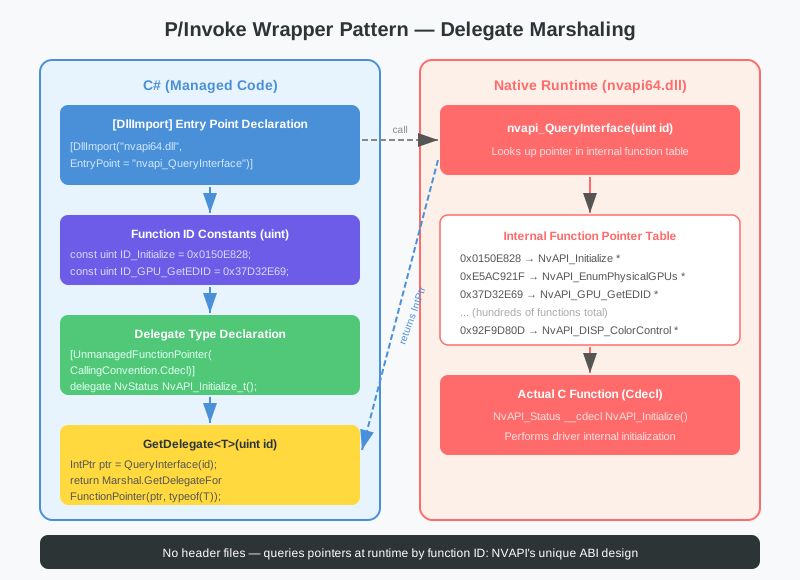
NVAPI doesn’t follow the typical Win32 API or COM interface model. The header files (.h) are publicly available, but the actual function symbols are not exported from the DLL. Instead, there is exactly one exported function — nvapi_QueryInterface — and every other function is obtained by passing a 32-bit integer ID to that QueryInterface to retrieve a function pointer.

1
2
3
nvapi64.dll exports:
  nvapi_QueryInterface(uint functionId) -> void*
  (nothing else)

This design lets NVIDIA swap out function implementations between driver updates without breaking the ABI. From the C# side, though, it means the usual [DllImport] approach won’t work — you need a different strategy.

Project Architecture
#

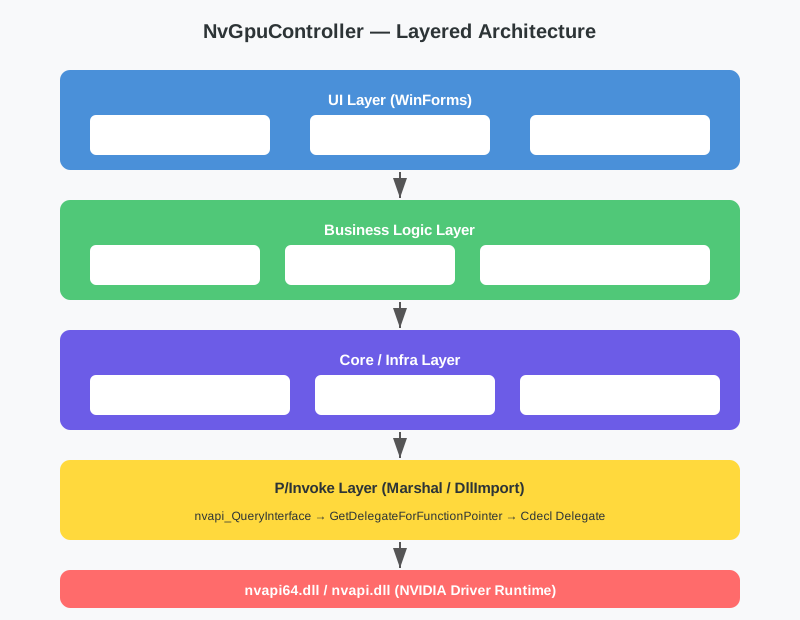
Full layered architecture

NvGpuController is organized into four layers.

Layer Namespace Responsibility
UI NvGpuController.UI WinForms screens, user input handling
Business Logic NvGpuController GPU/EDID/custom resolution control flow
Core / Infrastructure NvGpuController.Core Logger, shared utilities
NVAPI Wrapper NvGpuController.NVAPI P/Invoke, type definitions, marshaling

The UI only knows about the business logic layer; the business logic layer only calls into the NVAPI wrapper. The UI never touches NvApiWrapper directly.

Directory Structure
#

 1
 2
 3
 4
 5
 6
 7
 8
 9
10
11
NvGpuController/
├── Core/
│   └── Logger.cs          # Global logger
├── EDID/                  # EDID parsing (covered in Part 2)
├── NVAPI/
│   ├── NvApiTypes.cs      # Struct and enum definitions
│   └── NvApiWrapper.cs    # P/Invoke wrapper (the core)
├── UI/
│   └── MainForm.cs        # Main window
├── Program.cs             # Entry point, exception handling
└── NvGpuController.csproj

Logger — Minimal but Sufficient Diagnostics
#

When working with NVAPI, the most important thing is being able to track which function returned which status code. Logger is a thread-safe static logger designed for exactly that.

 1
 2
 3
 4
 5
 6
 7
 8
 9
10
11
12
13
14
15
16
17
18
19
20
21
22
23
24
25
26
27
// Core/Logger.cs
public static class Logger
{
    public static event Action<string> OnLog;

    private static readonly ConcurrentQueue<string> _logBuffer
        = new ConcurrentQueue<string>();

    public static void Log(string message)
    {
        string entry = $"[{DateTime.Now:HH:mm:ss.fff}] {message}";
        _logBuffer.Enqueue(entry);
        OnLog?.Invoke(entry);
    }

    public static void Info(string message)  => Log($"[INFO] {message}");
    public static void Error(string message) => Log($"[ERROR] {message}");
    public static void Warn(string message)  => Log($"[WARN] {message}");

    public static void NvApiCall(string funcName, int status)
    {
        string level = status == 0 ? "OK" : $"FAIL(0x{status:X})";
        Log($"[NVAPI] {funcName} -> {level}");
    }

    public static string[] GetAllLogs() => _logBuffer.ToArray();
}

The key piece is NvApiCall. It takes the NVAPI function name and the returned NvStatus integer, and records success or failure in a single line. On failure, the error code is printed in hex so it’s easy to cross-reference against the NVAPI documentation.

ConcurrentQueue is used because WinForms background threads — for example, GPU polling inside Task.Run — also need to write logs safely. The OnLog event lets the UI’s log viewer receive and display messages in real time.

Program.cs — The Exception Safety Net
#

In a WinForms app, P/Invoke code that passes a bad pointer or incorrectly sized struct can throw AccessViolationException or SEHException. If either hits the UI thread unhandled, the app simply dies.

 1
 2
 3
 4
 5
 6
 7
 8
 9
10
11
12
13
14
15
16
17
18
19
20
[STAThread]
static void Main()
{
    Application.EnableVisualStyles();
    Application.SetCompatibleTextRenderingDefault(false);

    Application.ThreadException += Application_ThreadException;
    AppDomain.CurrentDomain.UnhandledException += CurrentDomain_UnhandledException;
    Application.SetUnhandledExceptionMode(UnhandledExceptionMode.CatchException);

    Application.Run(new UI.MainForm());
}

private static void Application_ThreadException(object sender, ThreadExceptionEventArgs e)
{
    Logger.Error($"Unhandled UI exception: {e.Exception.Message}");
    MessageBox.Show(
        $"An error occurred:\n\n{e.Exception.Message}\n\nThe application will try to continue.",
        "Error", MessageBoxButtons.OK, MessageBoxIcon.Error);
}

Application.ThreadException catches exceptions on the UI thread; AppDomain.CurrentDomain.UnhandledException catches those on background threads. Both paths log to Logger, show a message box, and let the app keep running when the error isn’t fatal.

NvApiTypes.cs — Mapping C Structs to C#
#

NVAPI is C-based. To use it from C#, every C struct must be mapped precisely using [StructLayout] attributes. Even a small discrepancy in memory layout will cause the driver to read garbage data, destabilizing the system.

The NvStatus Enum
#

 1
 2
 3
 4
 5
 6
 7
 8
 9
10
11
12
13
14
15
16
public enum NvStatus : int
{
    OK                      = 0,
    Error                   = -1,
    LibraryNotFound         = -2,
    NoImplementation        = -3,
    ApiNotInitialized       = -4,
    InvalidArgument         = -5,
    NvidiaDeviceNotFound    = -6,
    EndEnumeration          = -7,
    InvalidHandle           = -8,
    IncompatibleStructVersion = -9,
    // ...
    ExpectedPhysicalGpuHandle = -101,
    ExpectedDisplayHandle     = -102,
}

NvStatus is declared as int. NVAPI functions return 0 on success and a negative value on failure. EndEnumeration(-7) is a signal that enumeration has completed — it’s not an error, it’s a loop termination condition.

The Struct Versioning Pattern
#

Most NVAPI structs have a Version field in the first 4 bytes. This field encodes both the struct size and the API version number, and it must be set correctly for the driver to interpret the struct properly.

 1
 2
 3
 4
 5
 6
 7
 8
 9
10
11
12
13
14
15
16
17
[StructLayout(LayoutKind.Sequential)]
public struct NvGpuThermalSettings
{
    public uint Version;
    public uint Count;
    [MarshalAs(UnmanagedType.ByValArray, SizeConst = 3)]
    public NvThermalSensor[] Sensors;

    public static NvGpuThermalSettings Create()
    {
        var s = new NvGpuThermalSettings();
        // Lower 16 bits: struct size, upper 16 bits: API version (v2)
        s.Version = (uint)(Marshal.SizeOf(typeof(NvGpuThermalSettings)) | (2 << 16));
        s.Sensors = new NvThermalSensor[3];
        return s;
    }
}

The pattern is: Version = (size) | (apiVersion << 16). This encoding is used consistently across all NVAPI structs. Providing a static Create() factory method prevents callers from making version calculation mistakes.

NvEdidV3 — Struct for Reading and Writing EDID
#

 1
 2
 3
 4
 5
 6
 7
 8
 9
10
11
12
13
14
15
16
17
18
[StructLayout(LayoutKind.Sequential)]
public struct NvEdidV3
{
    public uint Version;
    [MarshalAs(UnmanagedType.ByValArray, SizeConst = 256)]
    public byte[] EdidData;   // EDID byte array (up to 256 bytes)
    public uint EdidSize;     // Actual size of the EDID data
    public uint EdidId;       // Output ID (set automatically on read)
    public uint Offset;       // Offset for multi-block EDIDs

    public static NvEdidV3 Create()
    {
        var e = new NvEdidV3();
        e.Version = (uint)(Marshal.SizeOf(typeof(NvEdidV3)) | (3 << 16));
        e.EdidData = new byte[256];
        return e;
    }
}

NvColorControlV5 — Explicit Layout
#

The color control struct uses [StructLayout(LayoutKind.Explicit)] to specify each field’s offset in bytes. Compiler padding can’t be trusted here.

 1
 2
 3
 4
 5
 6
 7
 8
 9
10
11
12
13
14
[StructLayout(LayoutKind.Explicit, Size = 16)]
public struct NvColorControlV5
{
    [FieldOffset(0)]  public uint Version;         // 4 bytes
    [FieldOffset(4)]  public ushort Size;           // 2 bytes
    [FieldOffset(6)]  public NvColorCmd Cmd;        // 1 byte
    [FieldOffset(7)]  public NvColorFormat ColorFormat; // 1 byte
    [FieldOffset(8)]  public byte Colorimetry;
    [FieldOffset(9)]  public NvDynamicRange DynamicRange;
    [FieldOffset(10)] public NvColorDepth ColorDepth;
    [FieldOffset(11)] public NvColorSelectionPolicy SelectionPolicy;
    [FieldOffset(12)] public byte ColorSpaceId;
    // Bytes 13-15: padding (Size fixed at 16)
}

Depending on the driver version, support may require V1 (12 bytes), V3 (12 bytes), or V5 (16 bytes). Each is defined as a separate struct, and the appropriate one is selected at runtime.

NvApiWrapper.cs — The P/Invoke Core
#

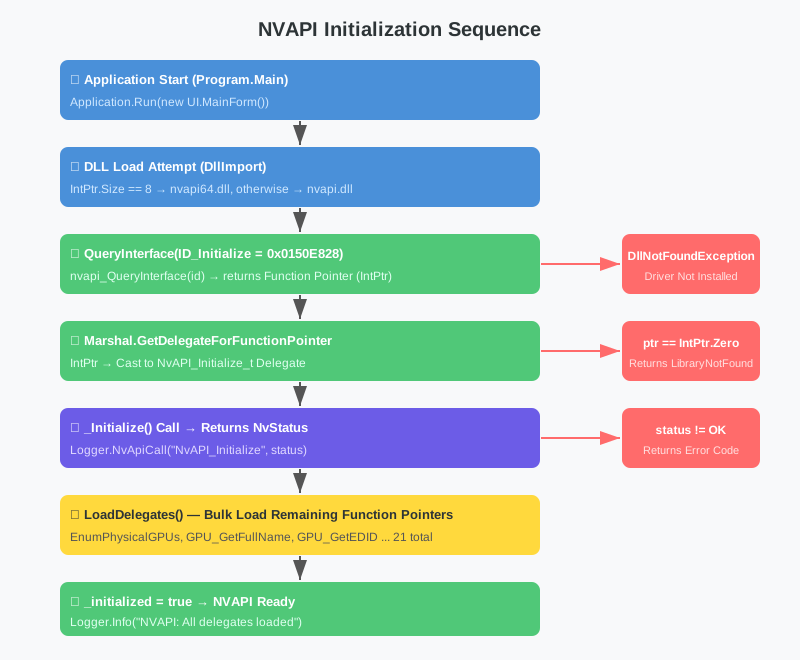
Here’s where things get interesting. Let’s walk through NVAPI initialization from C#, step by step.

NVAPI initialization sequence

Step 1: DllImport for nvapi_QueryInterface
#

 1
 2
 3
 4
 5
 6
 7
 8
 9
10
11
12
13
14
15
16
17
18
[DllImport("nvapi64.dll",
    EntryPoint = "nvapi_QueryInterface",
    CallingConvention = CallingConvention.Cdecl)]
private static extern IntPtr NvAPI64_QueryInterface(uint id);

[DllImport("nvapi.dll",
    EntryPoint = "nvapi_QueryInterface",
    CallingConvention = CallingConvention.Cdecl)]
private static extern IntPtr NvAPI32_QueryInterface(uint id);

private static bool _is64Bit = IntPtr.Size == 8;

private static IntPtr QueryInterface(uint id)
{
    return _is64Bit
        ? NvAPI64_QueryInterface(id)
        : NvAPI32_QueryInterface(id);
}

Different DLLs are called depending on whether the process is 64-bit or 32-bit. IntPtr.Size == 8 means 64-bit. CallingConvention.Cdecl is required because NVAPI uses the C calling convention.

Step 2: Defining Function ID Constants
#

Every NVAPI function has a unique 32-bit ID. These values come from the NVAPI SDK’s public header files.

 1
 2
 3
 4
 5
 6
 7
 8
 9
10
11
// Key function IDs
private const uint ID_Initialize           = 0x0150E828;
private const uint ID_Unload               = 0xD22BDD7E;
private const uint ID_GetErrorMessage      = 0x6C2D048C;
private const uint ID_EnumPhysicalGPUs     = 0xE5AC921F;
private const uint ID_GPU_GetFullName      = 0xCEEE8E9F;
private const uint ID_GPU_GetEDID          = 0x37D32E69;
private const uint ID_GPU_SetEDID          = 0xE83D6456;
private const uint ID_GPU_GetThermalSettings = 0xE3640A56;
private const uint ID_DISP_ColorControl    = 0x92F9D80D;
// ... 21 total

These IDs are stable across driver versions — that’s NVIDIA’s compatibility guarantee.

Step 3: Declaring Delegate Types
#

P/Invoke wrapper pattern

Each NVAPI function’s signature is declared as a C# delegate. The [UnmanagedFunctionPointer(CallingConvention.Cdecl)] attribute is required.

 1
 2
 3
 4
 5
 6
 7
 8
 9
10
11
12
13
14
15
[UnmanagedFunctionPointer(CallingConvention.Cdecl)]
private delegate NvStatus NvAPI_Initialize_t();

[UnmanagedFunctionPointer(CallingConvention.Cdecl)]
private delegate NvStatus NvAPI_EnumPhysicalGPUs_t(
    [Out] NvPhysicalGpuHandle[] handles, out uint count);

[UnmanagedFunctionPointer(CallingConvention.Cdecl)]
private delegate NvStatus NvAPI_GPU_GetEDID_t(
    NvPhysicalGpuHandle handle, uint outputId, ref NvEdidV3 edid);

[UnmanagedFunctionPointer(CallingConvention.Cdecl)]
private delegate NvStatus NvAPI_GPU_GetThermalSettings_t(
    NvPhysicalGpuHandle handle, int sensorIndex,
    ref NvGpuThermalSettings settings);

ref parameters correspond to C pointers — you’re passing the address of the struct, not the struct by value.

Step 4: The GetDelegate Generic Helper
#

QueryInterface calls and delegate conversion are wrapped in a single method.

1
2
3
4
5
6
7
private static T GetDelegate<T>(uint id) where T : class
{
    IntPtr ptr = QueryInterface(id);
    if (ptr == IntPtr.Zero)
        return null;
    return Marshal.GetDelegateForFunctionPointer(ptr, typeof(T)) as T;
}

If QueryInterface(id) returns IntPtr.Zero, the driver doesn’t support that function. In that case null is returned, and the wrapper methods check for null before calling, returning NvStatus.NoImplementation when the delegate isn’t available.

Step 5: Calling Initialize()
#

 1
 2
 3
 4
 5
 6
 7
 8
 9
10
11
12
13
14
15
16
17
18
19
20
21
22
23
24
25
26
27
28
29
30
31
32
33
public static NvStatus Initialize()
{
    try
    {
        _Initialize = GetDelegate<NvAPI_Initialize_t>(ID_Initialize);
        if (_Initialize == null)
        {
            Logger.Error("NVAPI: nvapi_QueryInterface failed for Initialize");
            return NvStatus.LibraryNotFound;
        }

        NvStatus status = _Initialize();
        Logger.NvApiCall("NvAPI_Initialize", (int)status);

        if (status == NvStatus.OK)
        {
            _initialized = true;
            LoadDelegates();  // Load the remaining 21 delegates
        }

        return status;
    }
    catch (DllNotFoundException)
    {
        Logger.Error("NVAPI: nvapi64.dll / nvapi.dll not found.");
        return NvStatus.LibraryNotFound;
    }
    catch (Exception ex)
    {
        Logger.Error($"NVAPI: Initialize exception: {ex.Message}");
        return NvStatus.Error;
    }
}

There are three failure paths:

  1. The DLL itself isn’t present (DllNotFoundException) — NVIDIA driver not installed
  2. QueryInterface returns null — DLL exists but doesn’t recognize the function ID
  3. _Initialize() returns something other than OK — driver-internal initialization failure

Step 6: LoadDelegates() — Bulk Loading the Remaining Function Pointers
#

 1
 2
 3
 4
 5
 6
 7
 8
 9
10
11
12
13
14
15
16
17
18
private static void LoadDelegates()
{
    _Unload = GetDelegate<NvAPI_Unload_t>(ID_Unload);
    _GetErrorMessage = GetDelegate<NvAPI_GetErrorMessage_t>(ID_GetErrorMessage);
    _EnumPhysicalGPUs = GetDelegate<NvAPI_EnumPhysicalGPUs_t>(ID_EnumPhysicalGPUs);
    _GPU_GetFullName = GetDelegate<NvAPI_GPU_GetFullName_t>(ID_GPU_GetFullName);
    _GPU_GetPhysicalFrameBufferSize = GetDelegate<NvAPI_GPU_GetPhysicalFrameBufferSize_t>(
        ID_GPU_GetPhysicalFrameBufferSize);
    _GPU_GetThermalSettings = GetDelegate<NvAPI_GPU_GetThermalSettings_t>(
        ID_GPU_GetThermalSettings);
    _GPU_GetAllClockFrequencies = GetDelegate<NvAPI_GPU_GetAllClockFrequencies_t>(
        ID_GPU_GetAllClockFrequencies);
    _GPU_GetEDID = GetDelegate<NvAPI_GPU_GetEDID_t>(ID_GPU_GetEDID);
    _GPU_SetEDID = GetDelegate<NvAPI_GPU_SetEDID_t>(ID_GPU_SetEDID);
    // ... 21 delegates total

    Logger.Info("NVAPI: All delegates loaded");
}

This is called once after a successful initialization. From that point on, all NVAPI calls go through cached delegates — no QueryInterface overhead on each call.

The Wrapper Method Pattern
#

All wrapper methods follow the same pattern.

 1
 2
 3
 4
 5
 6
 7
 8
 9
10
11
12
public static NvStatus GPU_GetFullName(
    NvPhysicalGpuHandle handle, out string name)
{
    name = "";
    if (_GPU_GetFullName == null) return NvStatus.NoImplementation;

    var str = new NvShortString();
    var status = _GPU_GetFullName(handle, ref str);
    Logger.NvApiCall("NvAPI_GPU_GetFullName", (int)status);
    name = str.ToString();
    return status;
}
  1. Initialize out parameters to defaults
  2. Null-check the delegate
  3. Call into NVAPI
  4. Log the result
  5. Convert and return

NvShortString is a struct that holds a fixed-length 64-byte ANSI string.

1
2
3
4
5
6
7
8
[StructLayout(LayoutKind.Sequential, CharSet = CharSet.Ansi)]
public struct NvShortString
{
    [MarshalAs(UnmanagedType.ByValTStr, SizeConst = 64)]
    public string Value;

    public override string ToString() => Value ?? string.Empty;
}

UnmanagedType.ByValTStr with SizeConst = 64 tells the marshaler to read a null-terminated string from a fixed 64-byte buffer.

The Special Case of Color Control
#

Most NVAPI functions accept a fixed-type struct, but NvAPI_DISP_ColorControl accepts different structs (V1/V3/V5) depending on the driver version. A fixed-type delegate won’t work here, so an IntPtr-based raw delegate is used instead.

 1
 2
 3
 4
 5
 6
 7
 8
 9
10
11
12
13
14
15
16
17
18
19
20
21
22
23
24
25
26
27
28
29
30
31
32
33
34
35
[UnmanagedFunctionPointer(CallingConvention.Cdecl)]
private delegate NvStatus NvAPI_DISP_ColorControl_Raw_t(
    uint displayId, IntPtr colorData);

public static NvStatus DISP_ColorControlV5(
    uint displayId, ref NvColorControlV5 cc)
{
    // Initialize delegate on first call
    if (_DISP_ColorControl_Raw == null)
    {
        var ptr = QueryInterface(ID_DISP_ColorControl);
        if (ptr == IntPtr.Zero) return NvStatus.NoImplementation;
        _DISP_ColorControl_Raw = Marshal.GetDelegateForFunctionPointer(
            ptr, typeof(NvAPI_DISP_ColorControl_Raw_t))
            as NvAPI_DISP_ColorControl_Raw_t;
    }

    // Copy struct to unmanaged heap -> call NVAPI -> read back result
    IntPtr mem = Marshal.AllocHGlobal(16);
    try
    {
        Marshal.StructureToPtr(cc, mem, false);
        var status = _DISP_ColorControl_Raw(displayId, mem);
        cc = (NvColorControlV5)Marshal.PtrToStructure(
            mem, typeof(NvColorControlV5));
        Logger.NvApiCall(
            $"ColorControl_v5({cc.Cmd}, depth={cc.ColorDepth})",
            (int)status);
        return status;
    }
    finally
    {
        Marshal.FreeHGlobal(mem);  // Must always free
    }
}

Marshal.AllocHGlobal allocates 16 bytes on the unmanaged heap, the struct is copied in, and the pointer is passed to NVAPI. Once NVAPI fills the buffer, Marshal.PtrToStructure reads it back as a struct. The finally block ensures the memory is always freed.

V3 (12 bytes) and V1 (12 bytes) follow the same pattern — only the size differs.

GPU Enumeration Example — Seeing the Full Flow
#

Here’s the complete flow from initialization through GPU enumeration.

 1
 2
 3
 4
 5
 6
 7
 8
 9
10
11
12
13
14
15
16
17
18
19
20
21
// Initialize
var status = NvApiWrapper.Initialize();
if (status != NvStatus.OK)
{
    Logger.Error($"NVAPI initialization failed: {status}");
    return;
}

// Enumerate GPUs
status = NvApiWrapper.EnumPhysicalGPUs(out var handles, out uint count);
if (status != NvStatus.OK) return;

for (uint i = 0; i < count; i++)
{
    NvApiWrapper.GPU_GetFullName(handles[i], out string name);
    NvApiWrapper.GPU_GetPhysicalFrameBufferSize(handles[i], out uint sizeKB);
    NvApiWrapper.GPU_GetBusId(handles[i], out uint busId);

    Console.WriteLine($"[{i}] {name}");
    Console.WriteLine($"    VRAM: {sizeKB / 1024} MB, Bus ID: {busId}");
}

Log output:

1
2
3
4
5
6
[09:00:00.123] [NVAPI] NvAPI_Initialize -> OK
[09:00:00.124] [INFO] NVAPI: All delegates loaded
[09:00:00.125] [NVAPI] NvAPI_EnumPhysicalGPUs -> OK
[09:00:00.126] [NVAPI] NvAPI_GPU_GetFullName -> OK
[09:00:00.127] [NVAPI] NvAPI_GPU_GetPhysicalFrameBufferSize -> OK
[09:00:00.128] [NVAPI] NvAPI_GPU_GetBusId -> OK

Each NVAPI call produces a log entry with the function name and result. When something goes wrong, you can see exactly which step failed.

What’s Next
#

Part 1 covered why I chose NVAPI, how the project is structured, and how to implement NVAPI’s QueryInterface-based initialization via C# P/Invoke.

Part 2 builds on this foundation to implement EDID reading and parsing. We’ll use NvAPI_GPU_GetEDID to retrieve raw bytes, then parse the EDID standard structure (Base Block, Extension Blocks) to extract the monitor name, supported resolutions, and timing information.


Series Overview

  1. NVAPI Initialization and Project Architecture (this post)
  2. EDID Reading and Parsing — Extracting Monitor Information
  3. EDID Writing — Injecting Custom EDIDs
  4. Custom Resolutions — TryCustomDisplay and Timing Calculations
  5. Color Control — RGB/YUV, Bit Depth, and HDR Settings
NVIDIA GPU Controller Dev Log 2026 - This article is part of a series.
Part 1: This Article