In the recent software development ecosystem, the use of AI code assistants has become a necessity, not an option. Various AI tools such as GitHub Copilot, Cursor, and Tabnine are not just auto-completing code; they are deeply involved across the entire development workflow, including code review, bug fixing, and even writing Git commit messages and creating Pull Requests (PRs). While this automation dramatically improves development productivity, it can also introduce unexpected security threats and degrade code quality during integration with version control systems (Git).
In particular, incidents frequently occur where AI-generated code is committed to a Git repository without verification, or sensitive information (such as API keys, authentication credentials) contained in prompt contexts is leaked to remote repositories. This is because AI tools suggest optimal code based on the given context, but they cannot guarantee that the code adheres 100% to a project’s security guidelines or architectural principles.
Therefore, from the perspective of a senior engineer with over 10 years of experience, it’s not just about adopting AI; a systematic strategy is needed for ‘how to safely integrate AI-generated artifacts into the version control system.’ This article will delve into the precautions you must know when integrating AI code assistants with Git, and provide practical, detailed tips for building a safe and efficient development environment using Git Hooks and branching strategies.
Paradigm Shift in AI Code Assistant and Git Integration #
In past development environments, developers directly wrote code, staged changes with git add, and then carefully crafted commit messages before performing git commit. However, with AI assistants deeply integrated into IDEs (Integrated Development Environments), this process has been dramatically shortened.
AI analyzes the currently open files, recently modified files, and even the state of Git’s Working Tree in real-time to understand the context. This enables the automation of the following tasks:
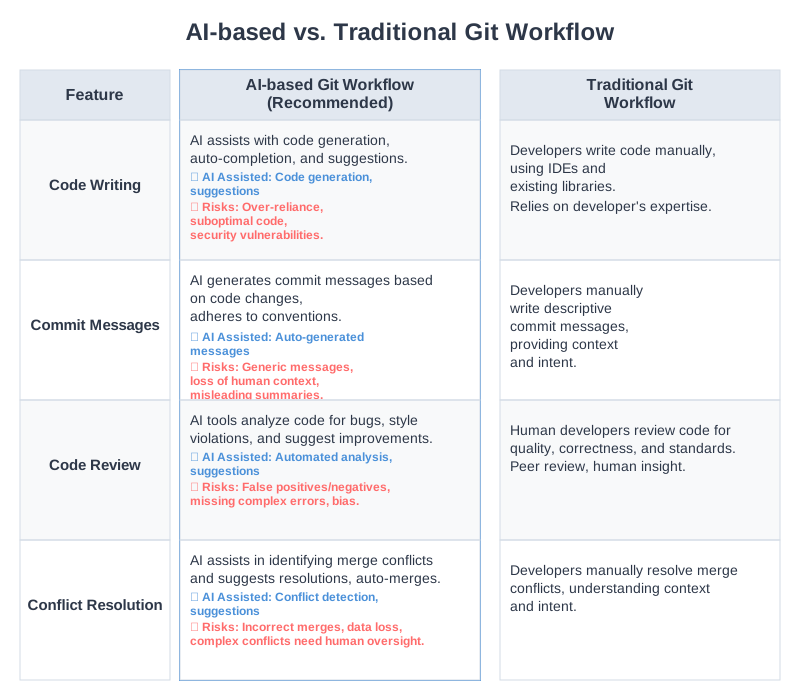
| Category | Traditional Git Workflow | AI-based Git Workflow | Key Differences & Risks |
|---|---|---|---|
| Code Writing | Developer types and structures logic directly | AI generates entire blocks based on comments or function names | Risk of incorrect logic insertion due to AI hallucination |
| Commit Messages | Manually review change history and write | AI analyzes git diff to automatically generate commit messages |
Missing project conventions and generation of meaningless mechanical messages |
| Code Review | Peer developer reads PR and comments | AI summarizes PR and points out potential bugs | Occurrence of false positives due to lack of domain knowledge |
| Conflict Resolution | Manually resolve conflict markers (<<<<<<<) |
AI analyzes conflict causes and suggests merge code | Risk of regression of existing features due to incorrect merge |
While these changes accelerate development, they have a critical drawback: they reduce the opportunity for ‘developer intent’ to intervene. Before AI-suggested code is permanently recorded in Git history, safeguards (Guardrails) are absolutely necessary to control and verify it.
Key Security and Conflict Issues that May Arise During Git Integration #
When using AI assistants integrated with Git, the three core issues to be most cautious about are sensitive information leakage, intellectual property (IP) contamination, and Git history fragmentation.
1. Risk of Sensitive Information (Secrets) Leakage #
This is the most critical security threat. AI often reads the contents of .env files or configuration files in the developer’s local environment as context. If, during code auto-completion, AI suggests hardcoding a production database password or an AWS Secret Key, and the developer inadvertently accepts it by pressing Tab and then commits, it can lead to a major security incident. Once committed, Git retains the content in its history, meaning sensitive information can be exposed through past commit history even if the code is modified later.
2. License Infringement and Intellectual Property (IP) Contamination #
AI models are trained on vast amounts of open-source code. Occasionally, AI may suggest code that is directly copied from a GPL-licensed project. If this is committed to a company’s proprietary project repository, it could lead to legal disputes due to license violations. Conversely, there’s also a risk that a company’s core secure code could be sent as a prompt to AI, stored on external servers, or used as training data for other models.
3. Meaningless Commit Sprawl and History Fragmentation #
Indiscriminate use of AI commit message generation can lead to countless uninformative commits like Update index.js or Fix typo. While AI is good at summarizing ‘what’ changed, it cannot accurately know ‘why’ the change was made unless the developer provides that information. This makes bug tracking via git bisect or release note generation very difficult in the future.
Architecture and Workflow for Safe AI-Git Integration #
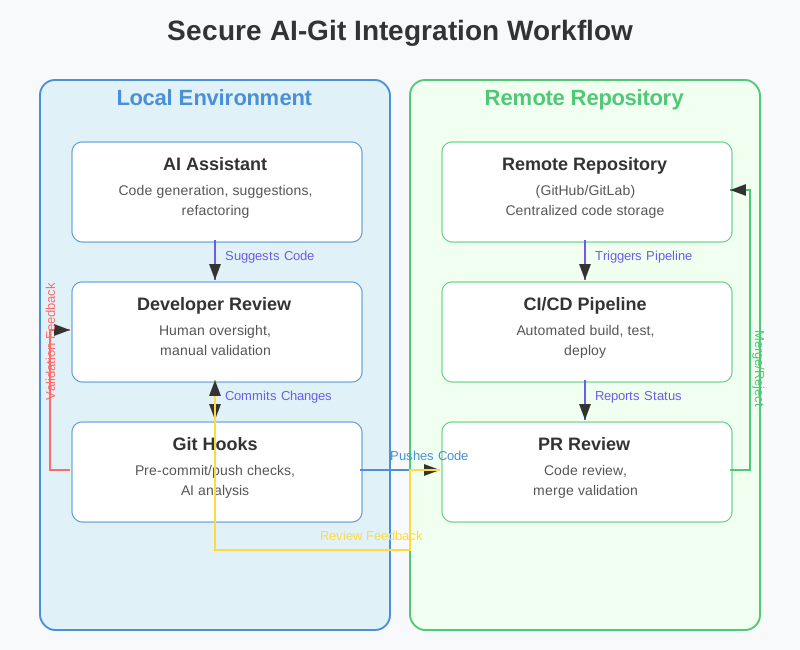
To prevent these issues, a multi-layered defense must be established before code from the local environment is pushed to a remote repository. Below is an ideal workflow concept for safe AI-Git integration.
|
|
- AI’s Proposal and Developer’s Review (1): Even if AI proposes code, the developer must review and accept the logic.
- Automated Verification via Git Hooks (2): The moment a
git commitcommand is executed, Git Hooks intervene to check for hardcoded sensitive information, lint errors, and commit message conventions within the code. - Remote Repository Transfer and CI Verification (3): Only safe code that has passed local verification is pushed to the remote repository, and a secondary verification is performed in the CI/CD pipeline.
Essential Security Settings and Git Hooks Usage #
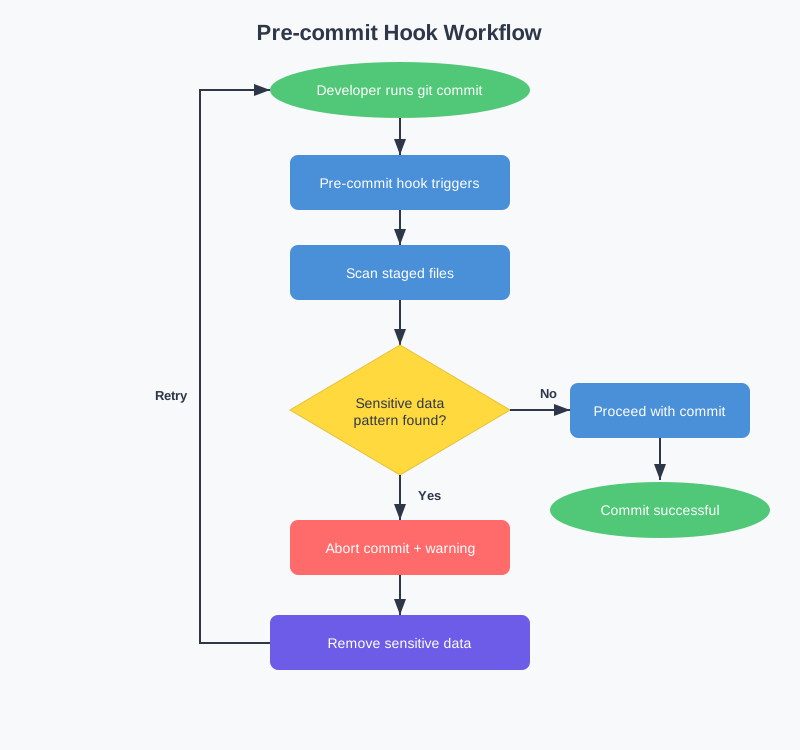
The first thing to set up to build a secure environment is local Git Hooks. Specifically, using the pre-commit hook to block sensitive information accidentally inserted by AI is key.
Blocking Sensitive Information with Pre-commit Hook #
It’s common to use open-source tools like TruffleHog or git-secrets, or the Python-based pre-commit framework. Here, we introduce a basic method of writing a shell script directly and applying it to .git/hooks/pre-commit.
Create a .git/hooks/pre-commit file in your project’s root directory and add the following code:
|
|
This script analyzes staged files every time a commit is attempted. If regular expression patterns for AWS Access Keys, GitHub Tokens, OpenAI API Keys, etc., are found, it forcibly aborts the commit. This fundamentally prevents the contents of .env files or hardcoded passwords, inadvertently generated by AI, from being recorded in Git history.
Utilizing .aignore Files (AI Context Limitation) #
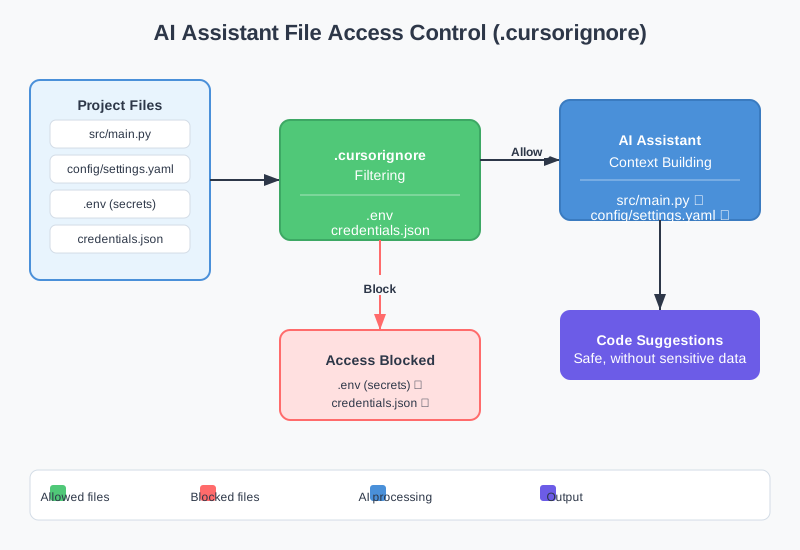
Recently, advanced AI editors (e.g., Cursor, GitHub Copilot Chat) index the entire project to improve the quality of their responses. However, this process can lead to files that should not be read being sent to AI servers. To prevent this, a configuration similar to .gitignore is needed.
For the Cursor editor, you can create a .cursorignore file in the project root to specify paths that AI should not read as context.
|
|
By setting this, AI will strictly ignore these directories and files when analyzing project code, preventing sensitive information from being leaked externally through the prompt window.
Verifying AI-Generated Commit Messages and Maintaining Conventions #
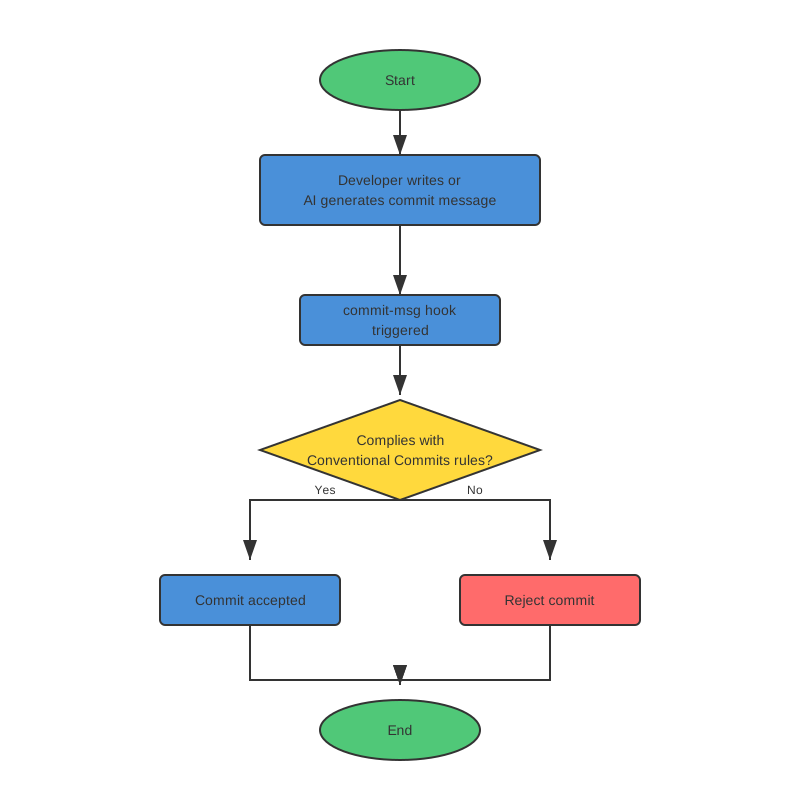
While using AI to automatically generate commit messages is very convenient, there’s a high risk of generating messages that violate a project’s ‘Conventional Commits’ rules or are out of context. To control this, two approaches should be used in parallel.
1. AI Commit Message Templating via Prompt Engineering #
Instead of simply commanding AI to “summarize these changes,” you should provide a clear System Prompt. Add rules like the following to your IDE’s custom prompt settings or the configuration file of your terminal-based AI tool.
|
|
2. Final Verification with Commit-msg Hook #
To prepare for cases where AI ignores the prompt and outputs an incorrect format, you can enforce commit message format using Git’s commit-msg hook. Apply the following script to .git/hooks/commit-msg.
|
|
By applying this hook, Git will reject commits when AI generates uninformative commit messages like Update files, thereby maintaining high quality of the history.
Branching Strategy and AI Code Review Automation #
Directly merging AI-generated code into the main branch (Main/Master) is very risky. Therefore, a thorough branch separation strategy and review process are essential in an AI collaboration environment.
Utilizing AI Experiment-Specific Branches (Feature/AI-Draft) #
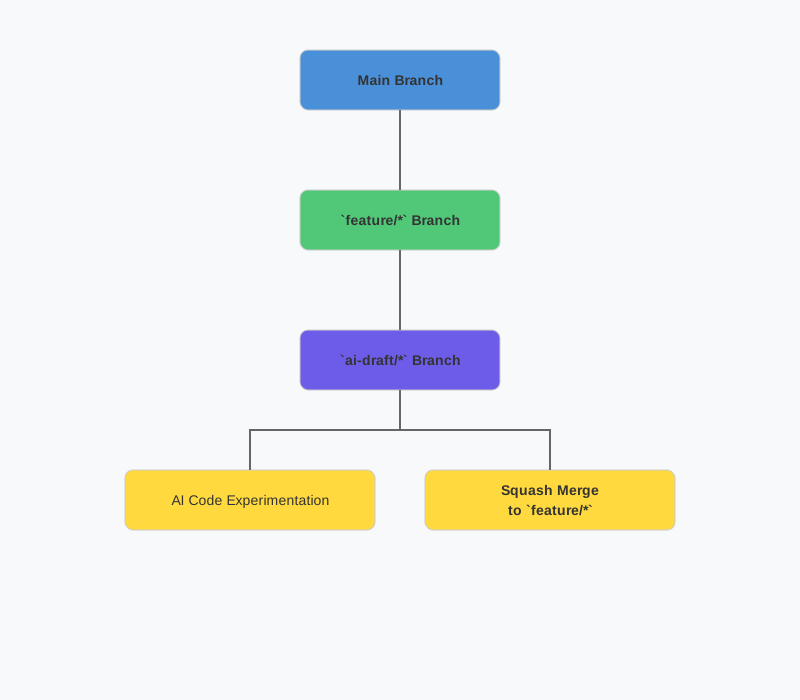
When developing new features, it’s good practice to separate code written directly by developers from code generated in large quantities by AI. For example, when having AI write a complex algorithm, create an ai-draft/login-logic branch derived from the feature/login-logic branch.
- Actively accept AI’s suggestions and freely make experimental commits on the
ai-draft/*branch. - Complete local testing to ensure the feature works correctly.
- Return to the original
feature/*branch and use thegit merge --squash ai-draft/login-logiccommand to squash the messy commit history created by AI into a single, clean merge. - During this process, the developer reviews the entire code again and makes a responsible commit under their own name.
Precautions for AI-based Pull Request Reviews #
More and more teams are integrating AI reviewer bots (e.g., CodiumAI, PR-Agent) with GitHub Actions or GitLab CI. AI bots automatically analyze code and leave comments when a PR is created. Key precautions include:
- AI review is merely a supplementary tool: While AI excels at finding security vulnerabilities (e.g., SQL injection, XSS) or code smells, it does not understand business logic flaws or domain-specific requirements. A senior developer’s human review must be responsible for the final approval.
- Noise Management: If AI continuously points out minor lint warnings or stylistic differences, developer fatigue can rapidly increase. You should tune the AI review bot’s configuration file to limit the inspection level (Severity) to
Highor above, so it only comments on critical security issues or fatal bugs.
Practical Tips: Git Integration Optimization Guide by AI Assistant #
The points to consider for Git integration vary depending on the characteristics of the tools you use.
-
GitHub Copilot (IDE Integrated)
- It integrates closely with the Git tab inside the IDE. Since modifying prompts separately for automatic commit message generation can be tricky, defense via the
commit-msghook mentioned earlier is most effective. - It is recommended to use the
/explaincommand inCopilot Chatto have it describe the Git Diff, and then for the developer to refine the commit message based on that explanation.
- It integrates closely with the Git tab inside the IDE. Since modifying prompts separately for automatic commit message generation can be tricky, defense via the
-
Cursor Editor (Editor-based)
- The Git terminal and editor are integrated, offering powerful features. You can even have AI write terminal commands via
Cmd + K(orCtrl + K). - Caution: AI might suggest destructive commands like
git push --forcein the terminal. Before executing any terminal command, always visually verify the command and make it a habit to press Enter only after confirmation.
- The Git terminal and editor are integrated, offering powerful features. You can even have AI write terminal commands via
-
Aider, ShellGPT, etc. (CLI-based Tools)
- These are AI agents that directly manipulate Git repositories in a terminal environment. These tools sometimes offer an option (Auto-commit) to automatically perform
git commitwithout user permission. - Never enable the Auto-commit feature. Always use the
--no-auto-commitflag to leave code changes only in the working tree, and the developer should verify withgit diffbefore manually committing.
- These are AI agents that directly manipulate Git repositories in a terminal environment. These tools sometimes offer an option (Auto-commit) to automatically perform
Conclusion #
AI code assistants are revolutionizing the development paradigm, but when integrated with version control systems like Git, balancing ‘convenience’ and ‘safety’ is paramount. Setting up Git Hooks to prevent sensitive information leakage, utilizing .aignore for context limitation, and implementing thorough branching and review strategies are fundamental competencies for developers in the AI era. We encourage you to apply the pre-commit hook to your projects right now to build a robust defense that ensures AI-suggested code is managed safely.