Recently, AI coding assistants such as GitHub Copilot, Cursor, and Tabnine have become indispensable tools in developers’ daily lives. From writing simple boilerplate code to drafting complex algorithms, AI dramatically improves development productivity. However, uncritically accepting code suggested by AI can lead to unexpected and serious problems.
Phenomena like hallucinations calling non-existent libraries, generation of code containing security vulnerabilities, and short-sighted code suggestions that ignore the overall system architecture are factors that developers must be aware of and vigilant about. An AI coding assistant is not a ‘magic wand’ but a powerful ‘power tool’ that requires control.
This article deeply analyzes the precautions that must be taken when using AI coding assistants in practice and provides a detailed guide to effectively resolve unexpected problems that may arise. From junior to senior developers, it covers everything you need to know to truly ‘pair program’ with AI.
How AI Coding Assistants Work and Their Inherent Limitations #
To understand why AI coding assistants make mistakes, you first need to know how they generate code. Most AI coding assistants are based on Large Language Models (LLMs).
1. Working Principle: Next-Token Prediction #
AI coding assistants are fundamentally statistical models trained on vast amounts of open-source code. When a developer types code or adds comments in the editor, the AI predicts and suggests the most probable next word (token) or code block based on the current context.
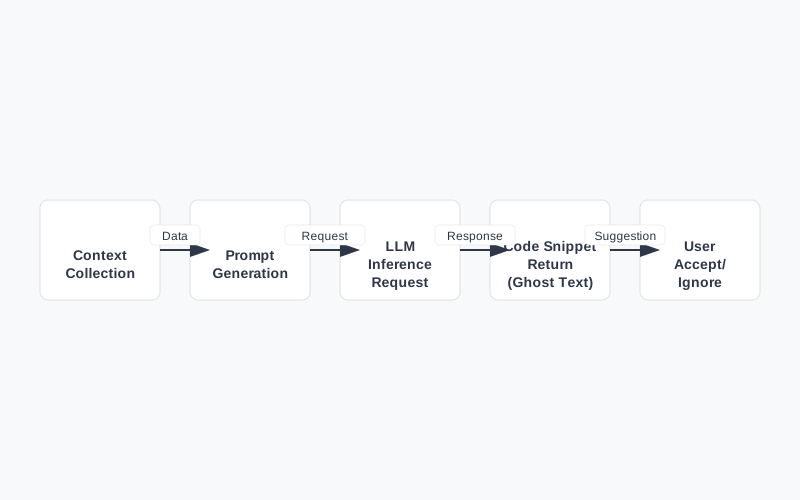
[AI Code Generation Flowchart]
- Context Collection: Gathers information such as the currently open file, code around the cursor, comments, and recently edited files.
- Prompt Construction: Transforms the collected information into a prompt format that the AI model can understand.
- Inference Request: Sends the prompt to a cloud or local LLM server to request code completion.
- Result Return and Rendering: Displays the code snippet generated by the model as ghost text in the editor.
- User Action: The developer accepts by pressing
Tabor ignores and continues typing.
2. Inherent Limitations #
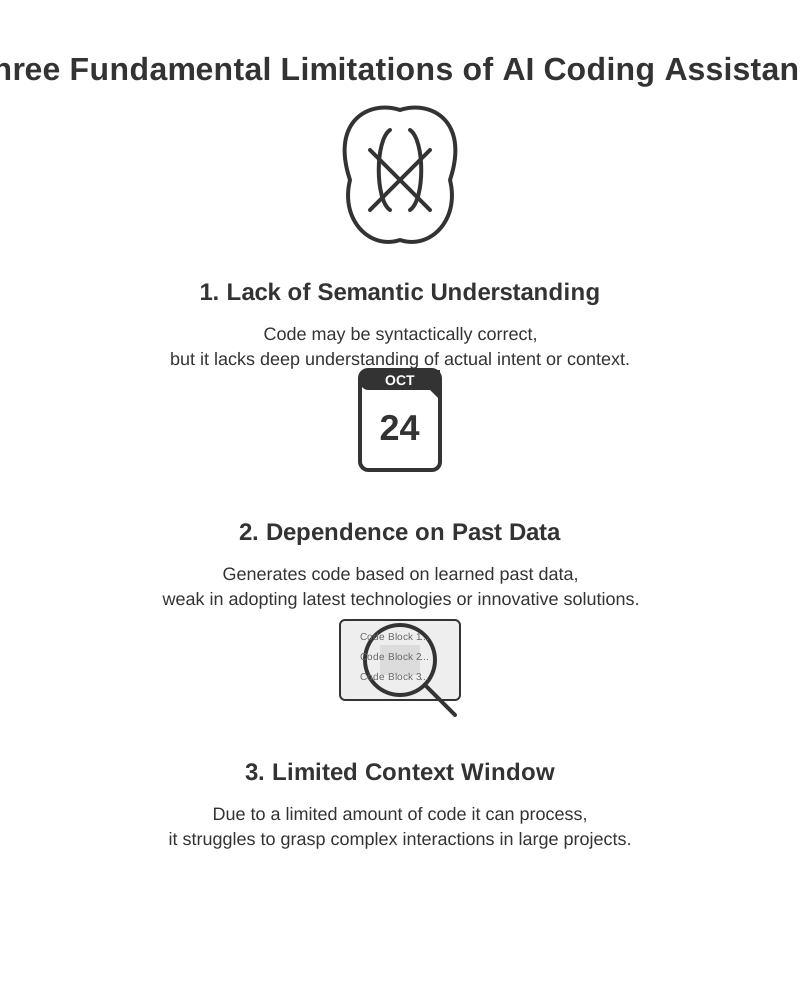
This statistical approach has the following fundamental limitations:
- Lack of Semantic Understanding: AI does not ‘understand’ how the code actually executes or what the business logic is. It merely reproduces patterns frequently seen in its training data.
- Dependence on Past Data: It may not reflect new library versions, latest security patches, or modern programming paradigms that emerged after its training data was generated.
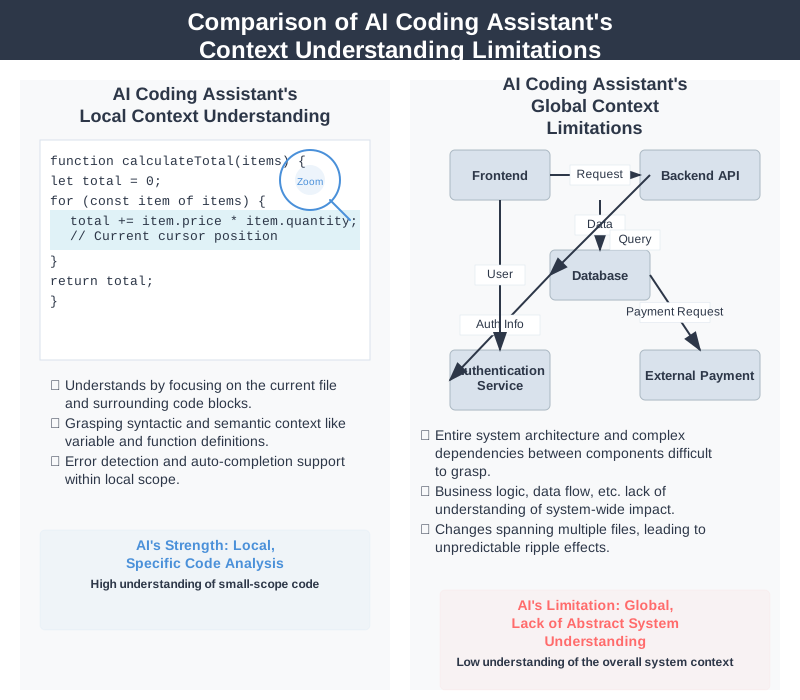
- Limited Context Window: There is a limit to the amount of code (number of tokens) it can analyze at once, making it unable to grasp the entire structure of a huge enterprise project consisting of hundreds of files.
We will examine the specific problems and precautions arising from these limitations in the next section.
Precaution 1: Hallucinations and Logical Errors #
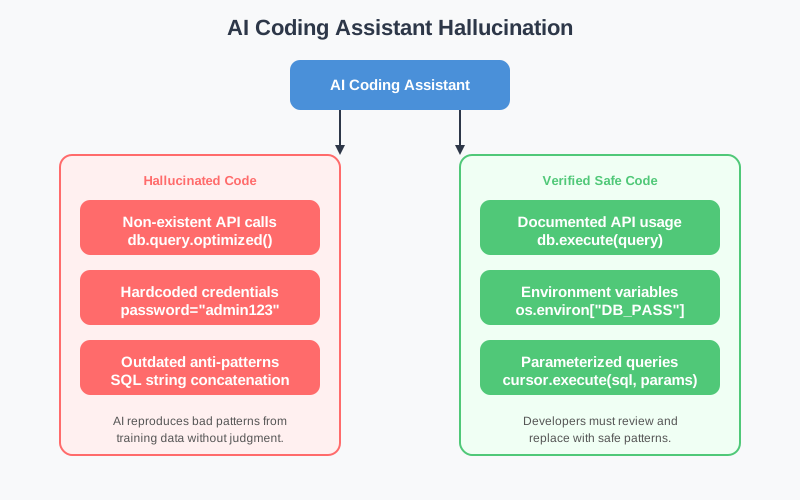
The most frequent problem encountered when using AI coding assistants is ‘hallucination’. This is the phenomenon of generating code that looks plausible but does not actually work or refers to non-existent entities.
Calling Non-Existent APIs and Libraries #
AI is very adept at inventing function names or variable names. Especially when it doesn’t fully know the internal structure of a specific library, it might mix patterns from other similar libraries to create hypothetical functions.
|
|
Looking at the code above, it calls a plausible-looking method get_magic_summary. If a developer unthinkingly accepts and executes this, an AttributeError will occur.
Subtle Logical Flaws (e.g., Off-by-one errors) #
Often, AI generates code that is syntactically perfect but does not align with the business logic. For example, an ‘Off-by-one error’ when calculating array indices, where +1 or -1 is handled incorrectly, is a common mistake made by AI.
|
|
Resolution and Prevention Guide #
- Cultivate the habit of checking official documentation: If AI suggests a method or class you haven’t seen before, you must open the official documentation for that language or framework to verify its existence and parameter correctness.
- Write Unit Tests: The most reliable way to verify the logic written by AI is to write test code. Interestingly, AI can also help write test code, but the ‘assertion criteria’ of the tests must be meticulously reviewed by the developer.
- Actively use Type Hinting: Actively using TypeScript or Python’s Type Hints allows the IDE’s static analysis tools to immediately send warnings when non-existent properties or methods are called, helping to detect hallucinations early.
Precaution 2: Security Vulnerabilities and Uncritical Acceptance of Outdated Patterns #
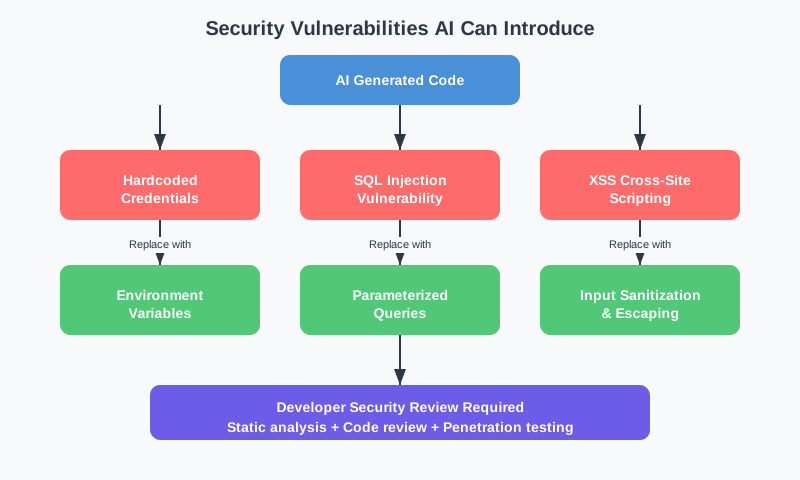
AI models are trained on vast amounts of open-source code. The problem is that this open-source code often contains countless pieces of code that are security-vulnerable or include anti-patterns that are no longer in use.
Hardcoded Credentials #
AI may often suggest patterns seen in example code, such as hardcoding API keys or passwords directly within the code.
|
|
SQL Injection and XSS Vulnerabilities #
Code that directly inserts user input into queries or HTML without validation is extremely dangerous. AI often suggests code that uses string formatting instead of parameterized queries.
|
|
Resolution and Prevention Guide #
- Introduce Security Linters: Static code analysis tools like SonarQube, ESLint security plugins, and Bandit (for Python) should be integrated into CI/CD pipelines and local development environments to automatically detect vulnerabilities.
- Adhere to Environment Variables Usage Principles: Never directly input credentials (API keys, passwords, etc.) into the code. Instead, modify the code to use
.envfiles or secret management services (e.g., AWS Secrets Manager). - Prompt for Latest Security Practices: When requesting code from AI, explicitly state security requirements. Example:
// Write a function to retrieve user information using a secure parameterized query
Precaution 3: Lack of Understanding of Overall Architecture and Context #
AI coding assistants are strong in ’local’ context, such as the currently open file or surrounding code, but are very weak in understanding ‘global’ context, such as the overall project architecture, design patterns, and dependency relationships.
Ignoring Project Conventions #
AI often generates code in a general style it has learned, ignoring team-defined naming conventions, error handling methods, and folder structures.
| Problem Type | Team Convention (Example) | AI Suggestion (Example) |
|---|---|---|
| Naming | Use camelCase for variable names |
Generate variables in snake_case |
| Error Handling | Throw custom AppError class |
Throw generic Error object or console.log handling |
| State Management | Centralized state management via Redux | Suggest using local State within components |
Generating Duplicate Code (Violation of DRY Principle) #
Even if a function is already implemented in another utility file within the project, AI may not know this and suggest implementing the same logic again in the current file. This significantly reduces code maintainability.
Resolution and Prevention Guide #
- Provide Appropriate Context (Context Feeding): You must provide hints to AI so it can understand project rules.
- Opening related files in multiple tabs in the editor increases the likelihood of AI referencing them.
- Clearly state the purpose of the file, key libraries to use, and conventions in comments at the top of the file.
- Prompt Engineering (Using Comments): Give clear instructions to AI through comments. Instead of simply “Write a function,” give specific instructions like “Write a function that imports
utils/api.jsfrom the project to fetch data.” - Importance of Code Review: Code written by AI must undergo the same rigorous code review (Pull Request review) as code written by fellow developers. A human must directly judge whether it conforms to the architecture and if there is any duplication.
Solving Unexpected Problems: Debugging and Prompt Tuning #
Here are practical techniques for resolving situations where AI generates incorrect code or insists on code that causes errors.
1. Break Down Problems into Smaller Units (Divide and Conquer) #
Requesting too large and complex a feature from AI at once (e.g., “Write the entire bulletin board CRUD API and frontend integration code”) dramatically increases the chance of failure.
[Correct Approach]
- Request database schema and model definitions.
- Request database connection logic.
- Request individual API endpoints (Create, Read, Update, Delete) separately.
- Review and test the code at each step.
2. Provide Error Messages as Feedback to AI #
If code written by AI runs and an error occurs, don’t panic. Copy the entire error message, paste it into the AI chat window (e.g., Copilot Chat), and ask for a solution.
- Bad Prompt: “The code doesn’t work. Fix it.”
- Good Prompt: “When I ran the code you wrote above, I got a
TypeError: Cannot read properties of undefined (reading 'map')error. Please modify the code to add error handling for when thedatavariable is not an array.”
3. Write ‘Pseudocode’ First #
If the developer first writes the logical flow (pseudocode) in comments, AI performs much better at filling in the code according to that flow.
|
|
Utilizing AI Coding Assistants Like a Senior Developer #
Here are best practices for leveraging AI coding assistants beyond simple ‘autocompletion’ to become true ‘productivity boosters’.
- Delegate Repetitive and Tedious Tasks: Writing regular expressions, generating mock data, simple syntax conversion between languages (e.g., converting Java objects to TypeScript interfaces), and writing verbose boilerplate code are all excellent tasks to fully entrust to AI.
- Code Explanation and Documentation: When you need to understand complex legacy code written by someone else, select the code and ask AI, “Explain what this code does line by line.” It becomes an excellent code analyzer. Also, hovering over a function and requesting comment generation will neatly create JSDoc or Docstrings.
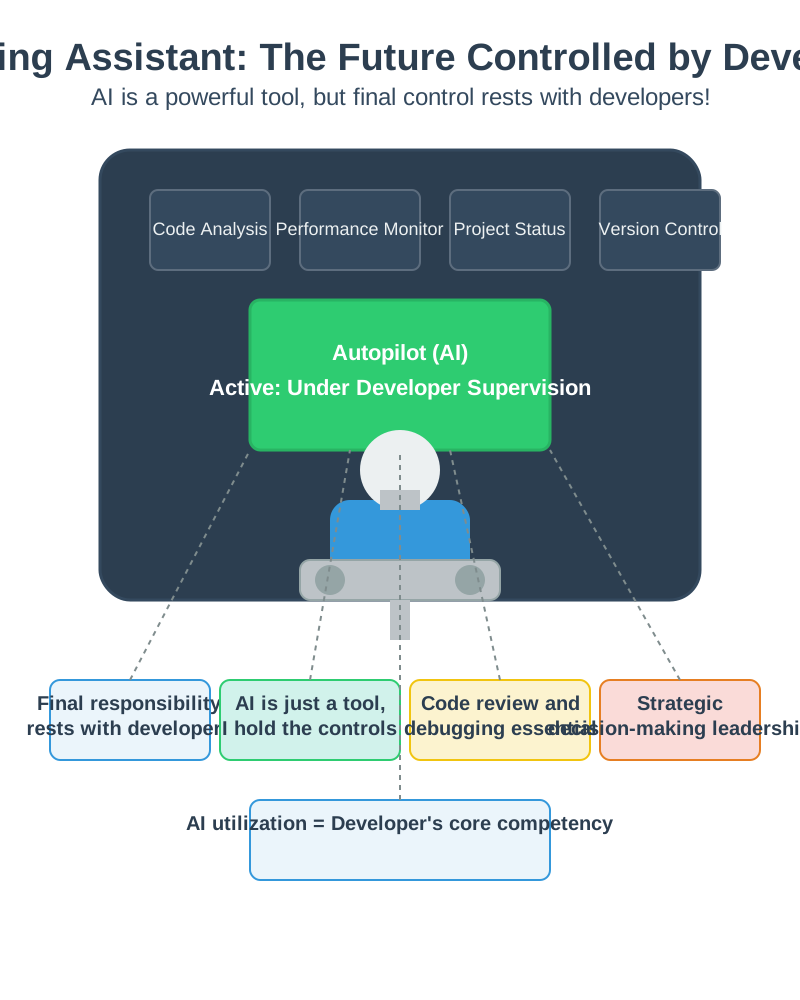
- The Developer Always Holds the Controls (Pilot in Command): Just as a pilot always monitors the instrument panel and prepares for emergencies even when the aircraft’s autopilot is on, developers must not forget that they are ultimately responsible for the code generated by AI. Strictly adhere to the principle: “Never commit code I don’t understand.”
Conclusion #
AI coding assistants like GitHub Copilot are revolutionary tools changing the paradigm of development. However, they have clear limitations: hallucinations, security vulnerabilities, and lack of context.
To use these tools safely and effectively, the developer’s inherent abilities to critically review AI-suggested code, provide clear prompts, and verify quality through testing and code reviews are more important than ever.
Ultimately, AI is merely an excellent typist that quickly types code, but the core of ‘software engineering’—deciding what structure to use and what problems to solve—still rests with the developer. Only when you understand and can control AI’s limitations will you experience overwhelming development productivity. Set appropriate guardrails for your project now and begin collaborating with AI.