A single cloud API call costs a few cents. Hundreds of calls per day, and the monthly bill becomes alarming. Add data privacy concerns, and a natural question arises: “Can I just run the LLM on my MacBook?”
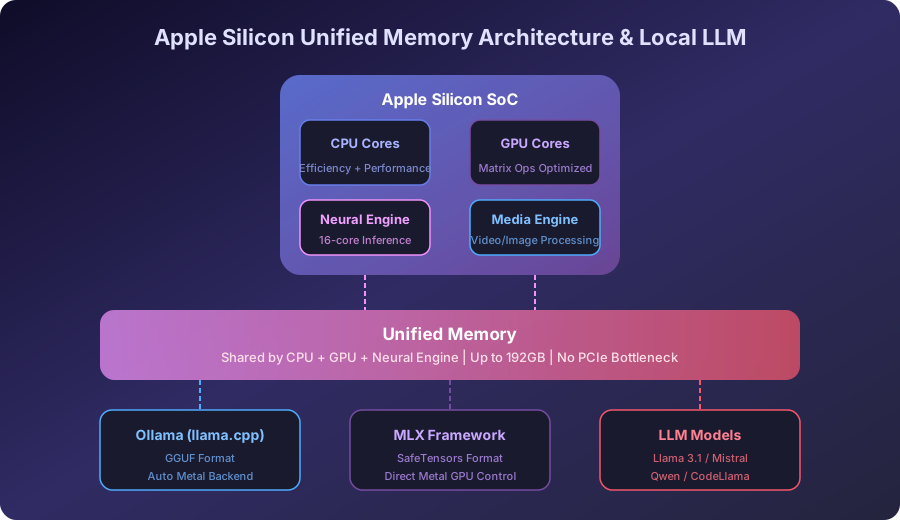
The answer is a resounding yes. Apple Silicon’s Unified Memory Architecture (UMA) is a game changer for local LLM inference. Because the CPU and GPU share the same memory pool, there’s no need to split models across VRAM boundaries or deal with PCIe offloading bottlenecks — you can load massive models directly into unified memory.
This guide covers how to maximize local LLM performance on Apple Silicon Macs using Ollama and MLX, complete with benchmark data and production-ready integration patterns.
Target audience: Developers, ML engineers, and AI product builders who want to run LLMs locally on macOS.
Why Apple Silicon Excels at Local LLM Inference #
The Decisive Advantage of Unified Memory #
In traditional x86 + discrete GPU setups, system RAM and GPU VRAM are physically separated. Loading a 70B parameter model requires at least 40GB of VRAM, but even the RTX 4090 caps at 24GB. This forces model sharding across CPU/GPU, with PCIe bus transfers creating severe bottlenecks.
Apple Silicon solves this fundamentally:
| Feature | x86 + NVIDIA GPU | Apple Silicon |
|---|---|---|
| Memory Architecture | RAM + VRAM separated | Unified Memory (shared) |
| Maximum Memory | 24GB VRAM (RTX 4090) | 192GB (M4 Ultra) |
| Memory Bandwidth | ~1TB/s (HBM3e) | 800GB/s (M4 Ultra) |
| Model Loading | Offloading when VRAM exceeded | Direct load into unified memory |
| Power Consumption | 350W+ | 30–60W |
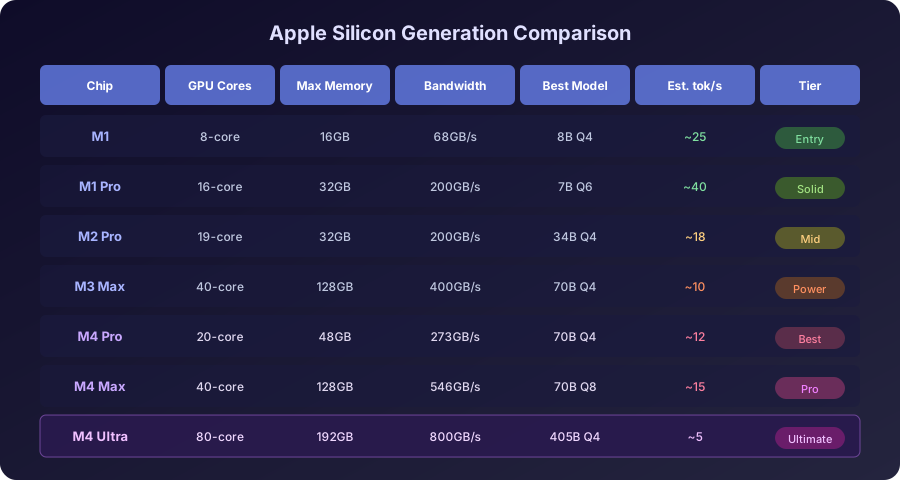
With an M4 Pro (48GB), you can load a Q4-quantized 70B model entirely in memory. The M4 Max (128GB) handles up to 120B-class models at Q4_K_M quantization on a single device.
Neural Engine and GPU Core Division of Labor #
Apple Silicon’s GPU cores are optimized for matrix multiplication, efficiently handling transformer attention computations. The 16-core Neural Engine contributes to inference acceleration, though most current LLM frameworks primarily leverage GPU cores. MLX controls these GPU cores directly through the Metal API to extract maximum performance.
Ollama: Run a Local LLM in 5 Minutes #
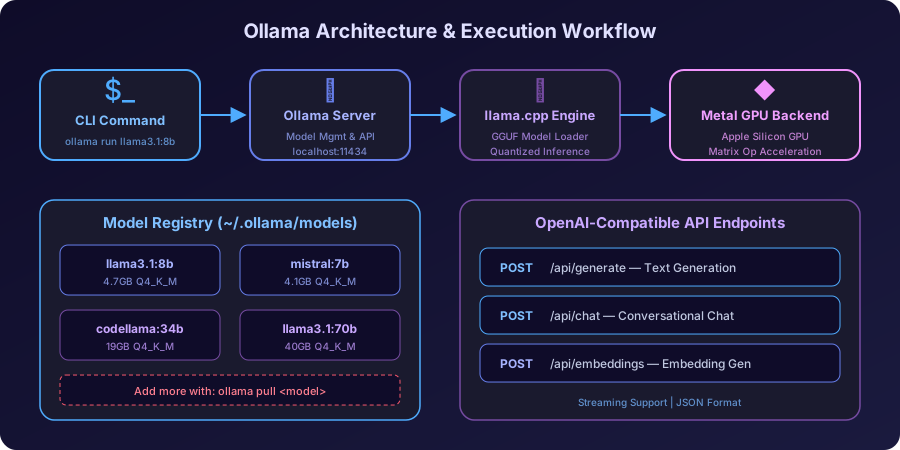
Ollama is the de facto standard for local LLM execution. With Docker-like CLI simplicity, you can download and run models instantly. Under the hood, it compiles llama.cpp with the Metal backend to automatically leverage Apple Silicon GPUs.
Installation and First Run #
|
|
Three commands — that’s all it takes to run an 8-billion parameter model locally. Ollama automatically detects available system memory and selects the optimal quantization level.
Recommended Models and Memory Requirements #
| Model | Parameters | Q4_K_M Size | Min Memory | Use Case |
|---|---|---|---|---|
| Llama 3.1 8B | 8B | ~4.7GB | 8GB | General coding, summarization, chat |
| Mistral 7B | 7B | ~4.1GB | 8GB | Fast inference, strong European languages |
| CodeLlama 34B | 34B | ~19GB | 32GB | Code generation specialist |
| Llama 3.1 70B | 70B | ~40GB | 48GB | GPT-4 class reasoning quality |
| Qwen2.5 72B | 72B | ~41GB | 48GB | Multilingual, math/coding strength |
| Llama 3.1 405B | 405B | ~230GB | 256GB | Research only, M4 Ultra required |
|
|
Key Performance Tuning Tips #
|
|
Caution: Increasing the context window dramatically increases KV cache memory usage. For an 8B model, ctx 8192 requires roughly 2GB additional memory.
MLX: Apple Silicon Native ML Framework #
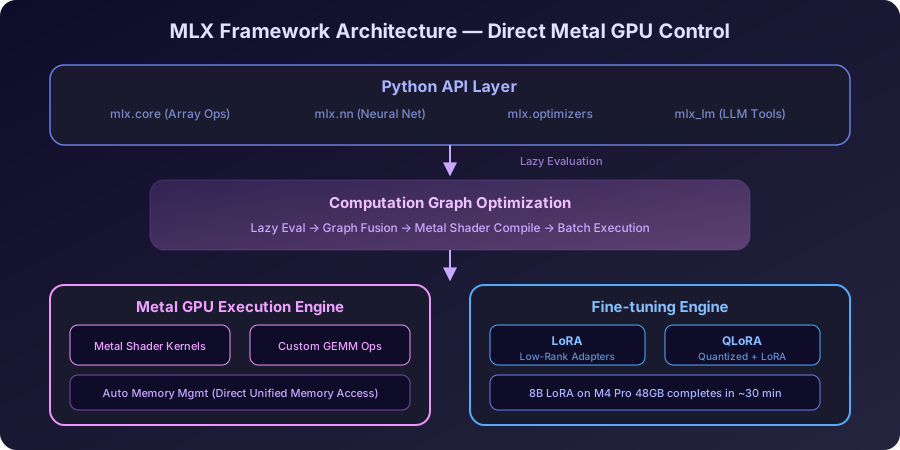
MLX is built by Apple’s machine learning research team specifically for Apple Silicon. It provides a NumPy-like API while directly leveraging the Metal GPU, delivering 1.5–3x faster inference than PyTorch on Apple Silicon.
MLX vs Ollama (llama.cpp): Key Differences #
| Aspect | Ollama (llama.cpp) | MLX |
|---|---|---|
| Backend | C/C++ + Metal | Python + Metal (Lazy Evaluation) |
| Setup Difficulty | Very easy | Moderate (Python env required) |
| Model Format | GGUF | SafeTensors (HuggingFace compatible) |
| Customization | Modelfile level | Full code-level control |
| Inference Speed (tok/s) | Fast | Faster (Metal optimized) |
| Fine-tuning | Not supported | LoRA/QLoRA supported |
| API Server | Built-in (OpenAI compatible) | Requires separate setup |
Installation and Execution #
|
|
Fine-tuning with LoRA on MLX #
MLX’s biggest differentiator is direct fine-tuning capability on Apple Silicon:
|
|
On an M4 Pro (48GB), LoRA fine-tuning of an 8B model completes in approximately 30 minutes. Customizing models with your own data without cloud GPUs is revolutionary for both privacy and cost.
Benchmarks: Ollama vs MLX Real-World Performance #
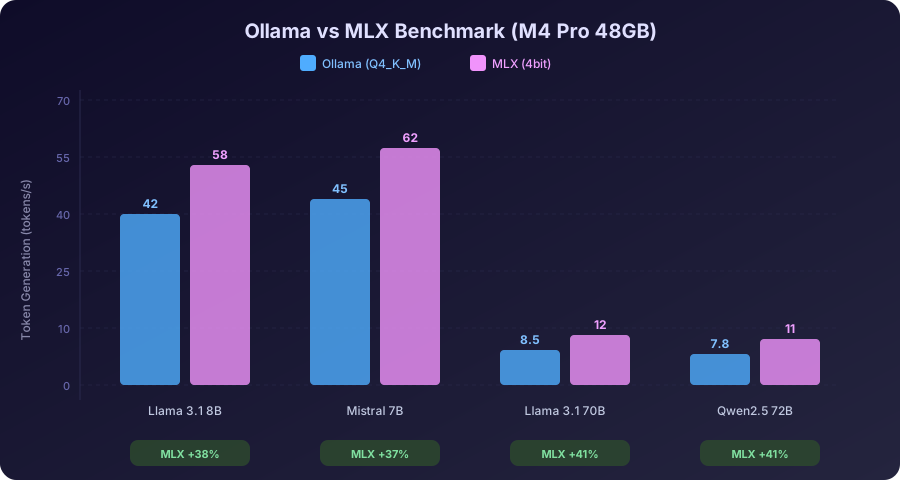
Measured on M4 Pro (48GB, 20-core GPU):
Token Generation Speed (tokens/second) #
| Model | Ollama (Q4_K_M) | MLX (4bit) | Difference |
|---|---|---|---|
| Llama 3.1 8B | 42 tok/s | 58 tok/s | MLX +38% |
| Mistral 7B | 45 tok/s | 62 tok/s | MLX +37% |
| Llama 3.1 70B | 8.5 tok/s | 12 tok/s | MLX +41% |
| Qwen2.5 72B | 7.8 tok/s | 11 tok/s | MLX +41% |
Time to First Token (TTFT) #
| Model | Ollama | MLX |
|---|---|---|
| 8B models | ~0.3s | ~0.2s |
| 70B models | ~2.1s | ~1.4s |
MLX is consistently 35–40% faster due to Metal shader optimization and Lazy Evaluation. MLX defers computation until values are actually needed, optimizes the computation graph, then executes in batch on the Metal GPU.
Practical choice: For API server use cases, choose Ollama (built-in OpenAI-compatible API). For maximum performance + fine-tuning, go with MLX.
Real-World Integration: Dev Workflow Patterns #
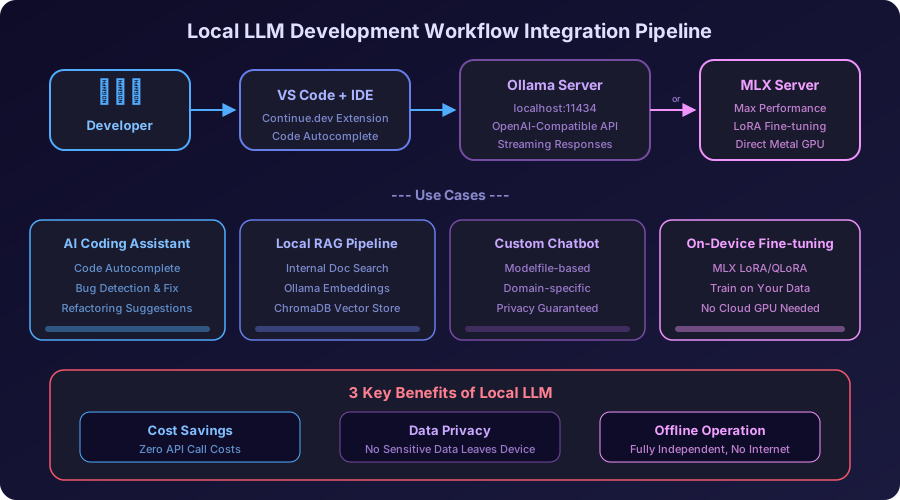
1. VS Code + Continue.dev Integration #
|
|
2. Calling Ollama API from Python #
|
|
3. Fully Local RAG Pipeline #
|
|
A complete RAG pipeline running entirely on-device with zero external API calls. Particularly valuable for enterprise environments handling sensitive internal documents.
4. Custom Models with Modelfile #
|
|
|
|
Memory Optimization Strategies #
Quantization Selection Guide #
| Quantization | Quality Loss | Memory Savings | Recommended When |
|---|---|---|---|
| FP16 | None | Baseline | Sufficient memory, highest quality needed |
| Q8_0 | Minimal | ~50% | Memory headroom available |
| Q6_K | Negligible | ~58% | Quality-speed balance |
| Q4_K_M | Minor | ~70% | Best overall (optimal quality/speed/memory) |
| Q4_0 | Minor+ | ~75% | Memory constrained |
| Q2_K | Noticeable | ~85% | Not recommended (significant quality degradation) |
macOS Memory Management Tips #
|
|
Key principle: Keep model size + KV cache + system overhead under 80% of physical memory. Once swapping begins, inference speed drops by 10x or more.
Recommended Setup by Chip Generation #
| Chip | Memory | Recommended Model | Framework | Expected Performance |
|---|---|---|---|---|
| M1 (8GB) | 8GB | Llama 3.1 8B Q4 | Ollama | ~25 tok/s |
| M1 Pro (16GB) | 16GB | Mistral 7B Q6 | MLX | ~40 tok/s |
| M2 Pro (32GB) | 32GB | CodeLlama 34B Q4 | MLX | ~18 tok/s |
| M3 Max (48GB) | 48GB | Llama 3.1 70B Q4 | MLX | ~10 tok/s |
| M4 Pro (48GB) | 48GB | Llama 3.1 70B Q4 | MLX | ~12 tok/s |
| M4 Max (128GB) | 128GB | Llama 3.1 70B Q8 | MLX | ~15 tok/s |
| M4 Ultra (192GB) | 192GB | Llama 3.1 405B Q4 | MLX | ~5 tok/s |
Troubleshooting Guide #
Common Ollama Issues #
|
|
Common MLX Issues #
|
|
Conclusion: The Future of Local LLM #
The Apple Silicon + Ollama/MLX combination marks the beginning of “local AI sovereignty.” High-quality LLM inference without cloud dependency, without cost anxiety, and without data privacy concerns is already a reality.
With the M4 generation, local LLMs have moved beyond experimentation to production-capable workloads. A 70B model running at 12 tok/s covers the majority of practical tasks: code review, document summarization, RAG, chatbots, and more.
Get started now:
brew install ollama— Your first model runs in 5 minutespip install mlx-lm— When maximum performance matters, go MLX- Continue.dev + Ollama — Local AI coding assistant right in your IDE
Before your next cloud API bill arrives, unlock the potential your MacBook already has.