As engineering teams grow, software delivery pipelines become increasingly complex. Plugin hell in Jenkins, manually managed environment variables, inconsistent deployment procedures across teams, and no clear visibility into where cloud costs are leaking. Harness was built to solve these problems structurally.
Harness is not just another CI/CD tool. It is a unified software delivery platform that provides CI, CD, GitOps, Feature Flags, Cloud Cost Management, and Security Testing Orchestration under a single roof. This guide covers Harness from its core architecture through real-world operational tips, written from a developer’s perspective.
1. What Is Harness — Redefining CI/CD #
The Limits of Traditional CI/CD Tools #
Jenkins has long been the de facto standard for CI/CD. But in modern microservice and multi-cloud environments, it shows its age.
- Plugin management burden: Hundreds of plugins that conflict with each other or go unmaintained
- Script-heavy pipelines: Groovy-based Jenkinsfiles are difficult to maintain at scale
- Poor visibility: Deployment status, failure root causes, and rollback history are hard to surface in one place
- No cost control: No way to know which pipelines consume how much cloud infrastructure
GitHub Actions and GitLab CI are good choices, but they still fall short in large enterprise environments with multi-cloud, multi-team, and governance requirements.
The Harness Approach #
Harness was founded in 2017 by Jyoti Bansal, the creator of AppDynamics. The core philosophy is: “Minimize the time developers spend on deployments, and let them focus on creating business value.”
Harness modules at a glance:
| Module | Description |
|---|---|
| CI (Continuous Integration) | Build, test, and artifact management |
| CD (Continuous Delivery) | Deployment strategies, environment management |
| GitOps | Declarative infrastructure management via Git |
| Feature Flags | Feature toggles and A/B testing |
| Cloud Cost Management | Cloud spend visibility and optimization |
| Security Testing Orchestration | Integrated security vulnerability scanning |
| Chaos Engineering | Fault injection and resilience testing |
2. Harness Architecture — Control Plane and Delegate #
Understanding the Harness architecture is the starting point for effective operations.
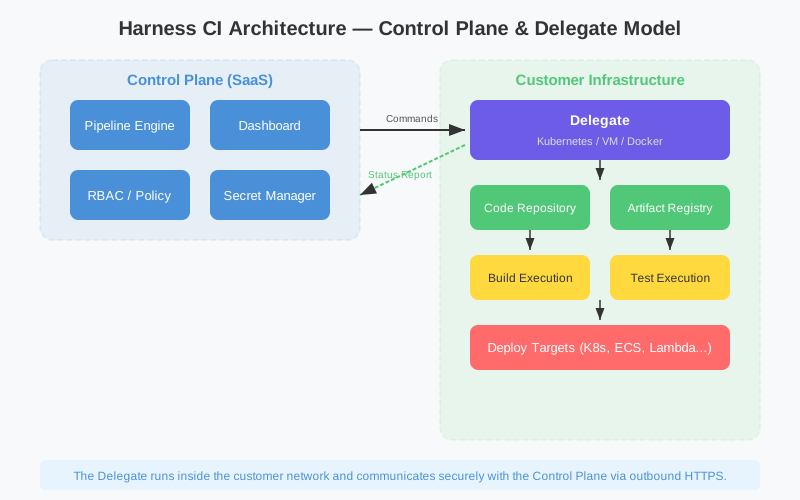
Control Plane (SaaS) #
The brain of Harness, the Control Plane is the SaaS layer hosted by Harness itself. Pipeline definitions, execution orchestration, dashboards, and log collection all happen here.
- Web UI accessible at
app.harness.io - REST API and GraphQL API
- Pipeline YAML storage and versioning
- Execution history and artifact registry integrations
Delegate — Your Agent Inside Customer Infrastructure #
The Delegate is a lightweight agent deployed inside the customer’s own infrastructure (on-premises, AWS, GCP, Azure, or a Kubernetes cluster). It receives instructions from the Control Plane and carries out the actual work.
What the Delegate does:
- Executes build jobs (Docker builds, tests, etc.)
- Deploys to Kubernetes clusters
- Accesses secrets (Vault, AWS Secrets Manager, etc.)
- Communicates with services behind firewalls
Why does this architecture matter? Harness never directly accesses customer infrastructure. The Delegate makes outbound connections to the Control Plane, meaning no inbound ports need to be opened. This is a primary reason Harness is adopted in security-sensitive industries like finance and healthcare.
Self-Managed Enterprise Edition (SMEE) #
For environments where SaaS is not an option, Harness provides SMEE, an on-premises installable version. It deploys to a Kubernetes cluster via Helm chart and supports air-gapped environments.
|
|
3. Six Key Benefits of Harness #
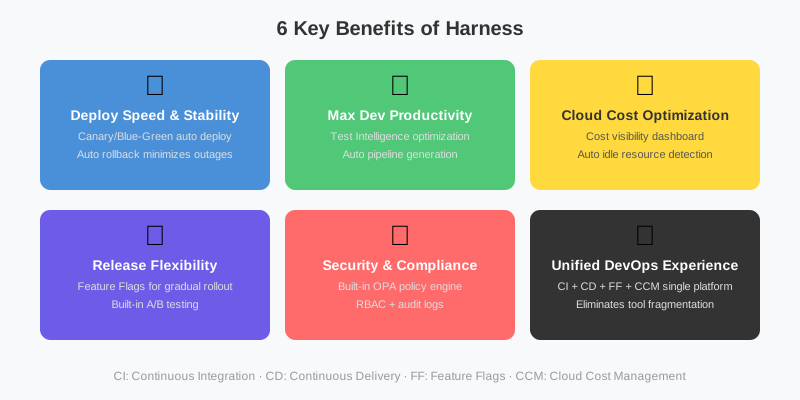
Teams that adopt Harness consistently report the following benefits:
- Faster deployment velocity: Pipeline automation and parallel execution shorten release cycles
- Increased developer productivity: Automate repetitive infrastructure tasks and minimize context-switching related to deployments
- Cloud cost optimization: Real-time visibility into wasted resources and automatic recommendations
- Release flexibility: Minimize risk with canary, blue/green, and rolling deployment strategies
- Security and compliance: Enforced OPA policies, RBAC, and audit trails
- Unified DevOps platform: CI, CD, cost management, and security in a single platform
4. CI (Continuous Integration) — Pipeline Configuration #
YAML-Based Pipeline Definition #
Every Harness CI pipeline is defined in YAML. Create a .harness/ directory in your Git repository and store pipeline files there — changes are automatically reflected.
|
|
Build Infrastructure Options #
Harness CI supports a range of build infrastructure types:
| Infrastructure Type | Description | Best For |
|---|---|---|
| Kubernetes | Runs on your own K8s cluster | Cost optimization, custom environments |
| Harness Cloud | Managed cloud runners by Harness | Quick start, no maintenance overhead |
| Docker | Runs via local Docker | Development and test environments |
| VM | Runs on virtual machines | Special hardware requirements |
Test Intelligence #
One of the most powerful features in Harness CI is Test Intelligence. It uses ML to identify and run only the tests related to the code that changed.
|
|
Real-world impact: running 300 relevant tests out of a 10,000-test suite — 70% reduction in test time.
Caching Strategy #
Caching is key to build speed. Harness supports both layer caching and dependency caching.
|
|
5. CD (Continuous Delivery) — Deployment Strategies #
Overview of Deployment Strategies #
Harness CD ships with modern deployment patterns built in. Teams can use proven strategies through configuration alone, without writing custom deployment scripts.
Canary Deployment #
Route a portion of traffic (e.g. 10%) to the new version, monitor error rates and latency, then gradually expand the rollout.
|
|
Blue/Green Deployment #
Maintain two identical environments. Validate the new version, then switch traffic. Enables instant rollback if issues arise.
|
|
Rolling Deployment #
Replaces existing instances sequentially. Simplest approach, but full redeployment is needed for rollback.
Environment Management #
Harness separates Environments from Infrastructure Definitions, allowing independent management of each.
|
|
Different configuration values, secrets, and approval policies can be applied per environment, enabling safe isolation between development, staging, and production.
Automatic Rollback #
The core safety net of Harness CD is automatic rollback. Integrate monitoring tools (Prometheus, Datadog, New Relic, etc.) and Harness will automatically roll back to the previous version when anomalous metrics are detected post-deployment.
|
|
6. GitOps Workflow — Git as the Source of Truth #
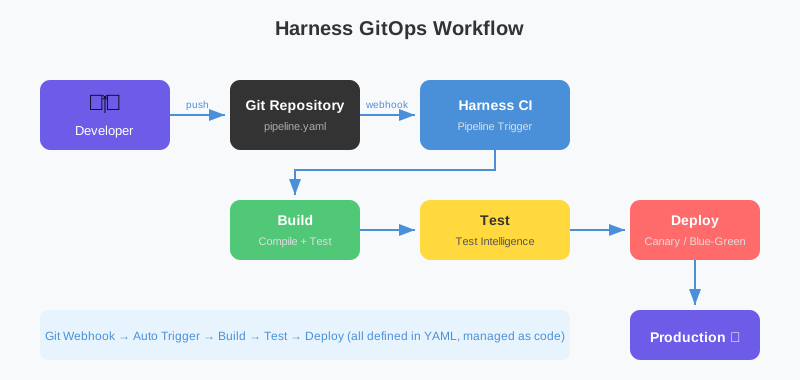
What Is GitOps? #
GitOps is the practice of managing infrastructure and application configuration declaratively in a Git repository. Git becomes the Single Source of Truth, and all changes flow through Pull Requests.
Harness GitOps is built on Argo CD, bringing powerful Kubernetes GitOps capabilities into the Harness platform for unified management.
The GitOps Workflow #
- Developer pushes application code or Kubernetes manifests to Git
- Harness CI runs build/test and produces a new container image
- Harness automatically updates the image tag in the Git config repository (opens a PR)
- On PR merge, the Harness GitOps Agent syncs the cluster state to match Git
- Any drift between cluster state and Git state is detected and auto-corrected
|
|
PR Pipeline Trigger #
|
|
7. Feature Flags — Safe Feature Releases #
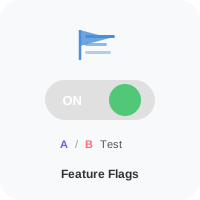
What Are Feature Flags? #
A Feature Flag is a technique that decouples code deployment from feature release. Code is already deployed to production, but a feature is only activated for specific user groups.
Also known as “deploying dark,” the benefits include:
- Business teams control the timing of feature releases
- A/B testing against specific user segments
- Instantly disable a feature without a code rollback
- Minimize risk through gradual rollout
Using the Harness Feature Flags SDK #
JavaScript/Node.js:
|
|
Java/Spring Boot:
|
|
Targeting Rules #
The strength of Harness Feature Flags lies in its flexible targeting rules.
|
|
A/B Testing Integration #
Connect feature flags with analytics tools to measure A/B test outcomes.
|
|
8. Cloud Cost Management — Taking Control of Cloud Spend #
The Reality of Cloud Costs #
A common pain point for teams on AWS, GCP, or Azure: “Why is this month’s cloud bill so high?” Without per-service, per-team, and per-environment cost breakdowns, waste is impossible to prevent.
Harness Cloud Cost Management (CCM) addresses this structurally.
Cost Visibility #
CCM enables cost analysis across multiple dimensions:
- By service: Which microservice is spending how much?
- By environment: Comparing dev / staging / production costs
- By team: Cost allocation based on team labels
- Time trends: Detecting anomalous spend spikes
|
|
AutoStopping and Recommendations #
AutoStopping: Automatically stops non-production resources when there is no traffic. Teams consistently report ~70% cost savings on dev and QA environments.
|
|
Spot/Reserved Instance Recommendations: Analyzes usage patterns and recommends migrating from on-demand to Spot or Reserved instances.
Budget Alerts #
|
|
9. Security and Governance #
OPA (Open Policy Agent) Policies #
Harness can enforce OPA policies before and after pipeline execution, letting teams manage organizational deployment rules as code.
|
|
RBAC (Role-Based Access Control) #
Harness provides fine-grained permission management:
|
|
Secret Management #
Harness integrates with external secret stores in addition to its own secret manager:
- HashiCorp Vault: Dynamic secrets, automatic rotation
- AWS Secrets Manager: Native AWS secrets
- GCP Secret Manager: GCP environment support
- Azure Key Vault: Azure environment support
|
|
Audit Trail #
All actions — pipeline executions, environment changes, secret access — are recorded in the audit log. This is essential for meeting compliance requirements such as SOC 2, ISO 27001, and HIPAA.
10. Operational Tips — Delegate Management and Pipeline Optimization #
Delegate Operations Best Practices #
1. High-Availability Delegate Setup
A single Delegate is a single point of failure. Run at least two Delegates and use Delegate selectors to route specific jobs to specific Delegate groups.
|
|
2. Delegate Resource Configuration
|
|
3. Delegate Version Pinning
Harness supports automatic upgrades, but for production environments, it is recommended to pin to a specific version.
|
|
Pipeline Optimization #
Parallel stage execution:
|
|
Conditional execution:
|
|
Pipeline templates:
Turn recurring pipeline patterns into templates for reuse. Dozens of microservice pipelines can be managed through a single template.
|
|
Troubleshooting Guide #
Delegate connectivity issues:
|
|
Debugging pipeline failures:
- Select the failed step on the pipeline execution page
- Click “View Logs” for detailed log output
- Use “Re-run from Failed Stage” to resume from the point of failure
Common errors and solutions:
| Error | Cause | Solution |
|---|---|---|
Delegate not available |
Delegate offline or overloaded | Check pod status, scale out |
Secret not found |
Wrong secret reference or insufficient permissions | Verify secret name and scope |
Image pull failed |
Container registry authentication issue | Update Connector credentials |
Timeout exceeded |
Build/deploy exceeding time limit | Increase timeout value, consider parallelization |
11. Comparison with Other CI/CD Tools — When to Choose Harness #
Tool Comparison #
| Criteria | Harness | GitHub Actions | Jenkins | ArgoCD |
|---|---|---|---|---|
| Configuration | YAML + UI | YAML | Groovy | YAML |
| Learning curve | Moderate | Low | High | Low |
| Enterprise features | Very strong | Moderate | Plugin-dependent | CD-focused |
| Cost management | Built-in | None | None | None |
| Feature flags | Built-in | None | None | None |
| Governance | OPA built-in | Limited | Plugin required | None |
| Pricing | Paid (free tier available) | Usage-based | Open source | Open source |
When Harness Is the Right Fit #
- Large enterprises: Dozens to hundreds of microservices, multiple teams, multi-cloud environments
- Compliance-critical industries: Finance, healthcare, government — sectors with strict audit and governance requirements
- Cost optimization priority: Organizations that want to track and optimize cloud spend per team and per service
- Platform consolidation: Teams that want CI, CD, feature flags, and cost management in one tool
- Security requirements: On-premises or private cloud deployments where no inbound connections are acceptable (Delegate model)
When Harness May Not Be the Best Fit #
- Small teams or simple deployments: GitHub Actions or GitLab CI may be sufficient
- Open-source requirements: Some Harness features are behind a paid tier
- Maximum customization: Teams that want to control nearly everything through code, like Jenkins, may find the abstraction layer limiting
Conclusion — Modern DevOps with Harness #
Harness is not simply a Jenkins replacement. It proposes a paradigm shift: managing the entire software delivery lifecycle through a unified platform.
It starts with CI/CD pipeline automation, extends to GitOps for infrastructure-as-code, uses Feature Flags for safe feature releases, and optimizes cloud spend with Cloud Cost Management — all within a single platform.
If you are evaluating Harness, start with the free tier. After a 14-day trial, the Developer plan provides 500 Harness Cloud build credits, 25,000 Feature Flags MAU, and access to core CI/CD — all at no cost.
The real question is not which tool to pick. It is “how much cognitive overhead can we remove from developers around deployment?” Harness answers that question at the platform level.
References: Harness Developer Hub, Harness University