AI Takes the Wheel — The Limits of Traditional Browser Automation #
The era of AI agents freely browsing the web, clicking buttons, and submitting forms has arrived. But implementation reveals surprising obstacles. CSS selectors built on Selenium or Puppeteer break when frameworks change. XPath is fragile against DOM restructuring. And in modern web apps with strict CSP (Content Security Policy), even script injection is blocked.
gstack approaches this problem from a completely different angle. It wraps the entire browser automation stack in a daemon architecture and uses the ARIA accessibility tree instead of CSS selectors for UI element identification. The result: ~100ms response times combined with framework-agnostic stability across React, Vue, and Angular alike.
This Part 3 digs deep into these advanced capabilities.
Browser Daemon Architecture: The Secret Behind Three Tiers #
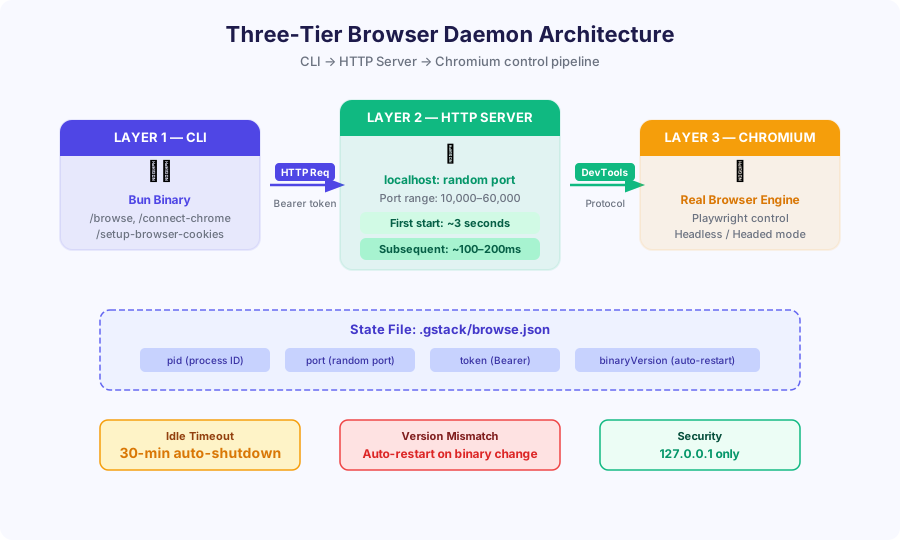
gstack’s browser control is divided into three distinct layers.
Layer 1: CLI (Bun Binary) #
The entry point used by the user or Claude. It receives commands like /browse, /connect-chrome, and /setup-browser-cookies and forwards them to Layer 2’s HTTP server. Distributed as a single binary built on the Bun runtime — no separate runtime installation needed.
Layer 2: HTTP Server (localhost) #
Acts as the bridge between the CLI and Chromium. The port is a random value between 10,000 and 60,000 to avoid conflicts. Every request carries Bearer token authentication.
Key performance points:
- First call: ~3 seconds (Chromium process startup)
- Subsequent calls: ~100–200ms (daemon is already running)
This difference is decisive. Traditional approaches restart the browser with every command, but gstack keeps the daemon alive so requests from the second call onward are dramatically faster.
Layer 3: Chromium (DevTools Protocol) #
A real Chromium browser instance. Playwright controls it via the Chrome DevTools Protocol (CDP). Everything a browser can do is available: JavaScript execution, network interception, screenshots, and more.
State File: .gstack/browse.json
#
The daemon’s current state is persisted in .gstack/browse.json:
|
|
30-minute idle timeout: Auto-shuts down with no commands. Automatically restarts on the next command.
Version auto-restart: If binaryVersion differs from the current binary, the daemon restarts automatically. No need to manually kill the process after an update.
/browse Command Categories
#
/browse is the core command for gstack browser automation. Its functionality divides into three categories.
READ — Understanding Current State #
|
|
WRITE — Page Manipulation #
|
|
META — Tab and Session Management #
|
|
The Ref System Revolution: UI Automation Without CSS Selectors #
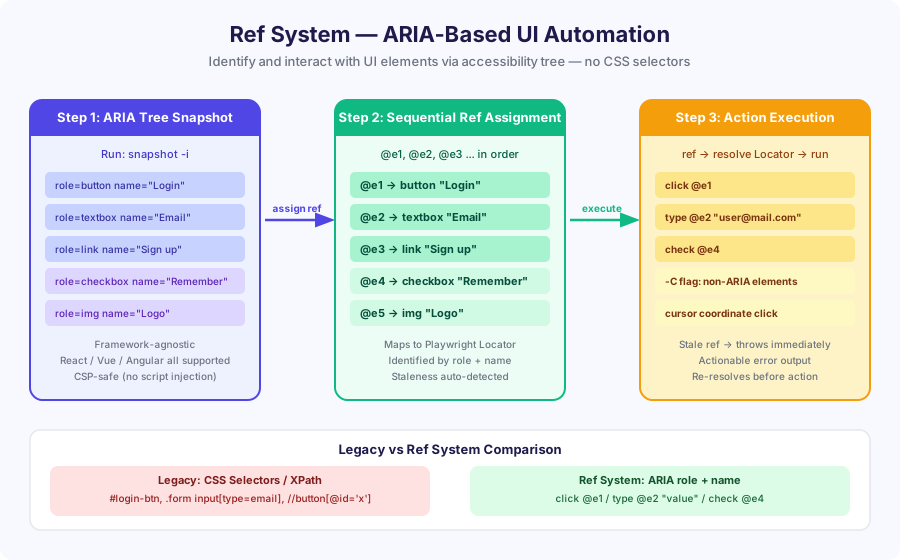
One of gstack’s most innovative features is the Ref system. It identifies UI elements reliably without CSS selectors or XPath.
How It Works: Three Steps #
Step 1: ARIA Tree Snapshot
|
|
The -i flag analyzes the current page’s ARIA accessibility tree and assigns sequential refs to every interactive element.
Sample output:
|
|
Step 2: Ref → Playwright Locator Mapping
Each ref is internally converted to a Playwright role + name locator:
@e1→page.getByRole('button', { name: 'Login' })@e2→page.getByRole('textbox', { name: 'Email' })
This mapping is the key. As long as the role and name remain intact, the locator works stably even when the DOM structure changes.
Step 3: Executing Actions via Refs
|
|
Advantages of the Ref System #
Framework-agnostic: Works identically with React, Vue, Angular, and Svelte. Only reads the ARIA tree, regardless of internal component implementation.
CSP-safe: No scripts are injected into the page. Works on sites with strict Content Security Policies — financial platforms, government sites, and beyond.
Automatic staleness detection: If a ref is no longer valid (DOM changed, page navigation, etc.), the system throws immediately before execution. Prevents silent failures from clicking the wrong element.
The -C Flag: Handling Non-ARIA Elements
#
For canvases, custom components, and other elements not exposed in the ARIA tree, the -C flag enables cursor-coordinate-based clicking:
|
|
/connect-chrome: Headed Mode and Live Monitoring
#
Headless mode isn’t always enough. OAuth logins, CAPTCHAs, and 2FA all require a real browser window. /connect-chrome solves this.
|
|
This command opens a real Chrome window and connects gstack to that session. The user can log in manually while gstack waits, then takes over automation afterward.
Green shimmer effect: The connected Chrome window displays a green shimmer animation along the screen border. A visual safety signal communicating “gstack is currently controlling this browser.”
Live monitoring: While connected, console errors, network requests, and popup dialogs are captured in real time.
Cookie Import: /setup-browser-cookies
#
If you’re already logged into your local Chrome, you can bring those session cookies directly into gstack.
|
|
Security design:
- Does not read Chrome’s cookie DB (SQLite) directly — copies it to a temporary file first (read-only principle)
- On macOS, a Keychain dialog is displayed to access the cookie encryption key. No access without user consent
- Imported cookies are valid only for the gstack session and do not affect the original browser
This allows Claude to automate web apps with the same logged-in state as the user.
Logging Architecture: Logs That Survive Crashes #
gstack’s logging system is not simple file writing. It’s a high-performance architecture built on three ring buffers.
Ring Buffer Structure #
|
|
Async flush: Writes to .gstack/*.log asynchronously at 1-second intervals. Non-blocking I/O means browser control command latency is unaffected.
Crash survival: Even if the process dies suddenly, at most 1 second of logs is lost. Already-flushed data is safely preserved on disk.
Reading logs:
|
|
Multi-Agent: Conductor and 10–15 Simultaneous Executions #
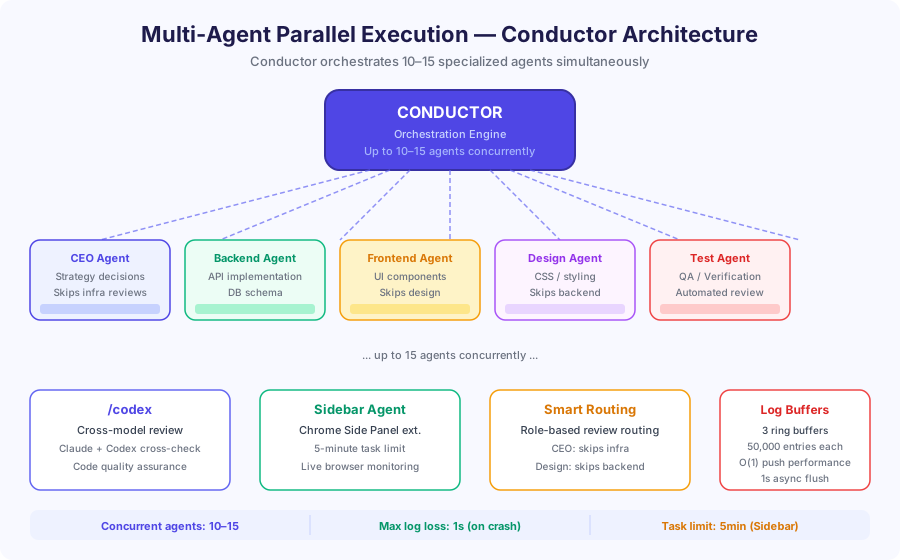
gstack’s most powerful capability is orchestrating not a single agent, but an entire agent fleet.
Conductor Orchestration #
Conductor is the coordination layer that runs 10–15 specialized agents simultaneously. Each agent focuses on a specific role:
- CEO Agent: Strategy decisions, skips infrastructure details
- Backend Agent: API implementation, DB schema
- Frontend Agent: UI components, state management
- Design Agent: CSS, accessibility, visual consistency
- Test Agent: QA, automated testing
Smart Review Routing #
Conductor’s core intelligence is role-based routing. When a backend code review request arrives, it routes only to the CEO and backend agents — the design agent is skipped. Conversely, CSS changes are reviewed only by design and frontend agents.
This optimization dramatically increases review throughput.
Real Speed of Parallel Execution #
Sequential vs parallel execution comparison:
- Sequential (traditional): 15 agents × 2 minutes average = 30 minutes
- Parallel (gstack): 15 simultaneous = approximately 2–3 minutes
More than 10x throughput improvement.
/codex: Cross-Model Review via OpenAI
#
To eliminate single-model bias, gstack uses OpenAI Codex for cross-validation.
|
|
How it works:
- Claude analyzes the specified file or changes
- The same code is sent to OpenAI Codex
- Both models’ review results are synthesized and output
A bug or security issue missed by one model is likely caught by the other. Particularly effective for high-stakes tasks like security audits or performance optimization.
Sidebar Agent: AI in the Chrome Side Panel #
The Sidebar Agent is a Chrome extension that embeds Claude directly in the browser’s side panel.
Features:
- Chat with the agent directly from Chrome’s side panel
- Immediate access to the current tab’s DOM and network requests
- 5-minute task limit: A safety guardrail preventing long-running runaway executions
- Real-time debugging without closing the browser
Example use:
|
|
The agent analyzes the DOM in real time, checks the network tab, and delivers an answer.
Security Model: Local-First Design #
gstack’s security is local-first by design from the ground up.
Network Isolation #
|
|
The HTTP server is accessible only from localhost. There is no way to control gstack’s browser from a remote machine.
Bearer Token Authentication #
Every HTTP request requires a Bearer token. The token is randomly generated at daemon startup and stored in .gstack/browse.json. Another process running on the same machine cannot control gstack without the token.
Shell Injection Prevention #
All command execution uses explicit argument arrays:
|
|
Even if URLs or inputs contain shell special characters, injection is impossible.
Read-Only Cookie DB #
Chrome’s cookie database is not opened directly. Instead, it is copied to a temporary file before reading. No write lock is placed on the original DB, and it can be safely read even while Chrome is running.
Wrapping Up: What Sets gstack Browser Automation Apart #
Three things that distinguish gstack from ordinary browser automation tools:
-
Daemon architecture: ~100ms responses after the first call. Chromium is not restarted on every command.
-
Ref system: ARIA accessibility tree-based. No CSS selectors needed, framework-agnostic, CSP-safe.
-
Multi-agent: Conductor runs 10–15 agents simultaneously. Smart routing maximizes efficiency.
When these three combine, it goes beyond simple browser control to become a complete AI-driven web automation platform.
Part 4 will cover real-world project applications and advanced troubleshooting.
gstack Complete Guide Series
- Part 1: Introduction and Core Concepts
- Part 2: Installation and Basic Workflow
- Part 3: Real Browser Automation and Multi-Agent ← You are here