Introduction: Imagine the Sprint First #
It’s two in the morning. You’re holding onto an idea that won’t leave your head. “Should I build this?” Immediately the familiar exhaustion sets in — requirements gathering, architecture design, writing code, review, testing, deployment. Days of work if you’re alone.
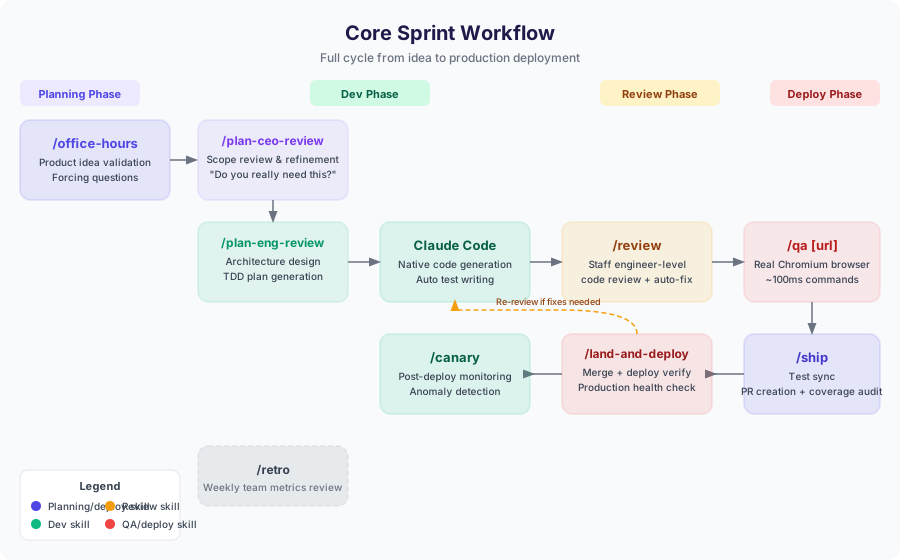
After installing gstack, that picture changes. You refine the idea into a product vision with /office-hours, build a TDD plan with /plan-eng-review, let Claude Code generate the implementation, and then /review catches bugs like a staff engineer would. /qa validates the UI in a real Chromium browser, /ship creates a PR with a full coverage audit, and /land-and-deploy takes the code to production and confirms health checks pass.
All of this connected through a single toolkit. This guide walks you through installing gstack and running your first complete sprint, step by step.
Prerequisites #
Two tools are needed before installing gstack.
Bun v1.0 or higher
gstack’s skill execution engine is built on Bun, a fast JavaScript runtime. If you haven’t installed it yet, visit bun.sh or run:
|
|
Verify the version after installation:
|
|
Claude Code with SKILL.md support
gstack loads its skills using Claude Code’s SKILL.md protocol. Make sure Claude Code is installed and up to date. Run claude --version to check, and if the /skills command responds, SKILL.md support is active.
Installing gstack (30 seconds) #
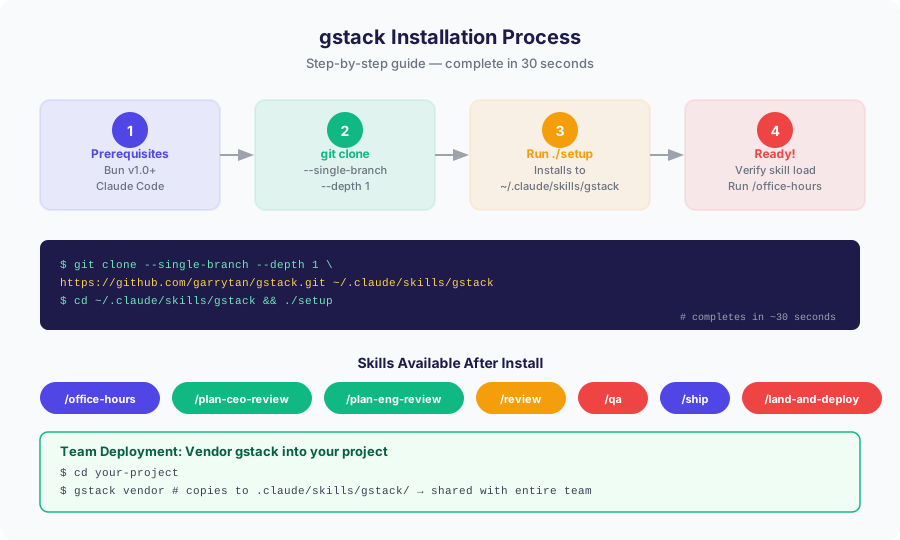
With prerequisites in place, installation is genuinely 30 seconds. Open a terminal and run these two lines:
|
|
The --single-branch --depth 1 flags fetch only the latest snapshot without full history, making it fast. The ./setup script installs dependencies and registers the skills so Claude Code can find them.
Once installation completes, start a new Claude Code session. If /office-hours produces a response, you’re good to go.
Team Deployment: Vendoring gstack into Your Project #
Installing gstack globally for personal use is one thing. For a team project where everyone should use the same version, vendoring is the right approach. gstack provides a dedicated command for this:
|
|
This copies gstack into .claude/skills/gstack/ inside your current directory. Commit that folder to git and every team member gets the same skill set without any separate installation step. CI/CD pipelines can reliably use gstack skills as well.
Vendored skills take priority over the global installation, so you can pin different gstack versions per project if needed.
First Skill: /office-hours — Product Framing
#
The first skill to reach for after installation is /office-hours. As the name suggests, it works like office hours with a demanding professor — it stress-tests your idea before you write a single line of code.
Start a Claude Code session and run:
|
|
Once the skill activates, you’ll be prompted to describe your idea freely. For example: “I want to build a team meeting auto-summarizer. It records audio, generates a summary, and sends it to Slack.”
Rather than agreeing, /office-hours fires forcing questions:
- “Does each meeting participant need to open the app manually, or should it run automatically?”
- “If the summary is 95% accurate, will the team trust it? Is a review process required?”
- “If there’s no Slack integration, does this product have no value — or is email delivery sufficient for the MVP?”
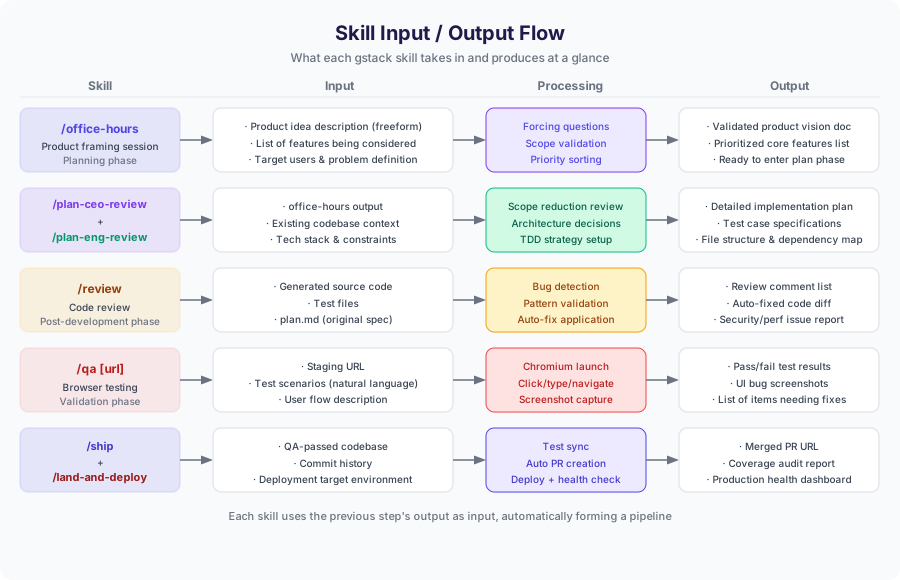
These questions surface assumptions you hadn’t examined. The goal of /office-hours isn’t to say you’re wrong — it’s to help you clearly define what the product actually is. At the end of the session, you’ll have a validated product vision document and a prioritized list of core features.
Planning Phase: /plan-ceo-review and /plan-eng-review
#
With a clear product vision, move into the planning phase. gstack splits planning into two distinct passes.
/plan-ceo-review: “Do you really need this?”
#
The first planning skill reviews scope from a CEO perspective:
|
|
This skill takes your proposed feature list and asks sharp questions about each item. “Does removing this feature prevent the MVP from working?” “Couldn’t this wait for version two?” The goal is to minimize scope using business logic.
Many developers find this pass harsh at first, but it eliminates unnecessary complexity before it becomes a problem. The output is a tightened, clarified feature specification.
/plan-eng-review: Architecture and TDD Planning
#
The second planning skill works from an engineering perspective:
|
|
It takes the CEO-reviewed spec and converts it into a concrete implementation plan — which files to create, which dependencies are needed, and how tests should be written, all structured around TDD principles.
The output is saved as plan.md, which Claude Code will reference when generating code. It includes file structure, function signatures, and expected test cases in enough detail to drive implementation.
Development Phase: Native Claude Code Generation #
With the plan ready, hand implementation off to Claude Code. This phase doesn’t use a specific gstack skill — it uses Claude Code’s native capabilities.
|
|
Claude Code generates code following the spec in plan.md and writes the corresponding test files. The context gstack built up in earlier phases makes the generated code significantly more accurate and consistent than starting from scratch.
Review Phase: /review — Staff Engineer-Level Code Review
#
Once the code is generated, run /review. This skill is one of gstack’s core value propositions.
|
|
/review doesn’t just check for syntax errors. It analyzes code the way a staff engineer reviews a PR:
- Bug detection: Edge cases, missing null handling, race conditions
- Pattern validation: Verifying the implementation matches the plan.md spec
- Security issues: SQL injection, XSS, missing authentication
- Performance problems: N+1 queries, unnecessary re-renders, memory leaks
- Auto-fixes: Issues that can be fixed automatically are applied immediately
After the review, you receive a list of items requiring attention alongside a diff of the auto-applied fixes. Its ability to catch problems that are hard to spot by reading code alone is genuinely impressive.
Testing Phase: /qa [url] — Real Browser Testing
#
Once the code review passes, run real browser testing. /qa drives an actual Chromium browser using Playwright to validate UI behavior.
|
|
Provide the staging URL and /qa will:
- Launch a real Chromium browser instance
- Execute test scenarios described in natural language
- Run commands at roughly 100ms per step (clicks, typing, navigation)
- Automatically capture screenshots when issues are found
- Generate a pass/fail report with a list of items needing fixes
Unit tests passing doesn’t guarantee the real browser behaves the same way. /qa closes that gap. It’s especially effective at catching problems that are hard to detect from code alone, like CSS layout bugs or JavaScript state management issues.
Deployment Phase: /ship, /land-and-deploy, /canary
#
Code that clears QA moves into the deployment phase. gstack automates this too.
/ship: PR Creation and Coverage Audit
#
|
|
/ship performs the following:
- Checks synchronization between test files and source code
- Generates a test coverage audit report (warns on under-covered areas)
- Automatically creates a PR based on commit history
- Includes a change summary, test results, and coverage information in the PR description
/land-and-deploy: Merge and Production Deployment
#
|
|
Once the PR is approved, run /land-and-deploy. This skill goes well beyond pressing the merge button:
- Executes the merge
- Triggers the deployment pipeline
- Runs health checks after deployment completes
- Verifies responses from key endpoints
- Checks baseline metrics like error rate and latency
If anything looks wrong during deployment, you get an immediate alert.
/canary: Continuous Post-Deploy Monitoring
#
|
|
After deployment completes, /canary sets up ongoing monitoring. It detects abnormal traffic patterns, error spikes, and response time degradation, sending alerts to the team when thresholds are crossed. When using a canary deployment strategy, it also tracks the staged traffic rollout.
Weekly Retrospective: /retro
#
To review your team’s development activity each week, use /retro:
|
|
This skill aggregates sprint activity metrics for the past week — how many features shipped, how many issues /review caught, what the QA pass rate looked like — and formats them as retrospective material for the team.
Practical Tips: Getting the Most from Each Skill #
A few things worth knowing after putting gstack through its paces:
1. Don’t skip /office-hours
It’s the first step you’ll want to skip when you’re in a hurry. Don’t. Thirty minutes of product framing prevents three days of rework.
2. Take /plan-ceo-review’s “cut this” suggestions seriously
The instinct is to say “but I want this feature too.” Resist it. Keeping the MVP scope small pays dividends. You can always add it in version two.
3. After /review, review the auto-fixes before running /qa
Even when /review applies automated fixes, build the habit of looking at what changed. Auto-fixes very rarely introduce new issues, but it’s worth a glance.
4. Give /qa specific scenarios
“Test the app” produces far less useful results than “Test the flow: log in → create a new item → save → confirm it appears in the list.” The more specific the instruction, the more meaningful the output.
5. Don’t ignore /ship’s coverage warnings
Under-covered code is where bugs breed. When /ship flags low coverage, add tests before moving on. This is the single habit that most improves long-term codebase quality.
6. Always vendor for team projects
Relying on global installs means different team members may run different gstack versions. Pin it with gstack vendor and commit the result.
Wrapping Up #
gstack’s core value isn’t just automation. Each skill takes the previous skill’s output as its input, automatically building a pipeline. Where human judgment is required, the skills surface clear questions to guide decisions. For solo developers, it provides a virtual team. For real teams, it provides a consistent process.
Part 1 covered gstack’s philosophy and overview. This Part 2 covered the actual installation and sprint workflow. Part 3 will look at applying gstack to a real project and explore advanced configuration options.
Go ahead and install it now. Thirty seconds is all it takes.
|
|