Imagine you have twenty academic papers to read before next week’s deadline, a two-hour meeting recording that needs a five-point summary, or a 200-page industry report your manager wants distilled by end of day. For exactly these situations, Google NotebookLM has fundamentally changed the way researchers, analysts, and knowledge workers process information.
The first thing that struck me when I started using NotebookLM was its core design principle: it answers only from the sources you upload. While ChatGPT and Gemini draw on their vast training data, NotebookLM grounds every answer in the exact documents you provide. This single constraint — which sounds like a limitation — turns out to be its greatest strength. Let’s walk through what NotebookLM can do in 2026 and how to get the most out of it.
What Is Google NotebookLM? #
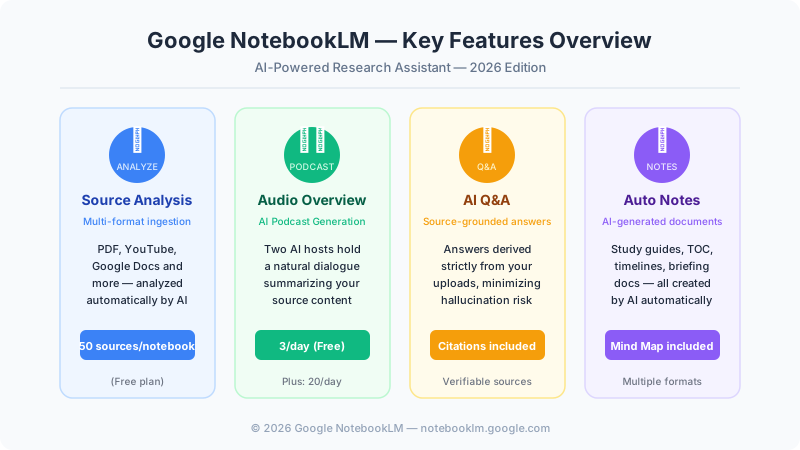
Google NotebookLM is an AI-powered research assistant launched by Google in 2023, built on the Gemini model. It lets you upload sources — PDFs, YouTube videos, Google Docs, audio files, and more — and then asks questions, generates summaries, and creates various note formats based strictly on those materials.
The key distinction from general-purpose AI chatbots is source scope restriction. ChatGPT and Gemini answer from their broad training knowledge. NotebookLM answers only from what you give it. For academic research, legal document review, and business report analysis, this distinction is decisive: you get answers you can trust, with citations you can verify.
As of 2026, NotebookLM is free to use with any Google account, with a NotebookLM Plus paid plan available at $19.99 per month for heavier users.
Source Upload — What You Can Feed NotebookLM #
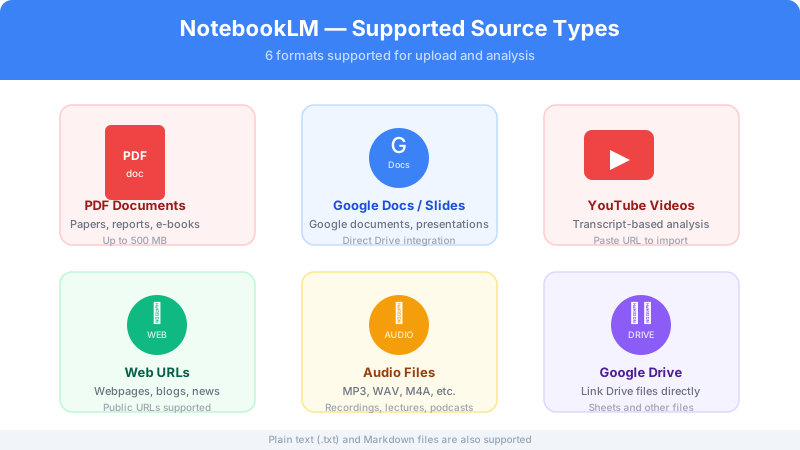
One of NotebookLM’s defining strengths is the variety of sources it can ingest. A single notebook can mix all of these in any combination.
Document Files
- PDF: Research papers, reports, e-books. Files up to 500 MB are supported.
- Plain text (.txt): Meeting notes, memos, transcripts.
- Markdown files: Technical documentation, developer notes.
Google Workspace Integration
- Google Docs: Connect documents directly from your Drive. Any edits sync automatically.
- Google Slides: Add presentation decks as analysis sources.
- Google Drive files: Sheets and other Drive files can be linked directly.
Media Sources
- YouTube videos: Paste a URL and NotebookLM analyzes the video via its transcript — turning lectures, interviews, and documentaries into searchable text.
- Audio files: MP3, WAV, M4A, and similar formats. Upload meeting recordings or interview audio for automatic analysis.
- Web URLs: Add publicly accessible web pages, blog posts, or news articles directly.
The free plan allows up to 50 sources per notebook. NotebookLM Plus raises that limit to 300.
Practical Tip: Source Organization Strategy #
Organize notebooks by topic rather than dumping everything into one place. A “Competitor Analysis” notebook, a “Research Papers” notebook, and a “Course Materials” notebook will each deliver sharper Q&A results than a single catch-all notebook. Mixing unrelated sources dilutes the AI’s focus and reduces answer precision.
Audio Overview — AI-Generated Podcast From Your Sources #
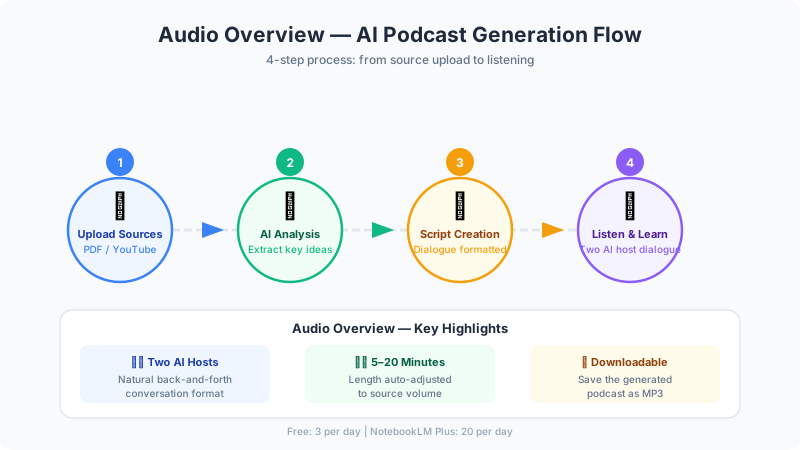
The feature that has generated the most buzz around NotebookLM is undoubtedly Audio Overview. Upload your sources, click Generate, and within a few minutes you have a podcast-style audio summary where two AI hosts hold a natural conversation about the content.
How Audio Overview Works #
- Source analysis: NotebookLM reads through all uploaded materials and extracts key concepts, major arguments, and important facts.
- Script generation: A dialogue script is written for two AI hosts — one male-voiced, one female-voiced — who discuss the content in a natural, back-and-forth format.
- Voice synthesis: The script is converted into realistic speech that sounds like an actual podcast.
- Listen or download: Play directly in the browser or download as an MP3 file.
The length of the generated podcast scales with the volume of source material, typically ranging from five to twenty minutes. The hosts do not simply read the content aloud — they ask questions of each other, offer different perspectives, and highlight what they find most interesting or surprising.
Where Audio Overview Shines #
- Commute learning: “Read” long papers or reports while walking, commuting, or exercising.
- Initial orientation: Get a high-level overview of a new topic before diving into the detailed documents.
- Memory reinforcement: Listen to a recap of content you’ve already read to consolidate understanding.
The free plan allows three Audio Overview generations per day. Plus users get twenty per day.
AI Q&A — Source-Grounded Answers With Citations #
NotebookLM’s Q&A engine works differently from conventional AI chatbots at a fundamental level. Every answer is grounded in the uploaded sources and includes explicit citations you can click to verify.
For example: upload five medical studies on exercise frequency, ask “What exercise frequency do these studies collectively recommend?”, and NotebookLM will quote the relevant passages from each paper and synthesize a comprehensive answer. Click any citation and the interface jumps directly to that specific location in the source document.
Key Characteristics of the Q&A System #
Accuracy-first design: If the answer is not in the sources, NotebookLM says so explicitly — “I could not find this information in the provided sources.” This transparency makes it suitable for research contexts where fabricated answers would be harmful.
Cross-source synthesis: When multiple sources address the same topic from different angles, NotebookLM compares and synthesizes them. Upload three studies that disagree on a point and ask NotebookLM to map the disagreement — it will lay out each position with citations.
Context-aware conversation: The system maintains conversational context, so follow-up questions build naturally on previous answers without restating the full context each time.
Multilingual queries: You can upload English PDFs and ask questions in another language. NotebookLM will answer in the language of your question.
Auto Note Generation #
Beyond Q&A, NotebookLM can generate several structured document types directly from your uploaded sources.
Study Guide: A structured document covering key concepts, important terminology, and sample Q&A based on the source material. Ideal for exam preparation or rapidly building fluency in a new subject.
Table of Contents: An automatic hierarchical outline of the source’s structure. Useful for navigating long documents and understanding how a complex work is organized.
Timeline: Events, milestones, or stages extracted from the sources and arranged chronologically. Particularly useful for historical analysis, project histories, or tracking how a research field has evolved.
Briefing Document: A concise executive-summary-style overview of the most important points. The format for quickly bringing someone up to speed.
Mind Map: A visual representation of how the source’s key concepts relate to each other. Added in 2025, the mind map view is especially useful for understanding complex systems and identifying connections that aren’t obvious from linear reading.
All generated notes are fully editable. You can add your own annotations, reorganize sections, and use them as a starting point for further Q&A.
The NotebookLM Workflow in Practice #
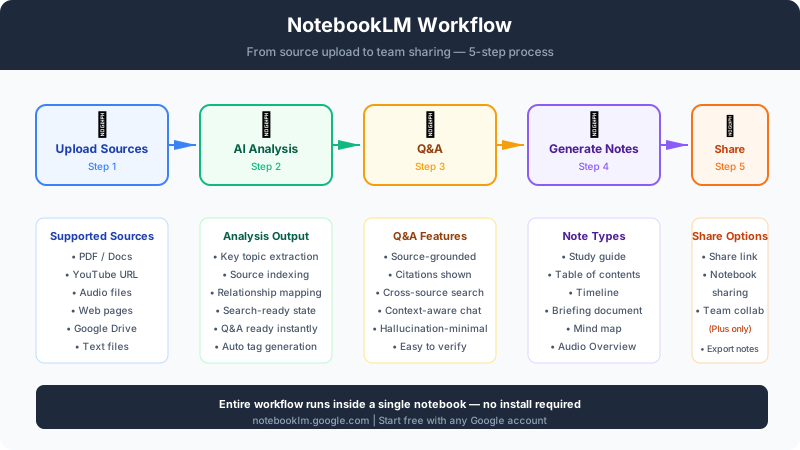
Here is what a typical NotebookLM session looks like end-to-end.
- Create a notebook: One notebook per project or topic.
- Upload sources: Add PDFs, paste YouTube URLs, link Google Docs.
- Wait for analysis: Happens automatically on upload. Large source sets may take a few minutes.
- Ask questions: Use the chat panel to query your sources, or explore the AI-suggested questions that appear after upload.
- Generate notes: Choose whichever auto-note formats fit your needs.
- Create an Audio Overview: Produce a podcast summary of the full notebook.
- Share: Share the notebook link with collaborators (Plus plan) or export generated notes for use elsewhere.
The entire workflow runs in a browser. No installation required. Start at notebooklm.google.com with any Google account.
Three Real-World Use Cases #
Use Case 1: Academic Literature Review #
Situation: A graduate student needs to review twenty prior studies before writing a thesis chapter.
Approach: Upload all twenty PDFs into one notebook. Ask questions like “What research gaps do these studies collectively identify?” and “Which papers use the most rigorous methodology?” Use the Timeline feature to trace how the field’s consensus has shifted over time.
Result: The core arguments and relationships across all twenty papers become navigable in minutes rather than days. Time spent on the initial literature review drops by 60–70%.
Use Case 2: Business Report Analysis #
Situation: A consultant must analyze annual reports from three competitors alongside three industry research reports.
Approach: Upload all six documents. Ask “How do the three companies’ AI investment strategies differ?” and “Which risks highlighted in the industry reports is Company A not addressing in their annual report?”
Result: The Briefing Document feature produces an executive summary ready for a management presentation. Cross-source synthesis surfaces competitive insights that reading each document individually would likely miss.
Use Case 3: Self-Directed Course Learning #
Situation: A working professional is learning a new field using a YouTube lecture series and accompanying PDF handouts.
Approach: Add ten YouTube lecture URLs and the PDF materials into one notebook. Generate a Study Guide to structure the learning. Use Q&A to dig deeper into concepts that weren’t clear in the lectures. Create an Audio Overview to review the material during commutes.
Result: Passive video watching becomes an active, structured learning experience. The Study Guide eliminates the need to manually take notes, and Audio Overviews extend learning time into otherwise idle parts of the day.
NotebookLM Plus — Plan Comparison #
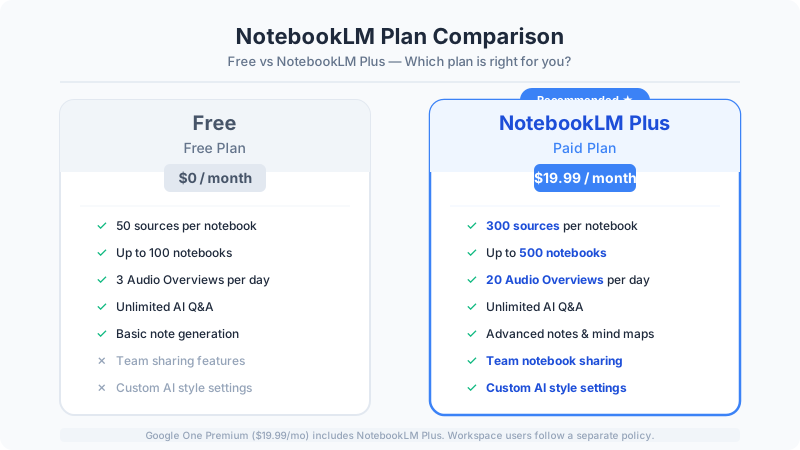
| Feature | Free | NotebookLM Plus |
|---|---|---|
| Monthly price | $0 | $19.99 |
| Sources per notebook | 50 | 300 |
| Notebooks | 100 | 500 |
| Audio Overviews | 3/day | 20/day |
| Team sharing | ❌ | ✅ |
| Custom AI style | ❌ | ✅ |
| Support | Standard | Priority |
NotebookLM Plus launched in late 2024 and is included in the Google One Premium subscription ($19.99/month). If you already subscribe to Google One Premium, Plus features are available at no additional cost.
The team sharing feature allows multiple users to collaborate on the same notebook — uploading sources, running Q&A, and generating notes together. This makes NotebookLM a viable shared research environment for small teams.
For most individual users, the free plan is more than sufficient as a starting point. If you find yourself hitting the three-daily Audio Overview limit regularly, or if your projects routinely involve more than 50 sources, the Plus upgrade is worth evaluating.
Caveats and Limitations #
Privacy considerations: Uploaded sources are tied to your Google account and are not visible to other users. That said, exercise judgment before uploading confidential documents, proprietary data, or personal information. Organizations should verify compatibility with their data governance policies before deploying NotebookLM for sensitive work.
Source-only knowledge: NotebookLM cannot access the internet or answer from general knowledge. It cannot tell you today’s news, current stock prices, or any information not present in your uploaded sources. This is a feature for accuracy but a genuine limitation when real-time information is needed.
Transcript dependency for YouTube: YouTube sources are analyzed via their transcripts (including auto-generated captions). Poor-quality auto-captions produce poor-quality analysis. For critical video sources, verify that the transcript is accurate before relying on the results.
Language nuance: NotebookLM handles English sources with greater depth and accuracy than other languages. For non-English documents, results are generally good but may occasionally miss idiomatic meaning or cultural context.
Conclusion #
Google NotebookLM addresses a problem that has grown more acute as the volume of available information has exploded: how do you extract reliable insight from a large, heterogeneous set of documents without reading every word? Its answer — restrict the AI to your sources, enforce citations, and let the user verify every claim — is a meaningful departure from how most AI tools are designed.
For researchers who need to synthesize literature, analysts processing large document sets, or learners who want to convert passive reading into active dialogue, NotebookLM delivers a qualitatively different experience from general AI assistants. The Audio Overview feature in particular opens a new modality: research you can listen to.
The free tier makes it easy to evaluate without commitment. Head to notebooklm.google.com, create a notebook, upload one PDF that matters to your current work, and ask it a question that would normally take you an hour to answer. The result will tell you everything you need to know about whether NotebookLM belongs in your toolkit.