In 2026, AI research tools have evolved well beyond simple search engines. AI Deep Research accepts a user’s question, autonomously explores dozens of web sources, cross-validates data, and automatically generates expert-level reports. This guide fully analyzes the Deep Research capabilities offered by Perplexity, Google Gemini, ChatGPT, and Claude.
What Is Deep Research? #
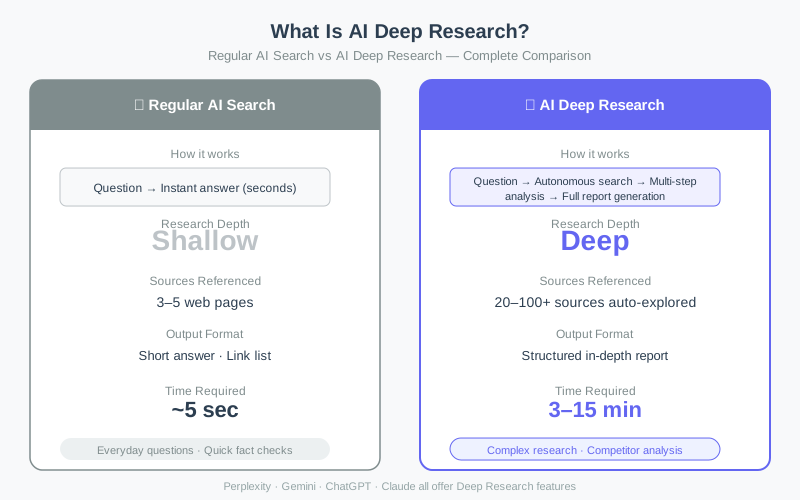
Regular AI search takes a question, references 3–5 web pages, and returns a short answer in seconds. Deep Research operates entirely differently.
Limitations of regular AI search:
- Sources referenced: 3–5 web pages
- Time required: ~5 seconds
- Output: Short answer + link list
- Best for: Everyday questions, quick fact checks
What Deep Research delivers:
- Sources referenced: 20–100+ autonomously explored
- Time required: 3–15 minutes
- Output: Structured in-depth report with table of contents
- Best for: Market research, competitive analysis, academic research
The engine of Deep Research is an autonomous agent. Rather than simply listing search results, the AI decides its own exploration path, evaluates source credibility, reconciles conflicting information, and produces a structured, citation-backed report — behaving like a skilled human researcher operating independently.
Key Metrics Comparison Across All Four Platforms #
Perplexity Deep Research #
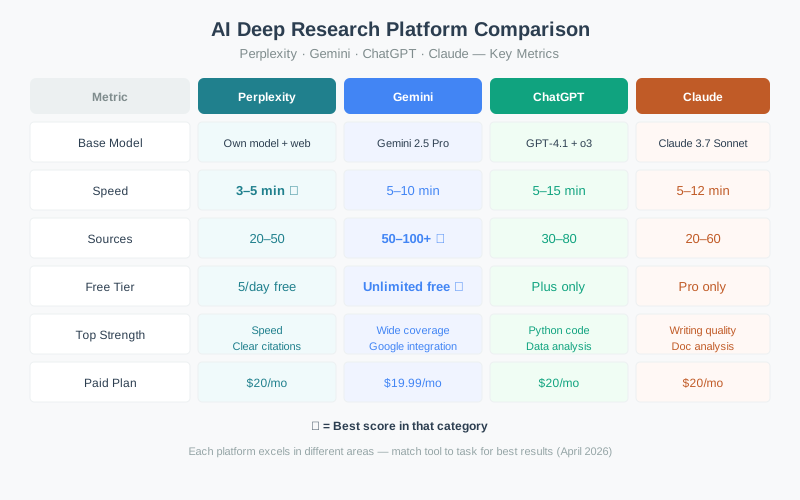
Perplexity is the first mover in the Deep Research market, combining its proprietary model with real-time web search to deliver the fastest results.
- Speed: 3–5 minutes (fastest of the four)
- Sources: 20–50
- Free tier: 5/day free (Pro: $20/month)
- Strengths: Clear citations, fast turnaround, news and fact-checking
- Weaknesses: Fewer sources than competitors
Perplexity’s citation system is its standout feature. Every sentence in the report carries a source number; clicking it navigates directly to the original source. It’s the best choice when you need the latest news or rapid fact verification.
Google Gemini Deep Research #
Gemini’s Deep Research leverages Google’s massive search infrastructure to explore more sources than any competitor — and it’s entirely free to use.
- Speed: 5–10 minutes
- Sources: 50–100+ (most of any platform)
- Free tier: Unlimited free (Gemini Advanced: $19.99/month)
- Strengths: Widest source coverage, Google ecosystem integration, unlimited free use
- Weaknesses: Output can be lengthy and occasionally less structured
Integration with Google Docs and Google Sheets is seamless. You can export research results directly to Docs or organize data into Sheets. It’s the ideal choice for market research and academic work where comprehensive source collection matters most.
ChatGPT Deep Research #
OpenAI’s Deep Research is distinguished by its data analysis and Python code execution capabilities, combining GPT-4.1’s reasoning with o3’s deep thinking.
- Speed: 5–15 minutes
- Sources: 30–80
- Free tier: Plus plan required ($20/month)
- Strengths: Data analysis, Python execution, numerical computation
- Weaknesses: No free tier, relatively slower
ChatGPT Deep Research’s unique advantage is its Code Interpreter integration. It goes beyond generating text reports — it analyzes collected data with Python, creates charts, and computes statistics. It’s the best pick for investment analysis, technical benchmark comparisons, and data-driven decision-making.
Claude Deep Research #
Anthropic’s Claude Deep Research stands apart on writing quality. It produces the most naturally written, logically structured reports from the information it gathers.
- Speed: 5–12 minutes
- Sources: 20–60
- Free tier: Pro plan required ($20/month)
- Strengths: Best-in-class writing quality, document analysis, logical structure
- Weaknesses: No free tier, fewer sources relative to competitors
Claude is particularly powerful when you feed it long documents or PDFs as input for Deep Research. Its ability to process complex materials — legal documents, academic papers, technical specifications — and extract key insights is exceptional.
How Deep Research Works #
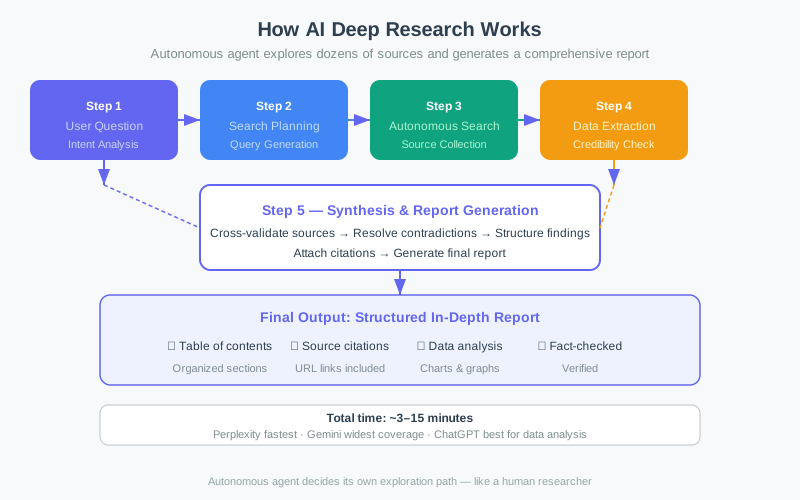
Understanding how Deep Research works helps you use it more effectively.
Step 1: Query Analysis #
The AI parses the user’s question to understand intent and extract core concepts. From “AI model market trends in 2026,” it derives key terms like “2026,” “AI models,” “market trends,” and maps out research directions.
Step 2: Search Planning #
Multiple search queries are generated to collect information from diverse angles — not just keyword searches but a planned strategy targeting academic papers, industry reports, expert commentary, and recent news.
Step 3: Autonomous Exploration #
The AI executes the queries, explores dozens of sources, evaluates each for credibility and relevance, and extracts useful information. When initial results surface new keywords, it autonomously extends the search.
Step 4: Data Extraction and Credibility Check #
Key facts, figures, and quotations are extracted from collected sources. The AI cross-validates the same facts across multiple sources and flags contradictions.
Step 5: Report Generation #
The verified information is synthesized into a structured report with a table of contents, sectioned analysis, data visualizations, and citation links — a professional-grade output, fully automated.
The entire process runs without human intervention. Total time: 3–15 minutes. A human researcher doing equivalent work would need hours to days.
Top 6 Real-World Use Cases #
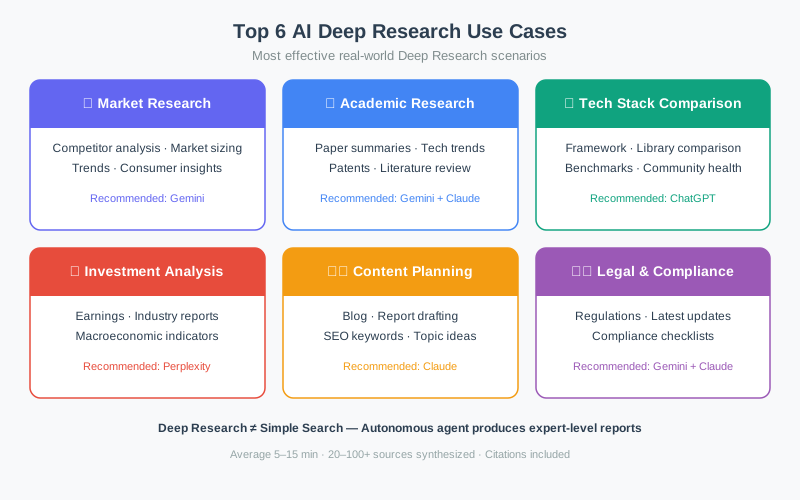
1. Market Research (Recommended: Gemini) #
Before entering a new market, Deep Research collects market size, competitive landscape, and consumer trends. Gemini’s 50–100+ source exploration produces comprehensive market research reports.
Example prompt: “SaaS B2B market in South Korea — current state and 2026 outlook analysis”
2. Academic Research (Recommended: Gemini + Claude) #
For paper summaries, technology trend tracking, and literature reviews, a two-stage workflow is most effective: use Gemini for broad paper collection, then Claude to refine and structure the key findings.
Example prompt: “Latest research trends in improving reasoning capabilities of large language models”
3. Tech Stack Comparison (Recommended: ChatGPT) #
ChatGPT is the best choice for comparing frameworks, libraries, and cloud services. Its ability to compute benchmarks directly in Python and generate charts makes it uniquely suited for technical comparisons.
Example prompt: “Next.js vs Remix vs Astro — 2026 frontend framework comparison”
4. Investment Analysis (Recommended: Perplexity) #
For rapid collection and analysis of earnings data, industry trends, and macroeconomic indicators, Perplexity’s speed and clear citations make it the right tool.
Example prompt: “NVIDIA Q1 2026 earnings analysis and AI semiconductor market outlook”
5. Content Planning (Recommended: Claude) #
Claude is ideal for research feeding blog posts, reports, and newsletters. Its superior writing quality means collected information is refined into the most readable, shareable form.
Example prompt: “Top 10 AI tools developers need to know in 2026 — content research”
6. Legal & Compliance (Recommended: Gemini + Claude) #
For gathering regulatory status, tracking legal amendments, and building compliance checklists, combine Gemini’s broad regulatory coverage with Claude’s precise, well-structured output.
Example prompt: “EU AI Act compliance checklist for Korean companies”
Platform Selection Guide #
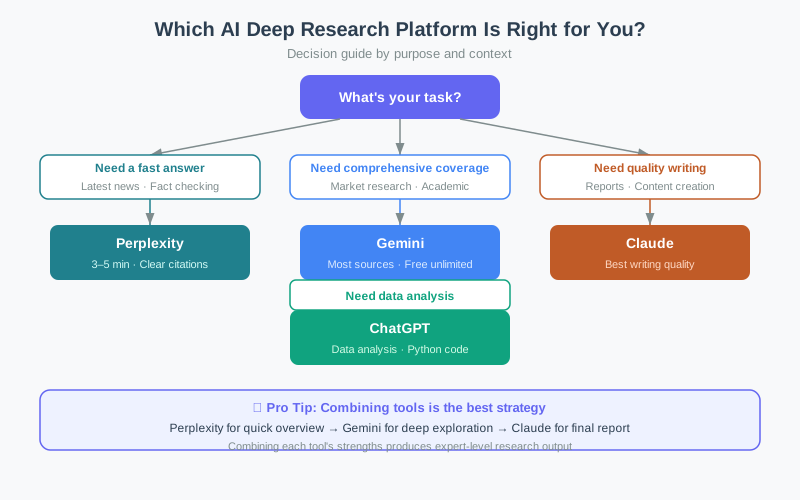
Here’s how to pick the right platform for each situation.
Need a fast answer → Perplexity For latest news, fact checks, and quick market overviews, Perplexity is the best choice. You get a clearly cited report in 3–5 minutes.
Need comprehensive coverage → Gemini When maximum source breadth matters — market research, academic work — Gemini is the clear winner. Unlimited free use means no cost barrier for repeated research.
Need data analysis → ChatGPT For numerical data analysis, chart generation, and Python-driven computation, ChatGPT is unmatched.
Need quality writing → Claude When the final report’s writing quality, logical structure, and readability are paramount — especially for reports you’ll share externally — choose Claude.
Practical Tips for Getting the Most from Deep Research #
1. Write specific questions #
“AI trends” returns generic results. “Q2 2026 AI agent market trends, key players, and investment activity” returns targeted, actionable research. Specificity is everything.
2. State the purpose and audience #
“A 10-minute presentation for investors” or “a technical comparison for a CTO evaluating adoption” tells the AI how to frame the report and raises output quality substantially.
3. Use the combination strategy #
The most powerful workflow combines platforms:
- Perplexity → Quick overview and latest information
- Gemini → Deep exploration across a wide source base
- Claude → Polish the findings into a polished final report
This three-step workflow maximizes each platform’s strengths, producing expert-level research output.
4. Verify critical outputs #
Deep Research is powerful but not infallible. For important figures and facts, check the original sources directly. Always verify the date on time-sensitive data.
How to Start for Free #
If you’re new to Deep Research, start with Gemini — all you need is a Google account for unlimited free access.
- Go to gemini.google.com
- Select “Deep Research” from the left menu
- Enter your research topic and run
- Export results to Google Docs
Perplexity also offers 5 free Deep Research queries per day. Running both in parallel gives you a powerful free Deep Research workflow with no subscription required.
Conclusion: Deep Research Is No Longer Optional #
AI Deep Research is fundamentally changing how knowledge work gets done in 2026. Market research, competitive analysis, and trend tracking that once took hours now completes in under 15 minutes. All four platforms have distinct strengths — the key is matching the tool to the task, or combining them for maximum effect.
If you haven’t yet integrated Deep Research into your workflow, now is the time. Start with Gemini’s free tier and experience the power firsthand.