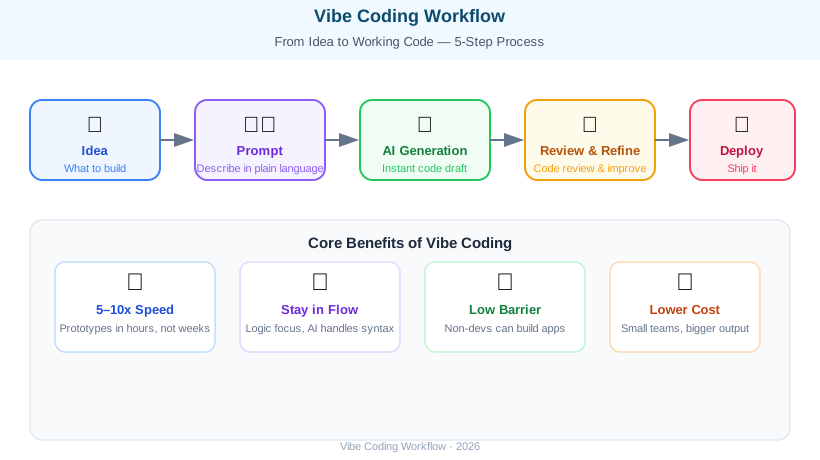
In late 2025, AI researcher Andrej Karpathy — formerly of Tesla and OpenAI — posted a short message on X: “I’ve been doing vibe coding lately. I don’t memorize syntax or worry about code. I just tell the AI what I want and run what it generates.” That brief post sent shockwaves through the developer community, and “vibe coding” has since become one of the hottest terms in software development heading into 2026.
Vibe coding is a new development paradigm that moves away from typing code line-by-line, instead describing what you want in natural language to an AI tool and then reviewing, testing, and refining the generated output. The name comes from coding “by vibe” — going with the flow of ideas rather than wrestling with syntax. It’s revolutionary because non-developers can build apps, and experienced developers can multiply their productivity five to ten times.
What Is Vibe Coding? #
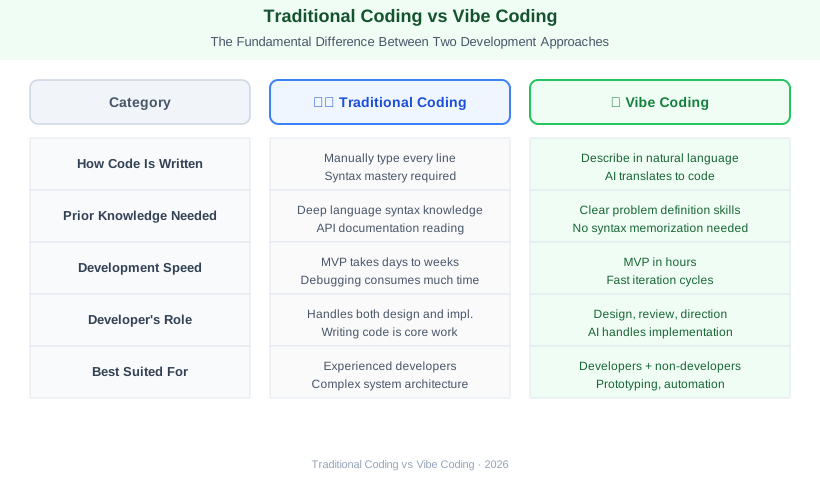
The heart of vibe coding is a clear division of labor: humans focus on the “what,” AI handles the “how.” Developers define problems, design architecture, and judge code quality. The AI writes the actual code, manages syntax, and handles repetitive boilerplate.
The contrast with traditional development is stark.
Traditional coding demands memorizing language syntax, reading API documentation, and spending significant time debugging. Turning an idea into working code can take days or weeks.
Vibe coding lets you describe a feature in plain language and get a working draft in seconds. You review it, run it, and steer it in the right direction. Initial prototypes can be ready in hours.
Why Vibe Coding Is Now Possible #
Between 2024 and 2026, the code-generation capabilities of large language models (LLMs) improved dramatically. Models like Claude 3.5 Sonnet, GPT-4o, and Gemini 1.5 Pro were trained on tens of millions of lines of open-source code and can now generate complex logic with high accuracy. The emergence of dedicated tools like Claude Code, Cursor, and GitHub Copilot brought AI natively into the IDE, making vibe coding a practical everyday workflow.
Top AI Coding Tools Compared #
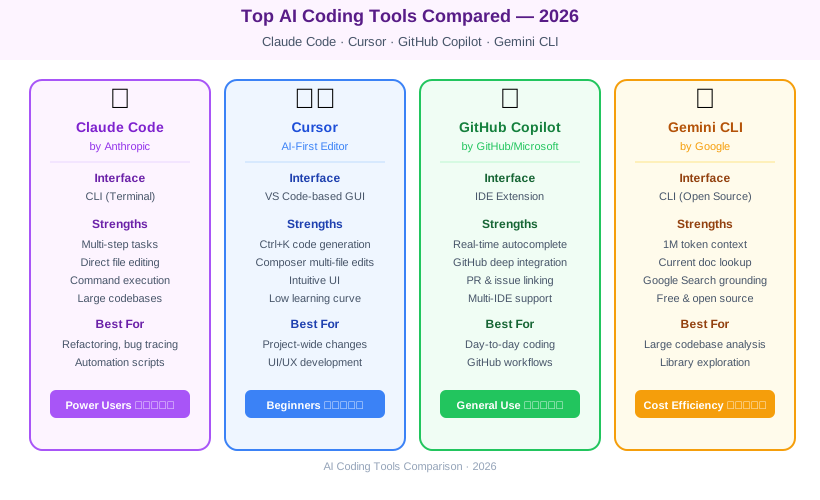
The tools enabling vibe coding each have distinct strengths. Here’s how the leading options stack up in 2026.
1. Claude Code (Anthropic) #
A terminal-based CLI agent that integrates deeply with your actual development environment — reading files, making edits, and running commands directly. CLAUDE.md files let it remember project-specific context across sessions. It excels at multi-step tasks: large codebase refactoring, bug tracing, and writing automation scripts.
2. Cursor #
An AI-first code editor built on VS Code, making the onboarding curve minimal for developers already familiar with that environment. Quick keyboard shortcuts (Ctrl+K for code generation, Ctrl+L for chat) make AI interactions feel natural. The Composer feature handles multi-file edits in one pass, making it especially useful for sweeping project-wide changes.
3. GitHub Copilot #
Deeply integrated with GitHub and compatible with VS Code, JetBrains, Neovim, and more. Its signature feature is real-time inline autocompletion — predicting your next line as you type. It also ties into GitHub repositories, pull requests, and issues, making it useful across the full development workflow.
4. Gemini CLI (Google) #
A terminal CLI for Google’s Gemini models, open-sourced and available to all. Backed by Google’s search capabilities, it’s particularly strong at referencing current documentation and libraries. Its context window supports up to one million tokens, making it well-suited for analyzing large codebases in a single session.
Real-World Use Cases #
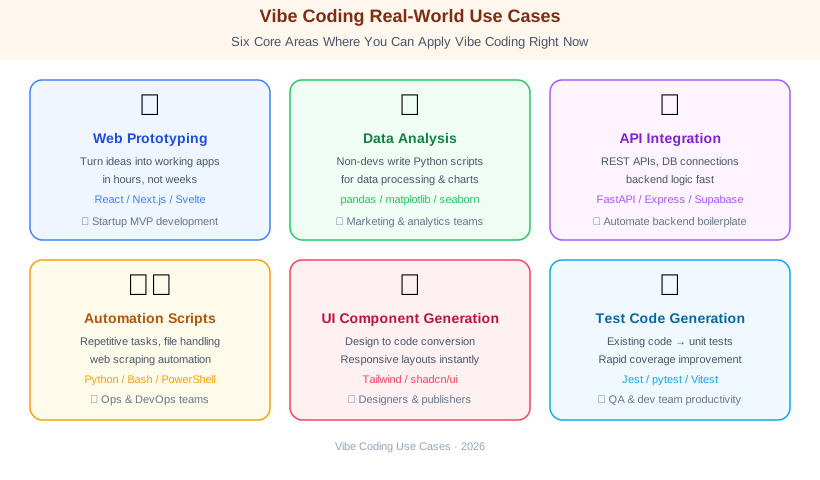
Vibe coding isn’t theoretical — it’s being used across a wide range of real scenarios today.
Web Prototyping: Startup founders and product managers are building MVPs to validate ideas without hiring engineers upfront. A prompt like “Build a React app with user authentication, post creation, and comments using Supabase” can yield a working scaffold in minutes.
Data Analysis and Automation: Non-developer analysts and marketers are writing Python scripts directly. Parsing Excel files, cleaning data, plotting charts, and generating reports — all without formal programming backgrounds. The barrier to automation has essentially collapsed.
API Integration and Backend Development: Repetitive, well-structured tasks like REST API wiring, database queries, and server logic are where AI shines most. Engineers stay focused on design and review; AI handles the implementation.
Test Code Generation: Show AI an existing function and say “write unit tests for this.” It generates test cases instantly. Teams are dramatically improving test coverage without dedicating extra engineering hours to it.
Vibe Coding Best Practices #
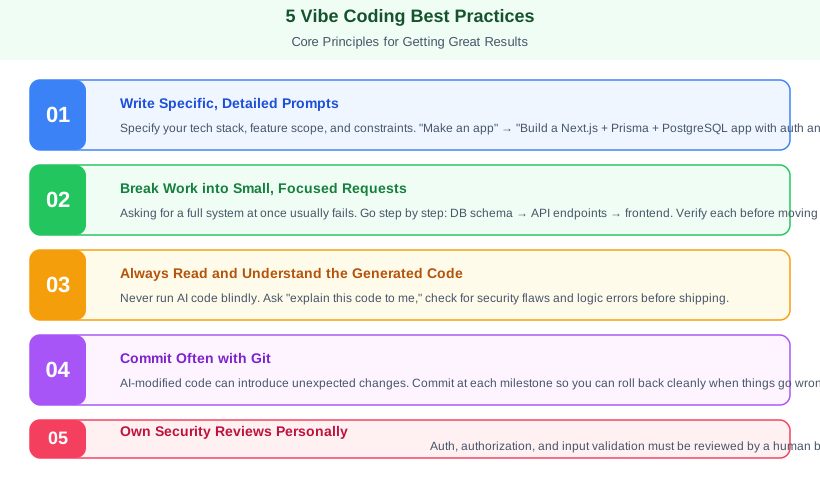
Getting good results from vibe coding depends on following a few key principles.
1. Write Specific, Detailed Prompts “Make an app” is too vague. Instead, write: “Using Next.js 14 App Router, build a blog app with user authentication via NextAuth.js, post CRUD operations, and comments. Use PostgreSQL for the database and Prisma as the ORM.” The more you specify the tech stack, feature scope, and constraints, the higher the quality of the output.
2. Make Small, Focused Requests Asking AI to build an entire system in one shot often produces inconsistent results. Break the work into small units and build iteratively: “First, design the database schema → next, build the API endpoints → finally, connect the frontend.” Each step can be verified before moving on.
3. Always Read and Understand the Generated Code Running AI-generated code blindly is risky. Review it for logical correctness, security vulnerabilities, and alignment with your business requirements. Ask the AI “explain this code to me” if anything is unclear — it will walk through each section in plain language.
4. Commit Often with Git AI-modified code can introduce unexpected changes. Make a commit at each meaningful step so you can easily roll back if something goes wrong.
5. Own Security Reviews Personally Authentication, authorization, input validation, and data handling must be reviewed by a human. AI follows general patterns well but can miss context-specific security requirements that only you fully understand.
Limitations and Cautions #
Vibe coding is powerful, but it’s not magic. Knowing its limits protects you from real problems.
AI Hallucinations: AI will confidently generate calls to methods that don’t exist or use APIs incorrectly. Always verify generated code against official documentation before shipping.
Complex Business Logic: Domain-specific rules, nuanced regulatory requirements, or deeply layered legacy systems still require experienced developers with deep contextual understanding.
Skill Atrophy Risk: Over-relying on AI-generated code without understanding it can erode your own technical skills over time. Use AI as a tool, but keep investing in understanding core concepts yourself.
License Exposure: AI may reproduce portions of copyrighted or specifically licensed open-source code. For commercial projects, legal review of AI-generated outputs is worth considering.
In 2026, Vibe Coding Is No Longer Optional #
Vibe coding is lowering the barrier to software creation, maximizing senior developer productivity, and accelerating the pace of software delivery. The productivity gap between teams that have adopted it and those that haven’t is growing wider by the month.
The critical insight is that AI isn’t replacing developers — developers who use AI well are replacing those who don’t. Writing clear prompts, judging generated code critically, and designing systems that hold together are still fully human skills.
Vibe coding is a tool. And the person who uses the tool well builds better things. Install Claude Code or Cursor today, describe a problem you’ve been sitting on, and see how fast it comes together. The result might surprise you.