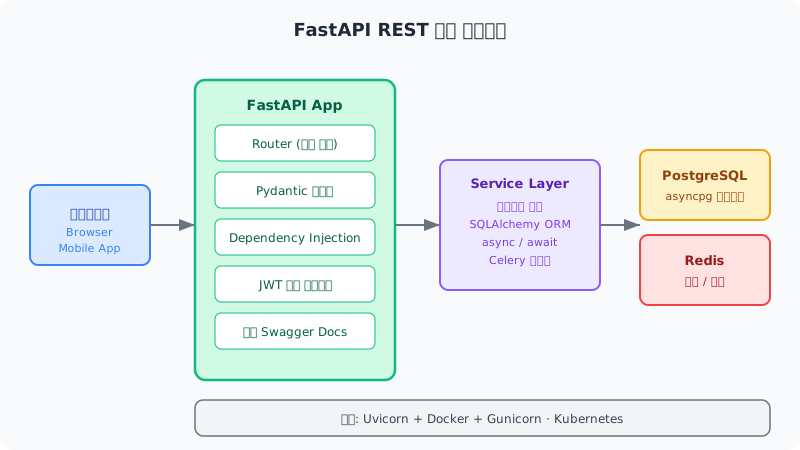
2025년 말, FastAPI는 GitHub 스타 수에서 Flask를 추월했습니다. 88,000개의 스타. Python 웹 프레임워크 중 가장 빠르게 성장한 프레임워크입니다. Microsoft, Netflix, Uber가 새 서비스를 FastAPI로 표준화하고 있다는 뉴스도 나왔습니다.
왜 이렇게 빠르게 성장했을까요? 직접 써보면 압니다. 코드를 쓰는 순간 자동으로 Swagger 문서가 생성되고, 타입 힌트만 써도 입력 검증이 됩니다. Flask 대비 API 개발 시간이 30~40% 단축된다는 게 과장이 아닙니다.
이 글에서는 FastAPI로 실제 작동하는 REST API 서버를 처음부터 만드는 과정을 단계별로 안내합니다.
환경 설정
#
Python 3.11 이상을 권장합니다.
1
2
3
4
5
6
# 가상환경 생성
python -m venv venv
source venv/bin/activate # Windows: venv\Scripts\activate
# 패키지 설치
pip install fastapi uvicorn[ standard] sqlalchemy pydantic-settings python-jose[ cryptography] passlib[ bcrypt]
첫 번째 API — 10분 버전
#
 1
 2
 3
 4
 5
 6
 7
 8
 9
10
11
12
13
14
15
16
# main.py
from fastapi import FastAPI
app = FastAPI(
title= "My API" ,
description= "FastAPI 입문 예제" ,
version= "1.0.0"
)
@app.get ( "/" )
def read_root ():
return { "message" : "Hello, FastAPI!" }
@app.get ( "/items/ {item_id} " )
def read_item ( item_id: int , q: str | None = None ):
return { "item_id" : item_id, "q" : q}
1
uvicorn main:app --reload
http://localhost:8000/docs에 접속하면 Swagger UI가 자동으로 생성되어 있습니다. 코드 몇 줄만 써도 바로 API를 테스트할 수 있습니다.
이게 FastAPI가 사랑받는 이유입니다. 문서화를 따로 작성할 필요가 없습니다.
Pydantic으로 데이터 검증
#
FastAPI의 핵심은 Pydantic과의 통합입니다. 스키마를 정의하면 입력 검증, 직렬화, 문서화가 자동입니다.
 1
 2
 3
 4
 5
 6
 7
 8
 9
10
11
12
13
14
15
16
17
18
19
20
21
22
23
24
25
26
27
28
29
from pydantic import BaseModel, EmailStr, validator
from datetime import datetime
class UserCreate ( BaseModel):
name: str
email: EmailStr
age: int
@validator ( 'age' )
def age_must_be_positive ( cls , v):
if v < 0 or v > 150 :
raise ValueError( '나이는 0~150 사이여야 합니다' )
return v
class UserResponse ( BaseModel):
id : int
name: str
email: EmailStr
created_at: datetime
class Config :
from_attributes = True # SQLAlchemy 모델과 호환
@app.post ( "/users" , response_model= UserResponse, status_code= 201 )
def create_user ( user: UserCreate):
# user.name, user.email은 이미 검증 완료
# 잘못된 데이터가 들어오면 FastAPI가 422 에러를 자동으로 반환
db_user = save_to_db( user)
return db_user
email: EmailStr이라고만 써도 이메일 형식 검증이 됩니다. 별도 검증 코드 없이 타입 힌트만으로 처리됩니다.
SQLAlchemy ORM + 비동기 DB
#
실제 프로젝트에서는 데이터베이스가 필요합니다. FastAPI는 비동기(async)를 지원하므로 asyncpg와 조합하면 고성능 DB 처리가 가능합니다.
 1
 2
 3
 4
 5
 6
 7
 8
 9
10
11
12
13
14
15
16
17
18
19
20
21
22
23
24
# database.py
from sqlalchemy.ext.asyncio import create_async_engine, AsyncSession
from sqlalchemy.orm import DeclarativeBase, sessionmaker
DATABASE_URL = "postgresql+asyncpg://user:password@localhost/dbname"
engine = create_async_engine( DATABASE_URL, echo= True )
AsyncSessionLocal = sessionmaker( engine, class_= AsyncSession, expire_on_commit= False )
class Base ( DeclarativeBase):
pass
# models.py
from sqlalchemy import String, Integer, DateTime
from sqlalchemy.orm import Mapped, mapped_column
from datetime import datetime
class User ( Base):
__tablename__ = "users"
id : Mapped[ int ] = mapped_column( Integer, primary_key= True )
name: Mapped[ str ] = mapped_column( String( 100 ))
email: Mapped[ str ] = mapped_column( String( 255 ), unique= True )
created_at: Mapped[ datetime] = mapped_column( DateTime, default= datetime. utcnow)
 1
 2
 3
 4
 5
 6
 7
 8
 9
10
11
12
13
14
15
16
17
18
# Dependency Injection으로 DB 세션 주입
from fastapi import Depends
from sqlalchemy.ext.asyncio import AsyncSession
async def get_db ():
async with AsyncSessionLocal() as session:
yield session
@app.post ( "/users" , response_model= UserResponse)
async def create_user (
user: UserCreate,
db: AsyncSession = Depends( get_db)
):
db_user = User( ** user. model_dump())
db. add( db_user)
await db. commit()
await db. refresh( db_user)
return db_user
Depends(get_db) 하나로 DB 세션 주입이 완료됩니다. 세션 열기/닫기, 예외 시 롤백 등은 get_db 함수가 알아서 처리합니다.
JWT 인증 구현
#
 1
 2
 3
 4
 5
 6
 7
 8
 9
10
11
12
13
14
15
16
17
18
19
20
21
22
23
24
25
26
27
28
29
30
31
32
33
34
35
36
37
38
39
# auth.py
from datetime import datetime, timedelta
from jose import JWTError, jwt
from passlib.context import CryptContext
from fastapi import HTTPException, status
from fastapi.security import OAuth2PasswordBearer
SECRET_KEY = "your-secret-key" # 실제로는 환경변수로 관리
ALGORITHM = "HS256"
ACCESS_TOKEN_EXPIRE_MINUTES = 30
pwd_context = CryptContext( schemes= [ "bcrypt" ], deprecated= "auto" )
oauth2_scheme = OAuth2PasswordBearer( tokenUrl= "token" )
def create_access_token ( data: dict ) -> str :
to_encode = data. copy()
expire = datetime. utcnow() + timedelta( minutes= ACCESS_TOKEN_EXPIRE_MINUTES)
to_encode. update({ "exp" : expire})
return jwt. encode( to_encode, SECRET_KEY, algorithm= ALGORITHM)
async def get_current_user ( token: str = Depends( oauth2_scheme)):
credentials_exception = HTTPException(
status_code= status. HTTP_401_UNAUTHORIZED,
detail= "인증에 실패했습니다" ,
headers= { "WWW-Authenticate" : "Bearer" },
)
try :
payload = jwt. decode( token, SECRET_KEY, algorithms= [ ALGORITHM])
user_id: str = payload. get( "sub" )
if user_id is None :
raise credentials_exception
except JWTError:
raise credentials_exception
return user_id
# 보호된 엔드포인트
@app.get ( "/me" )
async def read_current_user ( current_user_id: str = Depends( get_current_user)):
return { "user_id" : current_user_id}
라우터로 코드 분리
#
API가 커지면 main.py에 모든 것을 넣으면 안 됩니다. 라우터로 분리합니다.
 1
 2
 3
 4
 5
 6
 7
 8
 9
10
11
12
13
14
15
16
17
18
19
20
# routers/users.py
from fastapi import APIRouter
router = APIRouter( prefix= "/users" , tags= [ "users" ])
@router.get ( "/ {user_id} " )
async def get_user ( user_id: int , db: AsyncSession = Depends( get_db)):
...
@router.post ( "/" )
async def create_user ( user: UserCreate, db: AsyncSession = Depends( get_db)):
...
# main.py
from routers import users, posts, auth
app = FastAPI()
app. include_router( users. router)
app. include_router( posts. router)
app. include_router( auth. router)
CORS 설정
#
프론트엔드(React, Vue 등)와 연동할 때 CORS 설정이 필요합니다.
1
2
3
4
5
6
7
8
9
from fastapi.middleware.cors import CORSMiddleware
app. add_middleware(
CORSMiddleware,
allow_origins= [ "http://localhost:3000" , "https://yourdomain.com" ],
allow_credentials= True ,
allow_methods= [ "*" ],
allow_headers= [ "*" ],
)
Docker로 배포
#
 1
 2
 3
 4
 5
 6
 7
 8
 9
10
11
# Dockerfile
FROM python:3.11-slim
WORKDIR /app
COPY requirements.txt .
RUN pip install --no-cache-dir -r requirements.txt
COPY . .
CMD [ "uvicorn" , "main:app" , "--host" , "0.0.0.0" , "--port" , "8000" ]
 1
 2
 3
 4
 5
 6
 7
 8
 9
10
11
12
13
14
15
16
17
18
19
20
21
22
23
# docker-compose.yml
version : '3.8'
services :
api :
build : .
ports :
- "8000:8000"
environment :
- DATABASE_URL=postgresql+asyncpg://postgres:password@db/mydb
depends_on :
- db
db :
image : postgres:16
environment :
POSTGRES_PASSWORD : password
POSTGRES_DB : mydb
volumes :
- postgres_data:/var/lib/postgresql/data
volumes :
postgres_data:
FastAPI vs Django vs Flask 선택 기준
#
2026년 기준으로 제 추천은 다음과 같습니다.
FastAPI : API 서버, 마이크로서비스, ML 모델 서빙. 비동기 처리가 중요한 경우. 신규 프로젝트라면 첫 번째 선택.
Django : 어드민 패널이 필요한 경우. 모놀리식 웹 앱. ORM과 인증 등 배터리 포함 방식이 필요한 경우.
Flask : 초소형 서비스, 학습용. 레거시 Flask 프로젝트 유지보수.
FastAPI의 학습 곡선은 낮습니다. Python 기초와 타입 힌트를 알면 하루 만에 첫 API를 만들 수 있습니다. 시작해보시길 권합니다.