본문으로 건너뛰기

Claude API로 나만의 AI 에이전트 만들기 — Python SDK 실전 튜토리얼

·1931 단어수·10 분
작성자
Engineer

AI 에이전트를 직접 만들어보고 싶다는 생각은 많이들 하지만, 막상 시작하려면 어디서부터 해야 할지 막막합니다. “LLM을 API로 호출하는 건 해봤는데, 에이전트는 어떻게 다른 거지?“라는 질문이 출발점이 됩니다.

이 글에서는 Claude API와 Python SDK를 사용해서 실제로 동작하는 AI 에이전트를 단계별로 만들어봅니다. 기본 API 호출에서 시작해서 Tool Use, 그리고 완전한 에이전트 루프까지 이어집니다.

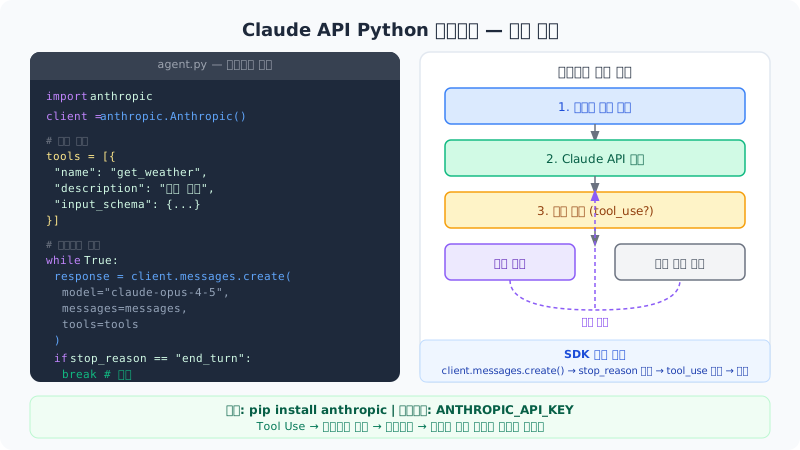
Claude API Python 에이전트 — 실행 흐름

에이전트란 무엇인가요?
#

단순 LLM 호출과 에이전트의 차이를 먼저 이해해야 합니다.

단순 LLM 호출: 질문 → 답변. 한 번의 요청과 응답으로 끝납니다.

AI 에이전트: 목표 → (도구 실행 → 결과 분석 → 다음 행동 결정) 반복 → 최종 답변. 목표를 달성하기 위해 여러 단계를 자율적으로 실행합니다.

에이전트의 핵심은 세 가지입니다.

  1. 도구 사용(Tool Use): 웹 검색, 코드 실행, 데이터베이스 조회 등 외부 기능 활용
  2. 루프: 목표가 달성될 때까지 반복 실행
  3. 상태 관리: 이전 단계의 결과를 다음 단계에 활용

환경 설정
#

패키지 설치
#

1
pip install anthropic

필요에 따라 추가 패키지를 설치합니다.

1
pip install anthropic python-dotenv  # 환경변수 관리용

API 키 설정
#

Anthropic Console(console.anthropic.com)에서 API 키를 발급받습니다.

1
2
3
4
5
# Linux/macOS
export ANTHROPIC_API_KEY="sk-ant-..."

# Windows PowerShell
$env:ANTHROPIC_API_KEY = "sk-ant-..."

또는 .env 파일을 사용합니다.

1
ANTHROPIC_API_KEY=sk-ant-...
1
2
from dotenv import load_dotenv
load_dotenv()

1단계: 기본 API 호출
#

가장 단순한 형태부터 시작합니다.

 1
 2
 3
 4
 5
 6
 7
 8
 9
10
11
12
13
import anthropic

client = anthropic.Anthropic()

message = client.messages.create(
    model="claude-opus-4-5",
    max_tokens=1024,
    messages=[
        {"role": "user", "content": "Python에서 피보나치 수열을 생성하는 함수를 작성해줘"}
    ]
)

print(message.content[0].text)

응답 객체의 주요 필드를 이해하는 것이 중요합니다.

1
2
3
4
print(message.id)           # 메시지 ID
print(message.model)        # 사용된 모델
print(message.stop_reason)  # 종료 이유 (end_turn, tool_use 등)
print(message.usage)        # 토큰 사용량

2단계: 멀티턴 대화
#

에이전트는 대화 히스토리를 유지해야 합니다.

 1
 2
 3
 4
 5
 6
 7
 8
 9
10
11
12
13
14
15
16
17
18
19
20
21
22
23
24
25
26
27
28
29
30
31
32
33
34
35
import anthropic

client = anthropic.Anthropic()

def chat(messages: list, user_input: str) -> str:
    """멀티턴 대화 함수"""
    messages.append({
        "role": "user",
        "content": user_input
    })

    response = client.messages.create(
        model="claude-opus-4-5",
        max_tokens=1024,
        system="당신은 친절한 Python 코딩 어시스턴트입니다.",
        messages=messages
    )

    assistant_message = response.content[0].text
    messages.append({
        "role": "assistant",
        "content": assistant_message
    })

    return assistant_message


# 사용 예시
conversation = []

response1 = chat(conversation, "리스트 컴프리헨션이 뭐야?")
print(f"Claude: {response1}\n")

response2 = chat(conversation, "방금 설명한 내용으로 예시 코드 보여줘")
print(f"Claude: {response2}")

messages 리스트에 대화 내용을 계속 추가하는 방식으로 문맥이 유지됩니다.

3단계: Tool Use (도구 사용)
#

Tool Use는 에이전트를 만드는 핵심 기능입니다. Claude에게 사용할 수 있는 도구 목록을 알려주면, 필요할 때 해당 도구를 호출하도록 요청합니다.

도구 정의
#

도구는 JSON Schema 형식으로 정의합니다.

 1
 2
 3
 4
 5
 6
 7
 8
 9
10
11
12
13
14
15
16
17
18
19
20
21
22
23
24
25
26
27
28
29
30
31
32
33
34
35
tools = [
    {
        "name": "get_weather",
        "description": "특정 도시의 현재 날씨를 조회합니다.",
        "input_schema": {
            "type": "object",
            "properties": {
                "city": {
                    "type": "string",
                    "description": "날씨를 조회할 도시 이름 (예: Seoul, Tokyo)"
                },
                "unit": {
                    "type": "string",
                    "enum": ["celsius", "fahrenheit"],
                    "description": "온도 단위"
                }
            },
            "required": ["city"]
        }
    },
    {
        "name": "calculate",
        "description": "수학 계산을 수행합니다.",
        "input_schema": {
            "type": "object",
            "properties": {
                "expression": {
                    "type": "string",
                    "description": "계산할 수식 (예: '2 + 3 * 4')"
                }
            },
            "required": ["expression"]
        }
    }
]

도구 실행 함수 구현
#

Claude가 도구를 요청하면 실제로 실행할 함수가 필요합니다.

 1
 2
 3
 4
 5
 6
 7
 8
 9
10
11
12
13
14
15
16
17
18
19
20
21
22
23
24
25
26
27
28
29
30
31
32
33
34
35
36
37
38
39
40
41
42
43
44
45
46
47
import math

def get_weather(city: str, unit: str = "celsius") -> dict:
    """날씨 API 호출 (예시 - 실제 API 연동 필요)"""
    # 실제 구현에서는 OpenWeatherMap 등 API 사용
    weather_data = {
        "Seoul": {"temp": 18, "condition": "맑음", "humidity": 60},
        "Tokyo": {"temp": 22, "condition": "흐림", "humidity": 75},
        "New York": {"temp": 15, "condition": "비", "humidity": 80},
    }

    data = weather_data.get(city, {"temp": 20, "condition": "알 수 없음", "humidity": 50})

    if unit == "fahrenheit":
        data["temp"] = data["temp"] * 9/5 + 32

    return {
        "city": city,
        "temperature": data["temp"],
        "unit": unit,
        "condition": data["condition"],
        "humidity": data["humidity"]
    }


def calculate(expression: str) -> dict:
    """수식 계산"""
    try:
        # 안전한 계산 (eval 대신 제한된 표현식만 허용)
        allowed_names = {k: v for k, v in math.__dict__.items() if not k.startswith("_")}
        result = eval(expression, {"__builtins__": {}}, allowed_names)
        return {"result": result, "expression": expression}
    except Exception as e:
        return {"error": str(e), "expression": expression}


def execute_tool(tool_name: str, tool_input: dict) -> str:
    """도구 실행 디스패처"""
    if tool_name == "get_weather":
        result = get_weather(**tool_input)
    elif tool_name == "calculate":
        result = calculate(**tool_input)
    else:
        result = {"error": f"알 수 없는 도구: {tool_name}"}

    import json
    return json.dumps(result, ensure_ascii=False)

4단계: 에이전트 루프
#

Tool Use와 멀티턴 대화를 결합해서 완전한 에이전트 루프를 만듭니다.

 1
 2
 3
 4
 5
 6
 7
 8
 9
10
11
12
13
14
15
16
17
18
19
20
21
22
23
24
25
26
27
28
29
30
31
32
33
34
35
36
37
38
39
40
41
42
43
44
45
46
47
48
49
50
51
52
53
54
55
56
57
58
59
60
61
62
63
64
65
66
67
68
69
70
71
72
73
74
75
76
77
78
79
80
81
82
83
84
85
86
import anthropic
import json

client = anthropic.Anthropic()


def run_agent(user_request: str, tools: list) -> str:
    """
    에이전트 메인 루프

    Args:
        user_request: 사용자 요청
        tools: 사용 가능한 도구 목록

    Returns:
        최종 응답 텍스트
    """
    messages = [
        {"role": "user", "content": user_request}
    ]

    print(f"사용자: {user_request}\n")

    while True:
        # Claude API 호출
        response = client.messages.create(
            model="claude-opus-4-5",
            max_tokens=4096,
            tools=tools,
            messages=messages
        )

        print(f"[stop_reason: {response.stop_reason}]")

        # 최종 응답인 경우 루프 종료
        if response.stop_reason == "end_turn":
            # 텍스트 응답 추출
            final_response = ""
            for block in response.content:
                if hasattr(block, "text"):
                    final_response += block.text
            return final_response

        # 도구 사용 요청인 경우
        if response.stop_reason == "tool_use":
            # 어시스턴트 응답을 메시지 히스토리에 추가
            messages.append({
                "role": "assistant",
                "content": response.content
            })

            # 각 도구 실행
            tool_results = []
            for block in response.content:
                if block.type == "tool_use":
                    print(f"도구 실행: {block.name}({block.input})")

                    result = execute_tool(block.name, block.input)
                    print(f"도구 결과: {result}\n")

                    tool_results.append({
                        "type": "tool_result",
                        "tool_use_id": block.id,
                        "content": result
                    })

            # 도구 결과를 메시지에 추가
            messages.append({
                "role": "user",
                "content": tool_results
            })
        else:
            # 예상치 못한 stop_reason
            print(f"예상치 못한 stop_reason: {response.stop_reason}")
            break

    return "에이전트 실행 중 오류가 발생했습니다."


# 실행 예시
if __name__ == "__main__":
    result = run_agent(
        "서울과 도쿄의 날씨를 비교해주고, 두 도시 온도 차이를 계산해줘",
        tools
    )
    print(f"\n최종 답변:\n{result}")

실행하면 다음과 같은 흐름으로 동작합니다.

 1
 2
 3
 4
 5
 6
 7
 8
 9
10
11
12
13
14
15
16
사용자: 서울과 도쿄의 날씨를 비교해주고, 두 도시 온도 차이를 계산해줘

[stop_reason: tool_use]
도구 실행: get_weather({'city': 'Seoul', 'unit': 'celsius'})
도구 결과: {"city": "Seoul", "temperature": 18, ...}

도구 실행: get_weather({'city': 'Tokyo', 'unit': 'celsius'})
도구 결과: {"city": "Tokyo", "temperature": 22, ...}

도구 실행: calculate({'expression': '22 - 18'})
도구 결과: {"result": 4, "expression": "22 - 18"}

[stop_reason: end_turn]

최종 답변:
서울은 현재 18°C 맑음, 도쿄는 22°C 흐림입니다. 두 도시의 온도 차이는 4°C로...

5단계: 스트리밍 응답
#

응답이 긴 경우 스트리밍으로 실시간 출력합니다.

 1
 2
 3
 4
 5
 6
 7
 8
 9
10
11
12
13
def stream_response(user_input: str) -> None:
    """스트리밍 응답 출력"""
    with client.messages.stream(
        model="claude-opus-4-5",
        max_tokens=1024,
        messages=[{"role": "user", "content": user_input}]
    ) as stream:
        for text in stream.text_stream:
            print(text, end="", flush=True)
    print()  # 줄바꿈


stream_response("Python의 제너레이터를 간단하게 설명해줘")

6단계: 시스템 프롬프트로 에이전트 역할 정의
#

에이전트의 성격과 역할을 시스템 프롬프트로 정의합니다.

 1
 2
 3
 4
 5
 6
 7
 8
 9
10
11
12
13
14
15
16
17
18
19
20
21
22
23
24
25
26
27
28
29
30
31
32
33
34
35
36
37
38
39
40
41
def create_coding_agent(language: str = "Python") -> callable:
    """특정 언어 전문 코딩 에이전트 생성"""
    system_prompt = f"""당신은 {language} 전문 시니어 엔지니어입니다.

역할:
- 코드 리뷰 및 개선 제안
- 버그 분석 및 수정 방법 설명
- 베스트 프랙티스 안내
- 성능 최적화 조언

원칙:
- 항상 코드 예시와 함께 설명합니다
- 이유를 설명하지 않고 답변하지 않습니다
- 보안과 성능 양쪽을 고려합니다
- 간결하고 읽기 쉬운 코드를 지향합니다"""

    def agent(user_input: str, messages: list = None) -> str:
        if messages is None:
            messages = []

        messages.append({"role": "user", "content": user_input})

        response = client.messages.create(
            model="claude-opus-4-5",
            max_tokens=2048,
            system=system_prompt,
            messages=messages
        )

        reply = response.content[0].text
        messages.append({"role": "assistant", "content": reply})
        return reply

    return agent


# 사용 예시
python_expert = create_coding_agent("Python")
conversation = []

print(python_expert("이 코드의 문제점이 뭐야?\n\ndef get_users():\n    users = db.execute('SELECT * FROM users')\n    return users", conversation))
실전 에이전트 패턴
#

패턴 1: 파일 처리 에이전트
#

 1
 2
 3
 4
 5
 6
 7
 8
 9
10
11
12
13
14
15
16
17
18
19
20
21
22
23
24
25
26
27
28
29
30
31
32
33
34
35
36
37
38
39
40
41
42
43
44
45
46
47
48
49
50
import os

file_tools = [
    {
        "name": "read_file",
        "description": "파일 내용을 읽습니다.",
        "input_schema": {
            "type": "object",
            "properties": {
                "path": {"type": "string", "description": "파일 경로"}
            },
            "required": ["path"]
        }
    },
    {
        "name": "write_file",
        "description": "파일에 내용을 씁니다.",
        "input_schema": {
            "type": "object",
            "properties": {
                "path": {"type": "string"},
                "content": {"type": "string"}
            },
            "required": ["path", "content"]
        }
    },
    {
        "name": "list_files",
        "description": "디렉터리의 파일 목록을 반환합니다.",
        "input_schema": {
            "type": "object",
            "properties": {
                "directory": {"type": "string"}
            },
            "required": ["directory"]
        }
    }
]

def execute_file_tool(tool_name: str, tool_input: dict) -> str:
    if tool_name == "read_file":
        with open(tool_input["path"], "r", encoding="utf-8") as f:
            return f.read()
    elif tool_name == "write_file":
        with open(tool_input["path"], "w", encoding="utf-8") as f:
            f.write(tool_input["content"])
        return f"파일 작성 완료: {tool_input['path']}"
    elif tool_name == "list_files":
        files = os.listdir(tool_input["directory"])
        return "\n".join(files)

패턴 2: 재시도 로직이 있는 에이전트
#

 1
 2
 3
 4
 5
 6
 7
 8
 9
10
11
12
13
14
15
16
17
18
19
20
21
22
23
import time
from anthropic import RateLimitError, APIError

def robust_agent_call(messages: list, tools: list, max_retries: int = 3) -> any:
    """재시도 로직이 포함된 API 호출"""
    for attempt in range(max_retries):
        try:
            return client.messages.create(
                model="claude-opus-4-5",
                max_tokens=4096,
                tools=tools,
                messages=messages
            )
        except RateLimitError:
            if attempt < max_retries - 1:
                wait_time = 2 ** attempt  # 지수 백오프
                print(f"Rate limit 도달. {wait_time}초 후 재시도...")
                time.sleep(wait_time)
            else:
                raise
        except APIError as e:
            print(f"API 오류: {e}")
            raise

토큰 비용 관리
#

API를 사용할 때 토큰 비용을 추적하는 것이 중요합니다.

 1
 2
 3
 4
 5
 6
 7
 8
 9
10
11
12
13
14
15
16
17
18
19
20
21
22
23
24
25
26
class TokenTracker:
    def __init__(self):
        self.input_tokens = 0
        self.output_tokens = 0

    def add(self, response):
        self.input_tokens += response.usage.input_tokens
        self.output_tokens += response.usage.output_tokens

    def estimate_cost(self, model: str = "claude-opus-4-5") -> float:
        """대략적인 비용 계산 (달러)"""
        # Claude Opus 4.5 기준 (2026년 가격 참고)
        input_cost = self.input_tokens * 15 / 1_000_000
        output_cost = self.output_tokens * 75 / 1_000_000
        return input_cost + output_cost

    def report(self):
        print(f"입력 토큰: {self.input_tokens:,}")
        print(f"출력 토큰: {self.output_tokens:,}")
        print(f"예상 비용: ${self.estimate_cost():.4f}")


tracker = TokenTracker()
response = client.messages.create(...)
tracker.add(response)
tracker.report()

다음 단계
#

기본 에이전트를 만들었다면 다음 주제로 넓혀갈 수 있습니다.

  • Structured Output: Pydantic 모델로 응답 형식 강제
  • 멀티 에이전트: 여러 에이전트가 협력하는 시스템
  • 메모리 시스템: 장기 기억을 위한 벡터 DB 연동
  • MCP(Model Context Protocol): 표준화된 도구 연동 프로토콜
  • LangChain/LlamaIndex 통합: 기존 AI 프레임워크와 연동

핵심 요약
#

  1. pip install anthropic으로 시작해서 기본 API 호출 → 멀티턴 대화 → Tool Use → 에이전트 루프 순서로 익힙니다.
  2. 에이전트 루프의 핵심은 stop_reason을 확인해서 tool_use면 도구를 실행하고, end_turn이면 종료하는 패턴입니다.
  3. 도구 정의는 JSON Schema로 하고, 실제 실행 함수는 별도로 구현해서 디스패처로 연결합니다.
  4. 프로덕션 환경에서는 재시도 로직과 토큰 비용 추적을 반드시 포함시킵니다.

참고 자료
#

함께 읽으면 좋은 글
#