# Linux/macOSexportGEMINI_API_KEY="your-api-key-here"# Windows (PowerShell)$env:GEMINI_API_KEY ="your-api-key-here"# .env 파일 사용 (python-dotenv 설치 필요)# GEMINI_API_KEY=your-api-key-here
SEO 최적화 규칙:
- 제목에 핵심 키워드를 포함할 것
- description은 검색 결과 스니펫으로 사용되므로 핵심 내용을 요약할 것
- slug는 영어 소문자와 하이픈만 사용할 것
- 태그는 5~8개로 구체적으로 지정할 것
- 본문에 h2, h3 소제목을 사용하여 구조화할 것
- 코드 예시를 반드시 포함할 것 (기술 포스트의 경우)
importosimportsysimporttimeimportrefromdatetimeimport datetime
fromgoogleimport genai
fromgoogle.genaiimport types
# API 클라이언트 초기화client = genai.Client(api_key=os.environ.get("GEMINI_API_KEY"))SYSTEM_PROMPT ="""당신은 기술 블로그 전문 작가입니다. Hugo 정적 사이트 생성기용 마크다운 포스트를 작성합니다.
반드시 다음 front matter 형식으로 시작하세요:
---
title: "포스트 제목"
date: 2021-06-05T08:00:00+09:00
lastmod: 2021-06-06T08:00:00+09:00
description: "SEO를 위한 150자 이내 설명"
slug: "english-lowercase-slug"
categories: ["ai-automation"]
tags: ["태그1", "태그2", "태그3", "태그4", "태그5"]
draft: false
---
작성 규칙:
1. 최소 1500단어 이상 작성
2. h2(##), h3(###) 소제목으로 구조화
3. 코드 블록은 언어 명시 (```python, ```bash 등)
4. 실용적인 예시와 코드를 포함
5. 한국어로 작성, 기술 용어는 영어 병기
6. SEO를 고려한 자연스러운 키워드 배치
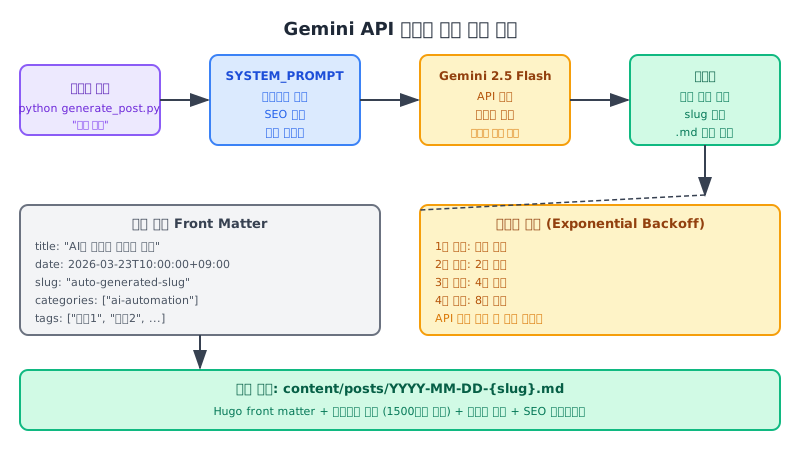
7. 마지막에 요약 또는 다음 단계 안내 포함"""defslugify(text:str)->str:"""한글 제목에서 영어 slug를 생성하는 함수"""# 영어와 숫자만 남기고 나머지는 하이픈으로 대체 text = text.lower() text = re.sub(r'[^a-z0-9\s-]','', text) text = re.sub(r'[\s]+','-', text.strip()) text = re.sub(r'-+','-', text)return text.strip('-')defget_current_date_string()->str:"""현재 날짜를 Hugo front matter 형식으로 반환""" now = datetime.now()return now.strftime("%Y-%m-%dT%H:%M:%S+09:00")defreplace_date_placeholder(content:str)->str:"""CURRENT_DATE_PLACEHOLDER를 실제 날짜로 교체""" current_date = get_current_date_string()return content.replace("CURRENT_DATE_PLACEHOLDER", current_date)defgenerate_post(topic:str, max_retries:int=4)->str:"""Gemini API를 호출하여 포스트를 생성, 실패 시 exponential backoff로 재시도"""for attempt inrange(max_retries):try:print(f"포스트 생성 중... (시도 {attempt +1}/{max_retries})") response = client.models.generate_content( model="gemini-2.5-flash", config=types.GenerateContentConfig( system_instruction=SYSTEM_PROMPT, temperature=0.7, max_output_tokens=8192,), contents=topic,) content = response.text
print(f"생성 완료: {len(content)}자")return content
except Exception as e:if attempt < max_retries -1: wait_time =2** attempt # 1, 2, 4, 8초print(f"오류 발생: {e}")print(f"{wait_time}초 후 재시도...") time.sleep(wait_time)else:raise RuntimeError(f"최대 재시도 횟수 초과: {e}")defsave_post(content:str, topic:str)->str:"""생성된 포스트를 파일로 저장"""# 날짜 플레이스홀더 교체 content = replace_date_placeholder(content)# 파일명 생성 date_prefix = datetime.now().strftime("%Y-%m-%d") slug = slugify(topic)ifnot slug: slug ="post" filename =f"{date_prefix}-{slug}.md" filepath = os.path.join("content","posts", filename)# 디렉토리 생성 (없는 경우) os.makedirs(os.path.dirname(filepath), exist_ok=True)# 파일 저장withopen(filepath,"w", encoding="utf-8")as f: f.write(content)print(f"저장 완료: {filepath}")return filepath
defmain():iflen(sys.argv)<2:print("사용법: python generate_post.py '포스트 주제'")print("예시: python generate_post.py 'Docker Compose로 개발 환경 구축하기'") sys.exit(1) topic =" ".join(sys.argv[1:])print(f"주제: {topic}")# API 키 확인ifnot os.environ.get("GEMINI_API_KEY"):print("오류: GEMINI_API_KEY 환경 변수가 설정되지 않았습니다.") sys.exit(1)# 포스트 생성 content = generate_post(topic)# 파일 저장 filepath = save_post(content, topic)print(f"\n완료! 생성된 파일: {filepath}")print("hugo server -D 로 미리보기를 확인하세요.")if __name__ =="__main__": main()
한글 주제를 영어 slug로 변환하는 함수입니다. Hugo에서 slug는 URL의 일부가 되므로 영어 소문자와 하이픈만 사용해야 합니다.
1
2
3
4
5
6
defslugify(text:str)->str: text = text.lower() text = re.sub(r'[^a-z0-9\s-]','', text)# 영어/숫자/공백/하이픈 외 제거 text = re.sub(r'[\s]+','-', text.strip())# 공백을 하이픈으로 text = re.sub(r'-+','-', text)# 연속 하이픈 제거return text.strip('-')
주제가 한글인 경우 slug가 비어있을 수 있습니다. 그래서 if not slug: slug = "post" 처리가 필요합니다. 더 좋은 방법은 AI가 생성한 front matter에서 slug를 추출하는 것인데, 이는 정규식으로 구현할 수 있습니다.
exportGEMINI_API_KEY="your-api-key"python generate_post.py "Docker와 Docker Compose 완전 가이드"
실행하면 다음과 같이 출력됩니다.
1
2
3
4
5
6
7
주제: Docker와 Docker Compose 완전 가이드
포스트 생성 중... (시도 1/4)
생성 완료: 4823자
저장 완료: content/posts/2026-03-23-docker-docker-compose.md

완료! 생성된 파일: content/posts/2026-03-23-docker-docker-compose.md
hugo server -D 로 미리보기를 확인하세요.